Reply
Topic Options
- Subscribe to RSS Feed
- Mark Topic as New
- Mark Topic as Read
- Float this Topic for Current User
- Bookmark
- Subscribe
- Printer Friendly Page


- Mark as New
- Bookmark
- Subscribe
- Mute
- Subscribe to RSS Feed
- Permalink
- Report Inappropriate Content

Power BI auto-trims my text. How can I prevent this?
05-18-2023
02:59 PM
I have the following table with one column called "Original Text":
Original Text
| OCN -TEST1 |
| OCN -TEST2 |
| OCN -TEST3 |
Note that the text before the "-" is composed of 4 characters one being a blank space that I must preserve. In power query I split the text by the delimiter "-" and then in a new custom column I measure the length of the column Original Text.1 to ensure the 4 characters are still there as follows:
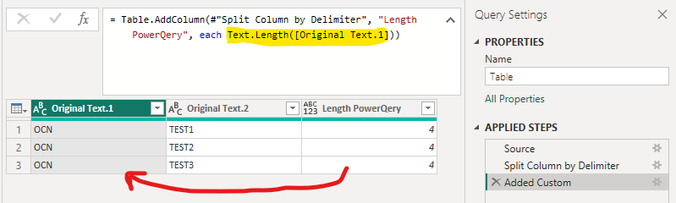
Given that the result of the column "Length PoweQery" is 4, this means that the blank space is still there as expected. But when I clic "Close & Apply" and add a new custom column using DAX that measures the length of the column "Original Text.1", the result is 3 because the blank space has disappear:
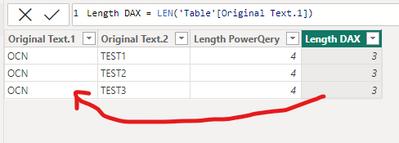
Why after clicking "Close & Apply" Power BI trims column "Original Text.1" and removes the blank space that I need to preserve?
How can I prevent this auto-triming?
Thank you.
Here is the pbix file if you need it:
6 REPLIES 6

- Mark as New
- Bookmark
- Subscribe
- Mute
- Subscribe to RSS Feed
- Permalink
- Report Inappropriate Content
09-10-2024
01:26 PM

Have you found a solution to this issue? We are having the same problem!


- Mark as New
- Bookmark
- Subscribe
- Mute
- Subscribe to RSS Feed
- Permalink
- Report Inappropriate Content
06-07-2023
07:46 PM
pls see my video
https://1drv.ms/v/s!AiUZ0Ws7G26RiF7THDkUSptdgmxD?e=dOrfi4
(x)=> Text.Replace(x,Character.FromNumber(32) ,Character.FromNumber(160))

- Mark as New
- Bookmark
- Subscribe
- Mute
- Subscribe to RSS Feed
- Permalink
- Report Inappropriate Content
05-19-2023
10:06 PM
Hi @juan_pablo
You just need to add a space before the dash when you connect the string as part of a formula if I understand correctly
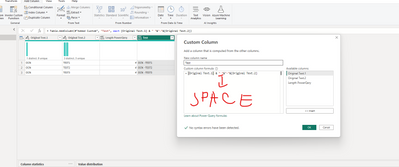
this is a formula for a custom column :
=[Original Text.1] & " "&"-"&[Original Text.2]
and here is a result :

If this post helps, then please consider Accepting it as the solution to help the other members find it more quickly
Regards,
Rita Fainshtein | Microsoft MVP
https://www.linkedin.com/in/rita-fainshtein/
Blog : https://www.madeiradata.com/profile/ritaf/profile
Rita Fainshtein | Microsoft MVP
https://www.linkedin.com/in/rita-fainshtein/
Blog : https://www.madeiradata.com/profile/ritaf/profile
- Mark as New
- Bookmark
- Subscribe
- Mute
- Subscribe to RSS Feed
- Permalink
- Report Inappropriate Content
06-07-2023
02:02 PM
Hi @Ritaf1983 thank you for your reply but I don't need to concatenate them again, I just need a column with the values including the blank space. The purpose of all this is to identify the entries in column "Original Text.1" that have length 4 even if the fourth character is a blank space. The real table has values without the blank space so I need to identify them using the LEN function in DAX.
I don't know why @v-yangliu-msft accepted the solution.
- Mark as New
- Bookmark
- Subscribe
- Mute
- Subscribe to RSS Feed
- Permalink
- Report Inappropriate Content
06-07-2023
07:17 PM
Hi @juan_pablo
If the goal is to test the column why don't you test this issue from PQ?
Or just replace your space with an underscore for example:
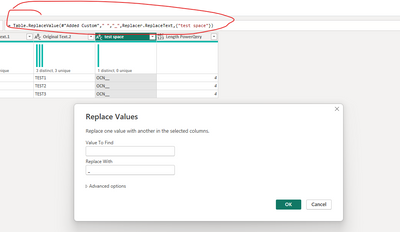

Regards,
Rita Fainshtein | Microsoft MVP
https://www.linkedin.com/in/rita-fainshtein/
Blog : https://www.madeiradata.com/profile/ritaf/profile
Rita Fainshtein | Microsoft MVP
https://www.linkedin.com/in/rita-fainshtein/
Blog : https://www.madeiradata.com/profile/ritaf/profile
- Mark as New
- Bookmark
- Subscribe
- Mute
- Subscribe to RSS Feed
- Permalink
- Report Inappropriate Content
06-21-2023
01:20 PM
Hi, Thank you again but I don't need a workaround I just need the blank space in the column. Some DAX formulas rely on it.

Helpful resources


Recommendations
| Subject | Author | Posted | |
|---|---|---|---|
| 10-12-2023 02:06 PM | |||
| 09-15-2023 01:08 PM | |||
| 02-02-2024 07:43 AM | |||
| 03-10-2024 10:18 PM | |||
| 07-29-2023 06:51 AM |


Featured Topics


Top Kudoed Authors (Last Month)
| User | Count |
|---|---|
| 109 | |
| 89 | |
| 81 | |
| 55 | |
| 46 |


Users online (1,637)


