cancel
Showing results for 
Search instead for 
Did you mean: 

July 7 - July 17 | Round 2 of the Power BI Dataviz World Championships. Don't miss your chance! Learn more

Reply
Anonymous
Not applicable

Power BI and Rounding Error Issues

Hi All, 

Question about whether it is possible to code the rounding for Power BI.


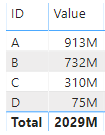
In my matrix , the values do not sum to the total amount.


I.e. The Total in the image (based on the rounding) is 2,030 instead of 2,029.

I know that the Total number is rounded correctly, but is there any way for the Total calculation to sum the rounded numbers, rather than the actuals so either the total equals 2,030, or the number that is rounded down in the rows is rounded up?


Rounding Capture.PNG
A potential solution might be toshow deciamls, but I cannot do it for this exercise. 


TIA!

1 ACCEPTED SOLUTION
v-gizhi-msft
Community Support
Community Support

Hi,


According to your description, i create a table to test:

41.PNG

Choose a table visual and it shows:

42.PNG

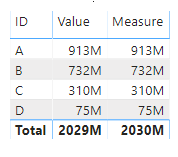
Then create a measure:

Measure = SUMX(DISTINCT('Table'[ID]),ROUND(CALCULATE(SUM('Table'[Value]))/1000000,0))*1000000

And it shows:

43.PNG

Hope this helps.


Best Regards,

Giotto Zhi

View solution in original post

2 REPLIES 2
v-gizhi-msft
Community Support
Community Support

Hi,


According to your description, i create a table to test:

41.PNG

Choose a table visual and it shows:

42.PNG

Then create a measure:

Measure = SUMX(DISTINCT('Table'[ID]),ROUND(CALCULATE(SUM('Table'[Value]))/1000000,0))*1000000

And it shows:

43.PNG

Hope this helps.


Best Regards,

Giotto Zhi

amitchandak
Super User
Super User

These numbers are in Million(M). So just change the format to None and check, if it is wrong. This typical round display seems like wrong. But GT again calculated so it is showing diff.


You can use format and round.

https://docs.microsoft.com/en-us/power-bi/desktop-custom-format-strings


Appreciate your Kudos. In case, this is the solution you are looking for, mark it as the Solution.
In case it does not help, please provide additional information and mark me with @

Thanks. My Recent Blogs -Decoding Direct Query - Time Intelligence, Winner Coloring on MAP, HR Analytics, Power BI Working with Non-Standard TimeAnd Comparing Data Across Date Ranges
Connect on Linkedin

Share with Power BI Enthusiasts: Full Power BI Video (20 Hours) YouTube
Microsoft Fabric Series 60+ Videos YouTube
Microsoft Fabric Hindi End to End YouTube

Helpful resources

Announcements
FabCon and SQLCon Barcelona 2026

FabCon & SQLCon – Barcelona 2026

Join us in Barcelona for FabCon and SQLCon, the Fabric, Power BI, SQL, and AI community event. Save €200 with code FABCMTY200.

60 days of Data Days Carousel

Data Days 2026

Join Fabric Data Days 2026: 60 days of free live/on-demand sessions, challenges, study groups, and certification opportunities.

Power BI DataViz World Championships carousel

Power BI DataViz World Championships - June 2026

A new Power BI DataViz World Championship is coming this June! Don't miss out on submitting your entry.