cancel
Showing results for 
Search instead for 
Did you mean: 

The Power BI Data Visualization World Championships is back! Get ahead of the game and start preparing now! Learn more

Reply
Anonymous
Not applicable

Power BI - ODBC error [IM003]- Unable to connect

Hi all,


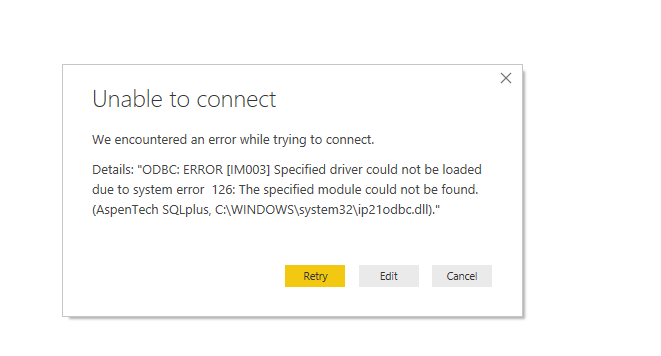
I am getting an error trying to connect to a database through an ODBC driver. I was able to connect to the database before (on a december 2018 desktop version). But since I have updated the to newer versions I have been getting this error. I am using a 64 bit PBI desktop and installing a 64 bit odbc driver.
Troubleshooting steps I have performed:
1. Uninstalled- Reinstalled the odbc drivers (64 bit)

2. Updated Power BI

3. Unregistered - Re-registered the ip21odbc.dll file using regsvr32
4. ~~Hit my laptop twice on the side!!~~

pbi error.png

4 REPLIES 4
Anonymous
Not applicable

Hi @Anonymous . Is it possible that the Aspen SQLPlus ODBC connection worked with the December 2018 version of Power BI Desktop because it was installed by an administrator for all users of the machine (and therefore had access to the ip21odbc.dll registered in "C:\WINDOWS\System32") ? And that it's not working now because newer versions of Power BI Desktop were installed by you and do not have the same registry or file location rights? Hope this helps.

Anonymous
Not applicable

I also have this exact same problem - I tried the above idea of re-installing Power BI because I have admin permissions, but it did not help. Are there any other ideas?

v-xicai
Community Support
Community Support

Hi @Anonymous ,


Which type database would you like to connect?


Have you upgraded the Power BI Desktop to the latest version 2.70.5494.761 ?


Did you change the database in database name or password?


You can learn more about the ODBC connector: https://docs.microsoft.com/en-us/power-bi/desktop-connect-using-generic-interfaces#data-sources-accessible-through-odbc.


Best Regards,

Amy


If this post helps, then please consider Accept it as the solution to help the other members find it more quickly.

Anonymous
Not applicable

Amy,


This is a SQL like database but different. It's called Aspen SQLPlus which is a 3rd party company who manages manufacturing process data.
I am at the latest version of Power BI. I have been having this issue since Feb, and I have updated to newer version every time they come. 

The ODBC connection itself tests ok. I am able to connect it through Excel. There is something with Power BI which is causing this, and I don't know what. A ticket with MS was closed down without any support. 

Helpful resources

Announcements
Power BI DataViz World Championships

Power BI Dataviz World Championships

The Power BI Data Visualization World Championships is back! Get ahead of the game and start preparing now!

November Power BI Update Carousel

Power BI Monthly Update - November 2025

Check out the November 2025 Power BI update to learn about new features.

FabCon Atlanta 2026 carousel

FabCon Atlanta 2026

Join us at FabCon Atlanta, March 16-20, for the ultimate Fabric, Power BI, AI and SQL community-led event. Save $200 with code FABCOMM.