cancel
Showing results for 
Search instead for 
Did you mean: 

The Power BI Data Visualization World Championships is back! Get ahead of the game and start preparing now! Learn more

Reply
Anonymous
Not applicable

Power BI KPI 2.0 Order of values

Hi All, 


I needed an Area and Line chart and  I read it somewhere to use the Power BI KPI2.0 chart, which allows me to select the type of chart for different values. 


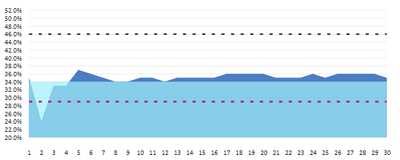
I did use this visual and it works, however, I am not able to arrange the values in the order I need them. For example, one is covered over by the other area. 

skygold16_0-1620023430475.png


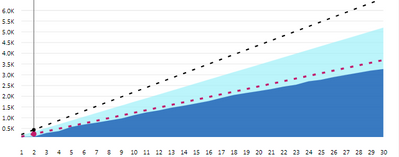
All I want is dark blue in front and lighter blue at the back. I tried changing the order of my measures values in Fields but it didn't help. For the other chart, it works as expected. 


skygold16_1-1620023676628.png


The only difference in both the chart is the type of values is decimal for one and % for the other.


To my understanding, it shows the lesser value in front but it doesn't allow to change the order by area chart. 


Any idea anyone?


6 REPLIES 6
gvincent
Regular Visitor

The order is determined by the end (most recent) value. The area with the highest value on the right of your graph will always be "below" the others... and I do not think this is configurable...

amitchandak
Super User
Super User

@Anonymous , seem like a cumulative measure

Cumm = CALCULATE([Measure],filter(allselected('date'),'date'[Day] <=max('date'[Day])))

Share with Power BI Enthusiasts: Full Power BI Video (20 Hours) YouTube
Microsoft Fabric Series 60+ Videos YouTube
Microsoft Fabric Hindi End to End YouTube
Anonymous
Not applicable

Sorry, I didn't get it. It is not an issue of measure I think. All I am after is, how do I order which area chart should be displayed in the front

@Anonymous , Staked Area is one option. And you can change Transparency too?

Share with Power BI Enthusiasts: Full Power BI Video (20 Hours) YouTube
Microsoft Fabric Series 60+ Videos YouTube
Microsoft Fabric Hindi End to End YouTube
Anonymous
Not applicable

I need a line and area chart together. And placing two different visuals on each other could be difficult in terms of adjusting the Y-axis values. 


I tried changing the transparency in the area chart option however, the alignment and order of the area chart is not consistent.

Anonymous
Not applicable

Hi @Anonymous,

Can you please share some dummy data with a similar data structure and expected results? It should help us clarify your scenario and test to coding formula.

How to Get Your Question Answered Quickly  

Regards,

Xiaoxin Sheng

Helpful resources

Announcements
Power BI DataViz World Championships

Power BI Dataviz World Championships

The Power BI Data Visualization World Championships is back! Get ahead of the game and start preparing now!

December 2025 Power BI Update Carousel

Power BI Monthly Update - December 2025

Check out the December 2025 Power BI Holiday Recap!

FabCon Atlanta 2026 carousel

FabCon Atlanta 2026

Join us at FabCon Atlanta, March 16-20, for the ultimate Fabric, Power BI, AI and SQL community-led event. Save $200 with code FABCOMM.