Get Fabric or SQL Certified for Free.
Get certified for free when you join Fabric Data Days 2026 and dive into Fabric, Power BI, SQL, AI, and other essential data skills.
Join now- Power BI forums
- Get Help with Power BI
- Desktop
- Service
- Report Server
- Power Query
- Mobile Apps
- Developer
- DAX Commands and Tips
- Custom Visuals Development Discussion
- Health and Life Sciences
- Power BI Spanish forums
- Translated Spanish Desktop
- Training and Consulting
- Instructor Led Training
- Dashboard in a Day for Women, by Women
- Galleries
- Data Stories Gallery
- Themes Gallery
- Contests Gallery
- QuickViz Gallery
- Quick Measures Gallery
- Visual Calculations Gallery
- Notebook Gallery
- Translytical Task Flow Gallery
- TMDL Gallery
- R Script Showcase
- Webinars and Video Gallery
- Ideas
- Custom Visuals Ideas (read-only)
- Issues
- Issues
- Events
- Upcoming Events
July 7 - July 17 | Round 2 of the Power BI Dataviz World Championships. Don't miss your chance! Learn more
- Power BI forums
- Forums
- Get Help with Power BI
- Desktop
- Re: Power BI JavaScript filter between 2 dates
- Subscribe to RSS Feed
- Mark Topic as New
- Mark Topic as Read
- Float this Topic for Current User
- Bookmark
- Subscribe
- Printer Friendly Page


- Mark as New
- Bookmark
- Subscribe
- Mute
- Subscribe to RSS Feed
- Permalink
- Report Inappropriate Content
Power BI JavaScript filter between 2 dates
var Filter =
[
{
"$schema": "http://powerbi.com/product/schema#advanced",
"target": {
"table": "Query1",
"column": "Date"
},
"logicalOperator": "And",
"conditions":
[
{
"operator": "GreaterThanOrEqual",
"value": "2017-11-23T00:00:00.000Z"
}
,
{
"operator": "LessThanOrEqual",
"value": "2017-11-30T00:00:00.000Z"
}]
},
{
"$schema": "http://powerbi.com/product/schema#basic",
"target": {
"table": "Query1",
"column": "Hotel"
},
"operator": "In",
"values": ["Versace"]
}
];
// Embed configuration used to describe the what and how to embed.
// This object is used when calling powerbi.embed.
// This also includes settings and options such as filters.
// You can find more information at https://github.com/Microsoft/PowerBI-JavaScript/wiki/Embed-Configuration-Details.
var config = {
type: 'report',
accessToken: accessToken,
embedUrl: embedUrl,
id: reportId,
settings: {
filterPaneEnabled: false,
navContentPaneEnabled: true
}
};
// Grab the reference to the div HTML element that will host the report.
var reportContainer = document.getElementById('reportContainer');
// Embed the report and display it within the div container.
var report = powerbi.embed(reportContainer, config);
// Report.on will add an event handler which prints to Log window.
report.on("loaded", function () {
report.off("loaded");
report.getFilters()
.then(filters => {
return report.setFilters(Filter);
})
});
I am using the above code to filter the report to display data for 1 week only but it the condition
{
"operator": "GreaterThanOrEqual",
"value": "2017-11-23T00:00:00.000Z"
}
,
{
"operator": "LessThanOrEqual",
"value": "2017-11-30T00:00:00.000Z"
}
IS NOT WORKING
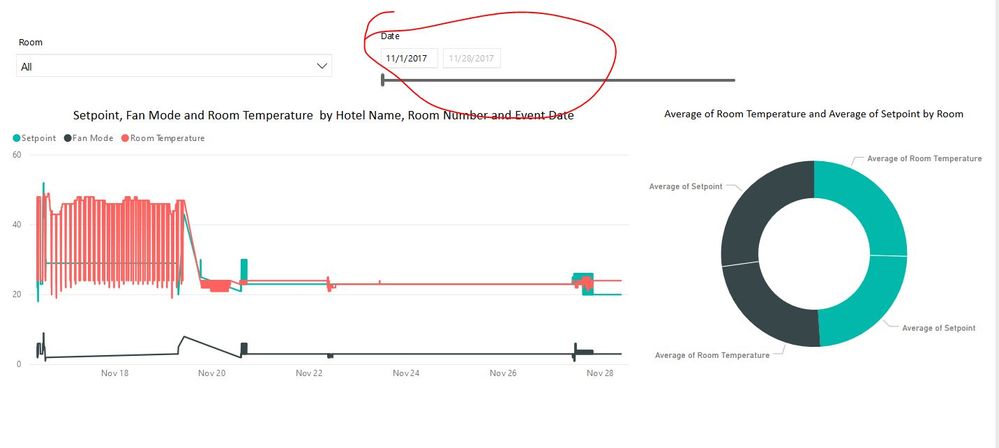
I would be grateful if your provide the solution at the earliest.
Thanks in advance
Solved! Go to Solution.


- Mark as New
- Bookmark
- Subscribe
- Mute
- Subscribe to RSS Feed
- Permalink
- Report Inappropriate Content
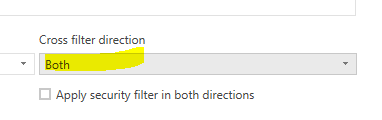
In the case "the line chart is filtering the data but the calendar is not getting updated", based on my test, if the filter is applied to your bussiness/transaction data, the "cross filter direction" should be "Both". In "Single" case, the behavior in your case is expected. In Single, you shall filter the calendar table instead.
- Mark as New
- Bookmark
- Subscribe
- Mute
- Subscribe to RSS Feed
- Permalink
- Report Inappropriate Content
Per my test, you can try
var Filter = {
 $schema: "http://powerbi.com/product/schema#advanced",
 target: {
 table: "Table1",
 column: "Date"
 },
 logicalOperator: "And",
 conditions: [{
 operator: "LessThanOrEqual",
 value: "2017-11-04 00:00:00"
 },
 {
 operator: "GreaterThanOrEqual",
 value: "2017-11-03 00:00:00"
 }
 ]
 }
The table and column names are case sensitive, please ensure that the names are correct in your case. Also, please enable the filter panel(filterPaneEnabled:true) for debugging. When the filter is applied you'll see something similar below in the filter panel.
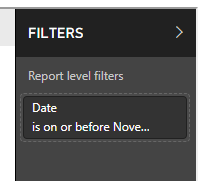
By the way, in your case, you may remove the trailing Z in the date string, see Power BI Offsetting DateTime filter passed via Json Power BI Embedded
- Mark as New
- Bookmark
- Subscribe
- Mute
- Subscribe to RSS Feed
- Permalink
- Report Inappropriate Content
First of all thank you very much for providing me with the solution
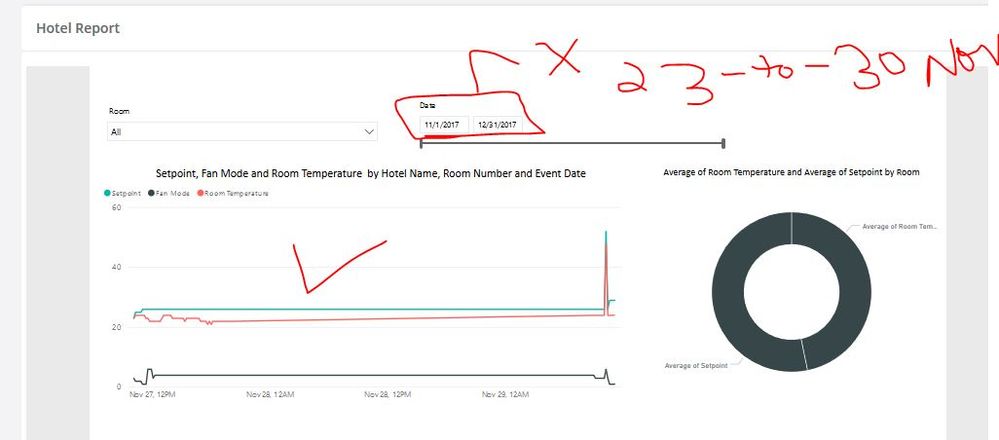
the line chart is filtering the data but the calendar is not getting updated
        var Filter =
            [

                {
                    $schema: "http://powerbi.com/product/schema#advanced",
                    target: {
                        table: "Query1",
                        column: "Date"
                    },
                    logicalOperator: "And",
                    conditions: [{
                        operator: "LessThanOrEqual",
                        value: "2017-11-30 00:00:00"
                    },
                    {
                        operator: "GreaterThanOrEqual",
                        value: "2017-11-23 00:00:00"
                    }
                    ]

                },
                {
                    $schema: "http://powerbi.com/product/schema#basic",
                    target: {
                        table: "Query1",
                        column: "Hotel"
                    },
                    operator: "In",
                    values: ["Versace"]

                }

            ];

I tried to apply filters on Power bi desktop as well.
Thanks once again for the help
- Mark as New
- Bookmark
- Subscribe
- Mute
- Subscribe to RSS Feed
- Permalink
- Report Inappropriate Content
I would be grateful if someone provides me with the solution.
- Mark as New
- Bookmark
- Subscribe
- Mute
- Subscribe to RSS Feed
- Permalink
- Report Inappropriate Content
In the case "the line chart is filtering the data but the calendar is not getting updated", based on my test, if the filter is applied to your bussiness/transaction data, the "cross filter direction" should be "Both". In "Single" case, the behavior in your case is expected. In Single, you shall filter the calendar table instead.
- Mark as New
- Bookmark
- Subscribe
- Mute
- Subscribe to RSS Feed
- Permalink
- Report Inappropriate Content
First of all thank you very much for providing me with the solution
the line chart is filtering the data but the calendar is not getting updated
        var Filter =
            [

                {
                    $schema: "http://powerbi.com/product/schema#advanced",
                    target: {
                        table: "Query1",
                        column: "Date"
                    },
                    logicalOperator: "And",
                    conditions: [{
                        operator: "LessThanOrEqual",
                        value: "2017-11-30 00:00:00"
                    },
                    {
                        operator: "GreaterThanOrEqual",
                        value: "2017-11-23 00:00:00"
                    }
                    ]

                },
                {
                    $schema: "http://powerbi.com/product/schema#basic",
                    target: {
                        table: "Query1",
                        column: "Hotel"
                    },
                    operator: "In",
                    values: ["Versace"]

                }

            ];
I tried to apply filters onPower bi desktop as well.
Thanks once again for the help
- Mark as New
- Bookmark
- Subscribe
- Mute
- Subscribe to RSS Feed
- Permalink
- Report Inappropriate Content
I also tried GreaterThan and LessThan operators

Helpful resources

FabCon & SQLCon – Barcelona 2026
Join us in Barcelona for FabCon and SQLCon, the Fabric, Power BI, SQL, and AI community event. Save €200 with code FABCMTY200.

Data Days 2026
Join Data Days 2026: 60 days of free live/on-demand sessions, challenges, study groups, and certification opportunities.

Power BI DataViz World Championships - June 2026
A new Power BI DataViz World Championship is coming this June! Don't miss out on submitting your entry.

| User | Count |
|---|---|
| 29 | |
| 27 | |
| 26 | |
| 23 | |
| 16 |


| User | Count |
|---|---|
| 53 | |
| 46 | |
| 38 | |
| 29 | |
| 21 |


