cancel
Showing results for 
Search instead for 
Did you mean: 

Level up your Power BI skills this month - build one visual each week and tell better stories with data! Get started

Reply
jkhan
Helper III
Helper III

Power BI - Incremental Refresh Feature.

Hi PowerBI Gurus,


I am trying to test new feature of Powerbi Incremental Refresh. But I am having issue with Data fresh after i uploaded pbix file to Powerbi Service


First I uploaded with MAY-2020 sample data and configured Incremental Refresh with below parameter 

1.JPG

2.JPG

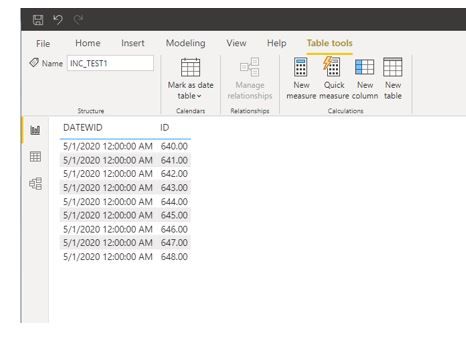
I uploaded pbix file to Powerbi Service and did refresh. MAY-2020 data was loaded successful. 
Then I added APR-2020 (Previous Month) sample records in my database and did refresh again in Powerbi Service But no data was loaded in powerbi
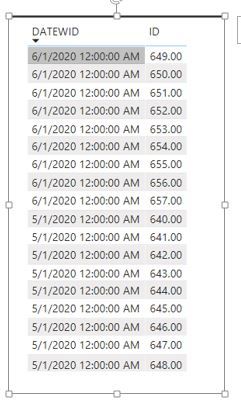
Then I added JUN-2020 (Next Month)sample records  in my database and did refresh again in Powerbi service. This time Jun-2020 data was loaded in powerbi.


3.JPG


Then I again loaded Jul, Aug, Sep -2020  sample records in my database and did refresh again in Powerbi service. This time no record was loaded in powerbi 

Can you please help me to understand why this is happening 

Best Regards

Jamsher

1 ACCEPTED SOLUTION
Anonymous
Not applicable

@jkhan 

The fresh range for incremental is from the previous selected date to the current date, it cannot fresh the future dates. 

Please refer to the Refresh range section in the official document


Paul Zheng _ Community Support Team
If this post helps, then please consider Accept it as the solution to help the other members find it more quickly.

View solution in original post

2 REPLIES 2
Anonymous
Not applicable

@jkhan 

The fresh range for incremental is from the previous selected date to the current date, it cannot fresh the future dates. 

Please refer to the Refresh range section in the official document


Paul Zheng _ Community Support Team
If this post helps, then please consider Accept it as the solution to help the other members find it more quickly.

jkhan
Helper III
Helper III

Please note incremental refresh works on Current Date and not on max date from dataset. 


PBI Service Session 20 - Incremental Refresh Traces
---------------------------------------------------------------------------------------------------------
https://www.youtube.com/watch?v=qkKVMrkJyXk&lc=z224dhyg2yydhvdl1acdp430hr1y0xmwgz5dr5tawydw03c010c

Helpful resources

Announcements
April Power BI Update Carousel

Power BI Monthly Update - April 2026

Check out the April 2026 Power BI update to learn about new features.

Fabric SQL PBI Data Days

Data Days 2026 coming soon!

Sign up to receive a private message when registration opens and key events begin.

New to Fabric survey Carousel

New to Fabric Survey

If you have recently started exploring Fabric, we'd love to hear how it's going. Your feedback can help with product improvements.

Power BI DataViz World Championships carousel

Power BI DataViz World Championships - June 2026

A new Power BI DataViz World Championship is coming this June! Don't miss out on submitting your entry.