Don't miss your chance to take the Fabric Data Engineer (DP-600) exam for FREE! Find out how by watching the DP-600 session on-demand now through April 28th.
Learn moreJoin the FabCon + SQLCon recap series. Up next: Power BI, Real-Time Intelligence, IQ and AI, and Data Factory take center stage. All sessions are available on-demand after the live show. Register now
Hi
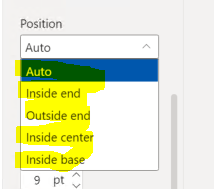
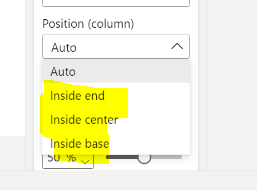
I have just upgraded to Power BI April 2022 - and I have just created a clustered bar chart and after a little while finding my way around the new formatting features - I have now have a question about the data labels that are in the chart - they same to have changed between versions? i have 2 screenshots if that helps - can anyone help as to why -
September 2021 (we had not upgraded for sometime)
April 2022 - Outside End is missing
Also does anyone know if you can get totals to show as a data label on a clustered bar chart?
Thanks
Karen
Hi @KarenL7,
Here is Line and clustered column chart With Custom Tooltip which will help you to get custom label placement outside the columns and also you can put total value as label you just need to create a dax measure to sum all the values(that you want the total of) and put it in label field.
Line and clustered Column Chart with custom tooltip PBIVizEdit.com
Download link for the custom visual file in this page
https://pbivizedit.com/gallery/line-and-clustered-column-with-custom-tooltip
This was made with our Custom Visual creator tool PBIVizEdit.com. With this tool,
Give this a shot and let us know if you face any problem/errors.
You can use the editor to modify your visual further (some modifications cannot be done in Power BI window and have to be in editor).
Thanks,
Team PBIVizEdit
Okay
I have found the answer to this - This does appear when I remove the legend - so it is nothing to do with the upgrade - my fault for getting frustrated with the new format so apologies for anyone who my read my question!
However I am curious to find out if anyone will know if the totals will appear on a stacked column chart when using a legend if anyone reads this post.
Thanks!
Karen
Hi @KarenL7
Thanks for reaching out to us.
What does the total look like on the stack column chart? Not sure which one you're referring to, is there any screenshots?
Best Regards,
Community Support Team _Tang
If this post helps, please consider Accept it as the solution to help the other members find it more quickly.
Hi
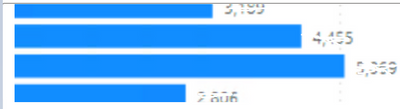
Just to confirm that the totals on the chart this is the stacked bar chart without the legend and has the totals on the outside end - Please see an example below
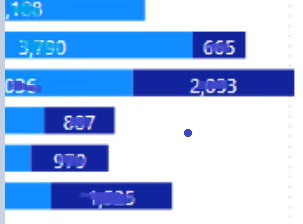
when I add in a legend the overall totals are removed and the data labels show for each individual - which is fine however -
I was just wondering how to show how to include the overall totals as well in the chart - but cant see an option anywhere as I would like to include them on some of my charts.
Thanks
karen
Check out the April 2026 Power BI update to learn about new features.
If you have recently started exploring Fabric, we'd love to hear how it's going. Your feedback can help with product improvements.
A new Power BI DataViz World Championship is coming this June! Don't miss out on submitting your entry.
| User | Count |
|---|---|
| 48 | |
| 40 | |
| 38 | |
| 20 | |
| 17 |
| User | Count |
|---|---|
| 68 | |
| 65 | |
| 30 | |
| 26 | |
| 25 |