FabCon is coming to Atlanta
Join us at FabCon Atlanta from March 16 - 20, 2026, for the ultimate Fabric, Power BI, AI and SQL community-led event. Save $200 with code FABCOMM.
Register now!- Power BI forums
- Get Help with Power BI
- Desktop
- Service
- Report Server
- Power Query
- Mobile Apps
- Developer
- DAX Commands and Tips
- Custom Visuals Development Discussion
- Health and Life Sciences
- Power BI Spanish forums
- Translated Spanish Desktop
- Training and Consulting
- Instructor Led Training
- Dashboard in a Day for Women, by Women
- Galleries
- Data Stories Gallery
- Themes Gallery
- Contests Gallery
- QuickViz Gallery
- Quick Measures Gallery
- Visual Calculations Gallery
- Notebook Gallery
- Translytical Task Flow Gallery
- TMDL Gallery
- R Script Showcase
- Webinars and Video Gallery
- Ideas
- Custom Visuals Ideas (read-only)
- Issues
- Issues
- Events
- Upcoming Events
The Power BI Data Visualization World Championships is back! Get ahead of the game and start preparing now! Learn more
- Power BI forums
- Forums
- Get Help with Power BI
- Desktop
- Power BI Desktop and Power BI Online versions not ...
- Subscribe to RSS Feed
- Mark Topic as New
- Mark Topic as Read
- Float this Topic for Current User
- Bookmark
- Subscribe
- Printer Friendly Page


- Mark as New
- Bookmark
- Subscribe
- Mute
- Subscribe to RSS Feed
- Permalink
- Report Inappropriate Content
Power BI Desktop and Power BI Online versions not showing same data after successful Publish
Hi!
I Save PBIX file and click Publish icon within Power BI Desktop...
I see Publish to Power BI message...
I highlight the correct destination and click Select icon...
It notifies me I am Replacing dataset
I click Replace icon...
It notifies me... Publishing to Power BI
I get the Success! notification...
I got to Power BI Online...
I click Got it icon...
I go to Power BI Online... corresponding Report Page I am looking at in Power BI Desktop...
And my total values are different...
What I am seeing within the output data... is that several elements are showing up in Power Bi Online that are filtered out in Power BI Desktop version.
I have never seen this before...
Thinking it might be a versioning issue... I removed Power BI Desktop from my PC... and re-installed it... and restarted my PC... and ran through all the the steps above only to get the same results.
Hope someone can shed some light on this issue.
Thank you!
mibu
Solved! Go to Solution.
- Mark as New
- Bookmark
- Subscribe
- Mute
- Subscribe to RSS Feed
- Permalink
- Report Inappropriate Content
You can disable persistent filters in Power BI here. Persistent filters saved your last used filters, so thats why your Power BI online reports are filtered.

- Mark as New
- Bookmark
- Subscribe
- Mute
- Subscribe to RSS Feed
- Permalink
- Report Inappropriate Content
I have the same issue except I have done what was suggested and nothing works.
On a Fiscal Year, Rolling 12 Months view for Jun-22 should be the same as YTD view and that is the case in my Power BI Desktop
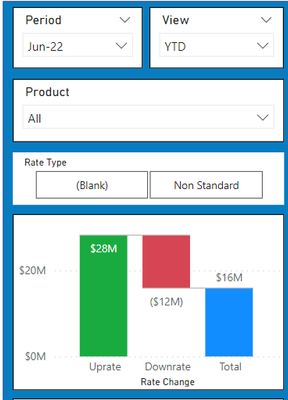

But when I publish this online, the Rolling 12 Month data is correct, but the YTD data is different.
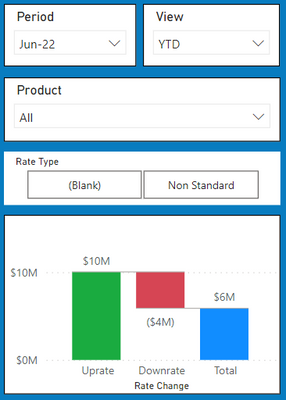
Why is this and should I resolve this issue?

- Mark as New
- Bookmark
- Subscribe
- Mute
- Subscribe to RSS Feed
- Permalink
- Report Inappropriate Content
Did you have any existing filters on the online version? If you dont have it, try to click on Refresh. If you do, click on Reset to default to clear all existing filters
- Mark as New
- Bookmark
- Subscribe
- Mute
- Subscribe to RSS Feed
- Permalink
- Report Inappropriate Content
Hey NickNg278,
Thanks for your feedback.
I tried Refresh and that didn't work... BUT, clicking Reset to default icon did! So, thank you!
The issue is... over 100 people have access in Power BI Online to my reports and as you know they can change filters from there any time they like. I thought when I Published any PBIX file to Power BI Online that it would automatically overwrite any changes (including changes to filters) made to my reports in Power BI Online... thus negating any changes/filters made by my community to any of my report pages.
Each time I publish a new version... do I have to make sure that Reset to default is grey'ed out so that I know people are not seeing a view that has been filtered by someone other than me? I would hope/think that Publishing a PBIX from Desktop to the cloud would result in a transfer of all selected filters from Desktop to Online.
OR... is there a way I can remove the ability to change Filters in my reports in Power BI online?
Thanks for your help!
mibu
- Mark as New
- Bookmark
- Subscribe
- Mute
- Subscribe to RSS Feed
- Permalink
- Report Inappropriate Content
- Mark as New
- Bookmark
- Subscribe
- Mute
- Subscribe to RSS Feed
- Permalink
- Report Inappropriate Content
NickNg278,
Super helpful! That is the solution for which I was looking. Thank you so much!!!
Mibu
- Mark as New
- Bookmark
- Subscribe
- Mute
- Subscribe to RSS Feed
- Permalink
- Report Inappropriate Content
To summarize how to Disable Persistent Filters
Open report in Power BI Desktop
Go File… Options and Settings…
Click Options…
Click Report Settings…
Check box next to:
Persistent filters / Don't allow end user to save filters on this file in the Power BI service.
- Mark as New
- Bookmark
- Subscribe
- Mute
- Subscribe to RSS Feed
- Permalink
- Report Inappropriate Content
My pleasure. I was running into this issue before, and it took me awhile to figure it out 🙂
- Mark as New
- Bookmark
- Subscribe
- Mute
- Subscribe to RSS Feed
- Permalink
- Report Inappropriate Content
@Anonymous Glad to know I was not alone! 🙂 Thanks again! Mibu
Helpful resources

Power BI Dataviz World Championships
The Power BI Data Visualization World Championships is back! Get ahead of the game and start preparing now!

Power BI Monthly Update - November 2025
Check out the November 2025 Power BI update to learn about new features.

FabCon Atlanta 2026
Join us at FabCon Atlanta, March 16-20, for the ultimate Fabric, Power BI, AI and SQL community-led event. Save $200 with code FABCOMM.

| User | Count |
|---|---|
| 59 | |
| 43 | |
| 42 | |
| 23 | |
| 17 |


| User | Count |
|---|---|
| 190 | |
| 122 | |
| 96 | |
| 66 | |
| 47 |


