cancel
Showing results for 
Search instead for 
Did you mean: 

Level up your Power BI skills this month - build one visual each week and tell better stories with data! Get started

Reply
jkunkoski
New Member

Power BI Desktop Filter Multi Value Field/Column

I have two data sources from two Excel files. Both files come from SharePoint Prem 2013. One field is from a Multi Select Field in a SharePoint list so the data in each row is messy, as follow: Row1/Column1: 5G;#;API;#;6G;#, Row2/Column1: API;#;6G;#, etc. The second data source provides a cleaned up version but DOES NOT match the values 1 for 1 of the first data source (above, Column1).


The second data source is one column with one value in each cell/row, for example, Row1/Column1: 5G, Row2/Column1: 6G, etc.


I'm trying to make it so the user can select a control containing all the values from the second data source that will filter rows in the first data source where that value exists. IF selection of data source2 matches a value in datasource1, filter charts and everything in datasource1 accordingly. Can someone help? I'm brand new to Power BI

2 REPLIES 2
Eric_Zhang
Microsoft Employee
Microsoft Employee

@jkunkoski

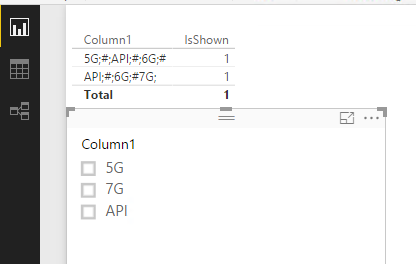
You can use a measure as below. See more detail in the attached pbix.


IsShown =
VAR ROWCNT =
    COUNTROWS (
        FILTER (
            Table1,
            SEARCH ( LASTNONBLANK ( Table2[Column1], "" ), Table1[Column1], 1, 0 ) > 0
        )
    )
RETURN
    IF (
        (
            ISFILTERED ( Table2[Column1] ) && HASONEVALUE ( Table2[Column1] )
                && ROWCNT > 0
        )
            || NOT ( ISFILTERED ( Table2[Column1] ) ),
        1,
        BLANK ()
    )

Capture.PNGCapture2.PNGCapture3.PNG

Anonymous
Not applicable

Hi Eric, thanks for your post. I tried to get the slicer working with two or more selections at same time but I could not. I wonder if its possible to filter for instance 5G and 7G at once. Best regards, Augusto

Helpful resources

Announcements
April Power BI Update Carousel

Power BI Monthly Update - April 2026

Check out the April 2026 Power BI update to learn about new features.

Fabric SQL PBI Data Days

Data Days 2026 coming soon!

Sign up to receive a private message when registration opens and key events begin.

New to Fabric survey Carousel

New to Fabric Survey

If you have recently started exploring Fabric, we'd love to hear how it's going. Your feedback can help with product improvements.

Power BI DataViz World Championships carousel

Power BI DataViz World Championships - June 2026

A new Power BI DataViz World Championship is coming this June! Don't miss out on submitting your entry.