Don't miss your chance to take the Fabric Data Engineer (DP-600) exam for FREE! Find out how by watching the DP-600 session on-demand now through April 28th.
Learn moreJoin the FabCon + SQLCon recap series. Up next: Power BI, Real-Time Intelligence, IQ and AI, and Data Factory take center stage. All sessions are available on-demand after the live show. Register now
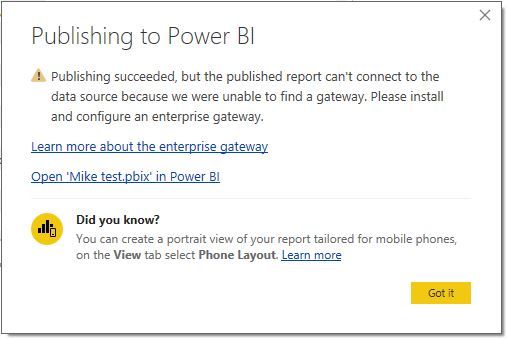
When I publish a BI report to the company workspace i get the below message. I am using direct query and the data is refreshed when I open the report but I need to understand this message and if a gateway is needed. I have read a lot online and a lot points to a gateway not being needed however there is some other information that contradicts this. So which is it? Gateway needed or not. If not, is there a way for me to turn off this message so it doesnt pop up when I share this with a client in their BI enviroment?
I am pulling data from Azure SQL DBs.
Solved! Go to Solution.
hi, @mikejimenez
Try to update Power bi Desktop to the latest version.
https://www.microsoft.com/en-us/download/details.aspx?id=45331
Best Regards,
Lin
Similar issue with Azure AS:
https://community.powerbi.com/t5/Issues/Publishing-report-connected-to-Azure-Analysis-Services-model...
Check out the April 2026 Power BI update to learn about new features.
If you have recently started exploring Fabric, we'd love to hear how it's going. Your feedback can help with product improvements.
A new Power BI DataViz World Championship is coming this June! Don't miss out on submitting your entry.
| User | Count |
|---|---|
| 42 | |
| 37 | |
| 35 | |
| 22 | |
| 15 |
| User | Count |
|---|---|
| 67 | |
| 58 | |
| 29 | |
| 27 | |
| 25 |