cancel
Showing results for 
Search instead for 
Did you mean: 

We've captured the moments from FabCon & SQLCon that everyone is talking about, and we are bringing them to the community, live and on-demand. Starts on April 14th. Register now

Reply
Nathan
Frequent Visitor

Power BI Desktop Direct Query What-If Analysis

I'm attempting to add a column that will provide me the last 2 weeks of sales. I've seen a few other posts where users were attempting to do this, but I'm unable to follow the same method as I'm using Direct Query (working with large datasets so not reasonable to change).


Here's the critera I'm attempting to work within (assuming it's possible):

  • The "Current Date" is dynamic so it must be calculated based on the data set. Right now, I'm attempting to max the date on the data set, but this prevents me from using it in other measures.
  • The Last 2 weeks of sales would be another column so I can see current sales and Last 2 Week sales side-by-side.


So, based on the above critera I've been unable to create anything useful. Is there a better way to approach this problem that I'm missing?


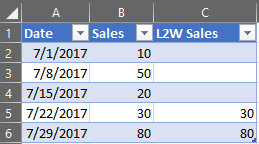
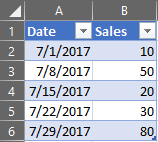
Here's an example of the dataset and what I'd like to have:


Desired DatasetDesired DatasetDatasetDataset


Based on the dataset above, below is what I'm attempting to do. It obviously does not work, but should help clarify what I'm attempting to do.

L2W Sales = CALCULATE(
	SUM(dataset[Sales]),
	TOPN(2, dataset, dataset[Date], DESC)
)


1 ACCEPTED SOLUTION
Nathan
Frequent Visitor

I've finally stumbled across a solution that appears to be working for me nicely.


For anyone else running across a similar issue, I created two measures: one to calculate the max date within the data, and another to calculate the L2W sales.


MaxDate = CALCULATE(MAX(dataset[date]), ALLSELECTED(dataset))


Then I take the MaxWeekEndingDate and use it the L2W calculation.


L2W Sales = CALCULATE(SUM(dataset[Sales]),
FILTER( ALLSELECTED(dataset[date]), dataset[date] >= (DATE(
YEAR([MaxDate]),
MONTH([MaxDate]),
DAY([MaxDate])
) - 14)
) )


The above measures will produce the "Desired Dataset" in my original question.


And here's the post that gave me the final piece of information I needed to solve it. https://community.powerbi.com/t5/Desktop/dateadd-and-max-error/td-p/124932


View solution in original post

4 REPLIES 4
Nathan
Frequent Visitor

I've finally stumbled across a solution that appears to be working for me nicely.


For anyone else running across a similar issue, I created two measures: one to calculate the max date within the data, and another to calculate the L2W sales.


MaxDate = CALCULATE(MAX(dataset[date]), ALLSELECTED(dataset))


Then I take the MaxWeekEndingDate and use it the L2W calculation.


L2W Sales = CALCULATE(SUM(dataset[Sales]),
FILTER( ALLSELECTED(dataset[date]), dataset[date] >= (DATE(
YEAR([MaxDate]),
MONTH([MaxDate]),
DAY([MaxDate])
) - 14)
) )


The above measures will produce the "Desired Dataset" in my original question.


And here's the post that gave me the final piece of information I needed to solve it. https://community.powerbi.com/t5/Desktop/dateadd-and-max-error/td-p/124932


Anonymous
Not applicable

@Nathan,

Glad to hear the issue is solved. You can accept your reply as solution, this way,  other community members could easily find the solution when they get same issues.

Regards,

Anonymous
Not applicable

@Nathan,

Could you please elaborate the logic about that how you get the desired dataset based on the sample dataset? If you want to get last 2 weeks sales from today, the L2W Sales should show the last row.

Regards,
Lydia

@Anonymous,


Yep, I've edited the post to provide one of the DAX queries that I attempted. Hopefully it helps provides some clarity to what I'm trying to do.


Ultimately, I'm trying to provide an unsummarized L2W Sales at the week level so that when I remove the Date column and add something like Item Description the L2W sales becomes aggregated to the Item Description level. There might be better ways to approach this problem, so I'm defintely open to any suggestions.


Thanks,


Nathan

Helpful resources

Announcements
New to Fabric survey Carousel

New to Fabric Survey

If you have recently started exploring Fabric, we'd love to hear how it's going. Your feedback can help with product improvements.

Power BI DataViz World Championships carousel

Power BI DataViz World Championships - June 2026

A new Power BI DataViz World Championship is coming this June! Don't miss out on submitting your entry.

Join our Fabric User Panel

Join our Fabric User Panel

Share feedback directly with Fabric product managers, participate in targeted research studies and influence the Fabric roadmap.

March Power BI Update Carousel

Power BI Community Update - March 2026

Check out the March 2026 Power BI update to learn about new features.