cancel
Showing results for 
Search instead for 
Did you mean: 

The Power BI Data Visualization World Championships is back! Get ahead of the game and start preparing now! Learn more

Reply
Tang
Frequent Visitor

Power BI DataSource.Error

Hi all


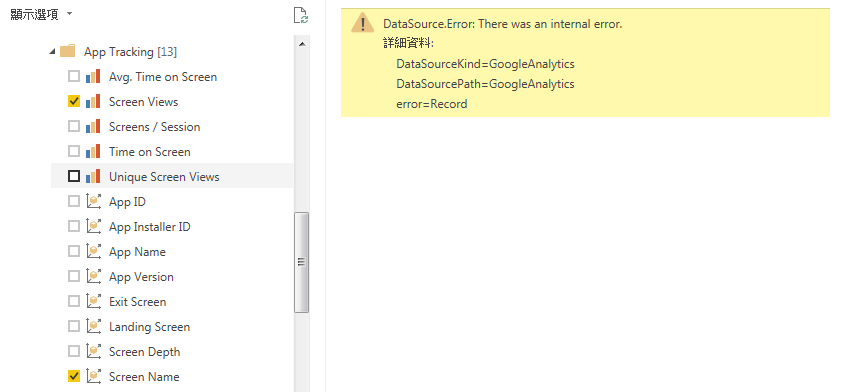
I tried to import metrics "Screen Views" and dimensions "Screen Name" from Google Analytics but showing the error message.

Below the details:

DataSourceKind=GoogleAnalytics
DataSourcePath=GoogleAnalytics
error=Record


How should I solve this problem?

Thanks

2 REPLIES 2
Tang
Frequent Visitor

Hi @v-sihou-msft

  Thank you for your response. 

     Actually, I would like to see "App Tracking" data.

     As below :  


 dataerror.PNG


   Just I found maybe reason is the amount over limits ?

v-sihou-msft
Microsoft Employee
Microsoft Employee

@Tang


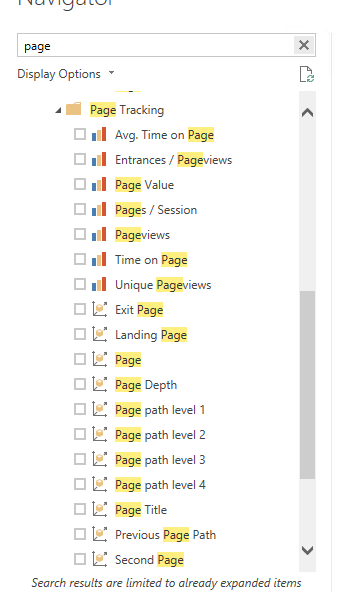
I haven't seen any "Screen Views" metric and "Screen Name" dimension when connecting Google Analytics. 


I guess you may want to view the Page dimension and metric. 


2323.PNG


Regards,


Helpful resources

Announcements
Power BI DataViz World Championships

Power BI Dataviz World Championships

The Power BI Data Visualization World Championships is back! Get ahead of the game and start preparing now!

December 2025 Power BI Update Carousel

Power BI Monthly Update - December 2025

Check out the December 2025 Power BI Holiday Recap!

FabCon Atlanta 2026 carousel

FabCon Atlanta 2026

Join us at FabCon Atlanta, March 16-20, for the ultimate Fabric, Power BI, AI and SQL community-led event. Save $200 with code FABCOMM.