
This is best Fabric, Power BI, SQL and AI community event. How do we know? The last event sold out! Save €200 with code FABCMTY200.
Register nowA new Data Days event is coming soon! This time we’re going bigger than ever. Fabric, Power BI, SQL, AI and more. Don't miss out.
Hi There,
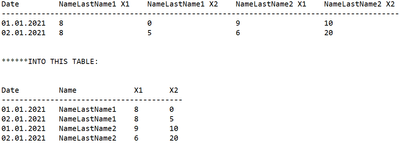
I have the first data set in excel (an example) which I need to transform it to the second table beneath. Do you know how I can make it in Power Query:
Many thanks
Kind regards
Hannah
Solved! Go to Solution.
@Anonymous in this case, you will have to unpivot and pivot your data. below is the sequence that you can follow
1. Your data is in below format. Open your data in power query window
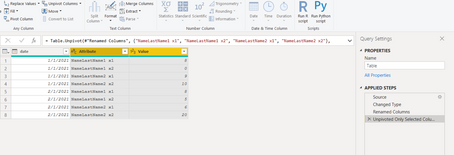
2. then select the last 4 columns of your data and then go to unpivot columns and select unpivot only selected columns. Your data will transform into below format
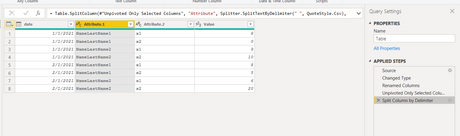
3. now you can split column2 basis space delimiter, your data will be in below format
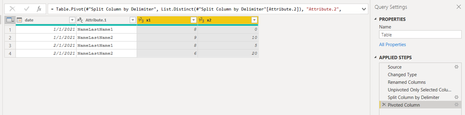
4. last option now you need to pivot the data back, select last two columns and choose pivot column option. your data will be converted into below format which you need here
for your reference, i am attaching the pbix sample file which you can use to go step by step. let me know if it helps you. thanks
Proud to be a Super User!
Hi @Anonymous ,
Does the replies above solve your problem? If it has been solved, please mark the correct reply as the standard answer to help the other members find it more quickly.Thanks in advance for your kind cooperation!
Hope it helps,
Community Support Team _ Caitlyn
If this post helps then please consider Accept it as the solution to help the other members find it more quickly.
@Anonymous in this case, you will have to unpivot and pivot your data. below is the sequence that you can follow
1. Your data is in below format. Open your data in power query window
2. then select the last 4 columns of your data and then go to unpivot columns and select unpivot only selected columns. Your data will transform into below format
3. now you can split column2 basis space delimiter, your data will be in below format
4. last option now you need to pivot the data back, select last two columns and choose pivot column option. your data will be converted into below format which you need here
for your reference, i am attaching the pbix sample file which you can use to go step by step. let me know if it helps you. thanks
Proud to be a Super User!
Thank you very much for your help. It works perfectly!
@Anonymous , Unpivot last 4 column in power query
Check out the May 2026 Power BI update to learn about new features.
Sign up to receive a private message when registration opens and key events begin.
If you have recently started exploring Fabric, we'd love to hear how it's going. Your feedback can help with product improvements.
| User | Count |
|---|---|
| 29 | |
| 28 | |
| 25 | |
| 19 | |
| 14 |
| User | Count |
|---|---|
| 53 | |
| 47 | |
| 27 | |
| 20 | |
| 19 |