Get certified for free when you join Fabric Data Days 2026 and dive into Fabric, Power BI, SQL, AI, and other essential data skills.
Join nowTry your skills in the Power BI Dataviz World Championship! Round one ends June 26. Join now
Hi guys
Im looking to calculate a rolling average of the last 10 data entries excluding todays date
Example data below
Table _1
| Date | mRSI | Expected measure result on that day |
| 2/08/22 | .6 | (.7+.3+.8+.3+.3+.4+.2+.3+.1+.8) / 10 |
| 2/08/22 | .5 | |
| 2/08/22 | .4 | |
| 1/07/22 | .7 | (.3+.3+.4+.2+.3+.1+.8+.9+.8) / 9 |
| 1/07/22 | .3 | |
| 1/07/22 | .8 | |
| 1/06/22 | .3 | (.2+.3+.1+.8+.9+.8) / 6 |
| 1/06/22 | .3 | |
| 1/06/22 | .4 | |
| 1/05/22 | .2 | |
| 1/05/22 | .3 | |
| 1/05/22 | .1 | |
| 1/04/22 | .8 | |
| 1/04/22 | .9 | |
| 1/04/22 | .8 | |
Hope this makes sense. Obviously if there was more data and it wasn't showing the start of the table then each days measure would be dividing by 10.
Thanks!
Solved! Go to Solution.
Hi @PS_123456
Try this measure:
Average Last 10 mRSI:=
VAR LastTenDataPoints =
TOPN(
10,
SampleData,
[Date],
DESC
)
VAR DataPointTotal =
SUMX(
LastTenDataPoints,
[mRSI]
)
RETURN
DIVIDE(
DataPointTotal,
10,
BLANK()
)
Measures are in Power Pivot in the attached workbook.
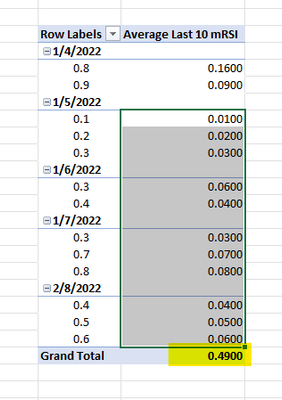
For the sample data you provided, this is the output
It's including 11 data points because there's a tie (working backwards) to 1/5/2022 and "If there is a tie, in Order_By values, at the N-th row of the table, then all tied rows are returned...." But if you have additional data points (maybe time?) you'd be able to break it.
Hope this helps!
Hi @PS_123456 ,
Whether the advice given by @littlemojopuppy has solved your confusion, if the problem has been solved you can mark the reply for the standard answer to help the other members find it more quickly. If not, please point it out.
Looking forward to your feedback.
Best Regards,
Henry
Hi @PS_123456
Try this measure:
Average Last 10 mRSI:=
VAR LastTenDataPoints =
TOPN(
10,
SampleData,
[Date],
DESC
)
VAR DataPointTotal =
SUMX(
LastTenDataPoints,
[mRSI]
)
RETURN
DIVIDE(
DataPointTotal,
10,
BLANK()
)
Measures are in Power Pivot in the attached workbook.
For the sample data you provided, this is the output
It's including 11 data points because there's a tie (working backwards) to 1/5/2022 and "If there is a tie, in Order_By values, at the N-th row of the table, then all tied rows are returned...." But if you have additional data points (maybe time?) you'd be able to break it.
Hope this helps!
Don't miss out on Data Days, June 15 through August 7. Learn Fabric, Power BI, SQL, AI and more.
Check out the May 2026 Power BI update to learn about new features.
| User | Count |
|---|---|
| 24 | |
| 22 | |
| 21 | |
| 20 | |
| 14 |
| User | Count |
|---|---|
| 59 | |
| 53 | |
| 41 | |
| 31 | |
| 31 |