cancel
Showing results for 
Search instead for 
Did you mean: 

The Power BI Data Visualization World Championships is back! Get ahead of the game and start preparing now! Learn more

Reply
PuneethERB
Frequent Visitor

Power BI DAX No Data Calculation

Hi All,

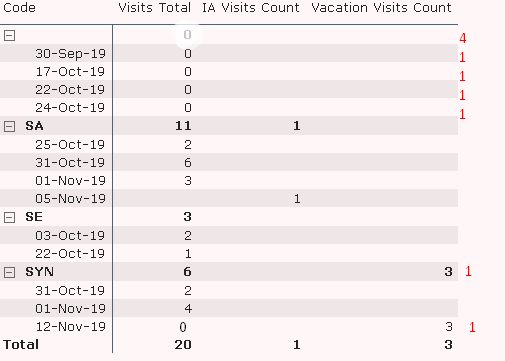
[Referring to the screenshot] About the data: I've prepared the model where in the 'Date' as seen in the screenshot is an intermediate table and 'Code' is also an intermediate table and the Measures 'Visits Total' & 'IA visits','Vacation Visits' are from different tables. These tables primary dates and codes columns are connected to the intermediate table.

Requirement: if (any of the measure has no data/0 then i want the result as 'Count the respective date as 1 day' ) the result i wanted is highlighted in the RED color in screenshot.

Hoping for the DAX help on this.Would be grateful for the help in this regard. Thanks.dax help1.png

1 ACCEPTED SOLUTION
v-eachen-msft
Community Support
Community Support

Hi @PuneethERB ,


You could create two measures.

Measure =
VAR a =
    PRODUCTX (
        FILTER (
            'Table',
            'Table'[Value] IN { BLANK (), 0 }
                && (
                    CALCULATE ( SUM ( 'Table'[Value] ), ALLEXCEPT ( 'Table', 'Table'[Date] ) ) = 0
                )
        ),
        1
    )
RETURN
    IF (
        NOT ( ISINSCOPE ( 'Table'[Type] ) ) && ISINSCOPE ( 'Table'[Date] )
            && SELECTEDVALUE ( 'Table'[Value] ) IN { BLANK (), 0 },
        a,
        SUM ( 'Table'[Value] )
    )
Measure new = 
SUMX(VALUES('Table'[Date]),[Measure])

Then put "Measure new" into Values.

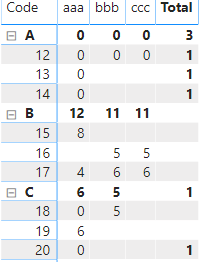
Here is the result.

2-1.PNG

Here is my test file for your reference.


Community Support Team _ Eads
If this post helps, then please consider Accept it as the solution to help the other members find it.

View solution in original post

1 REPLY 1
v-eachen-msft
Community Support
Community Support

Hi @PuneethERB ,


You could create two measures.

Measure =
VAR a =
    PRODUCTX (
        FILTER (
            'Table',
            'Table'[Value] IN { BLANK (), 0 }
                && (
                    CALCULATE ( SUM ( 'Table'[Value] ), ALLEXCEPT ( 'Table', 'Table'[Date] ) ) = 0
                )
        ),
        1
    )
RETURN
    IF (
        NOT ( ISINSCOPE ( 'Table'[Type] ) ) && ISINSCOPE ( 'Table'[Date] )
            && SELECTEDVALUE ( 'Table'[Value] ) IN { BLANK (), 0 },
        a,
        SUM ( 'Table'[Value] )
    )
Measure new = 
SUMX(VALUES('Table'[Date]),[Measure])

Then put "Measure new" into Values.

Here is the result.

2-1.PNG

Here is my test file for your reference.


Community Support Team _ Eads
If this post helps, then please consider Accept it as the solution to help the other members find it.

Helpful resources

Announcements
Power BI DataViz World Championships

Power BI Dataviz World Championships

The Power BI Data Visualization World Championships is back! Get ahead of the game and start preparing now!

December 2025 Power BI Update Carousel

Power BI Monthly Update - December 2025

Check out the December 2025 Power BI Holiday Recap!

FabCon Atlanta 2026 carousel

FabCon Atlanta 2026

Join us at FabCon Atlanta, March 16-20, for the ultimate Fabric, Power BI, AI and SQL community-led event. Save $200 with code FABCOMM.