Join us at FabCon Atlanta from March 16 - 20, 2026, for the ultimate Fabric, Power BI, AI and SQL community-led event. Save $200 with code FABCOMM.
Register now!The Power BI Data Visualization World Championships is back! Get ahead of the game and start preparing now! Learn more
Morning,
So yesterday I added some custom visuals to my toolbox, installed the required R-scripting and now my PBI custom visuals are not working. I did this first on my work desktop, then tried PBID on my notebook (which already had R installed). Both are functioning the same.
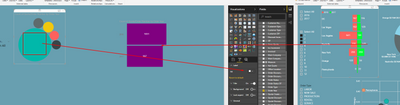
Within the attached image:
Anyone else experiencing or have experienced this? Do I need to remove the R based visuals and uninstall the R package? If so, then PBI is BROKE.
Thank you
Hi @Miskondukt,
Could you please download the new Power BI Desktop (2.46.4732.581) which is released at 5/5/2017 and check if the issue still occurs in this new version of Power BI Desktop?
If the custom visuals still don’t work in your scenario, please share some sample data and R script so that we can reproduce.
Thanks,
Lydia Zhang
Just had my boss try on his PC, he had to download the current version and he also experienced the same issues. Is this a Power BI Desktop updated version issue?
Just opened a file made before the update and those appear to work fine. Now I am really confused.
Please help
The Power BI Data Visualization World Championships is back! Get ahead of the game and start preparing now!
Check out the November 2025 Power BI update to learn about new features.
| User | Count |
|---|---|
| 59 | |
| 43 | |
| 42 | |
| 23 | |
| 17 |
| User | Count |
|---|---|
| 190 | |
| 122 | |
| 96 | |
| 66 | |
| 47 |