Don't miss your chance to take the Fabric Data Engineer (DP-700) exam on us!
Learn moreWe've captured the moments from FabCon & SQLCon that everyone is talking about, and we are bringing them to the community, live and on-demand. Starts on April 14th. Register now
Hi.
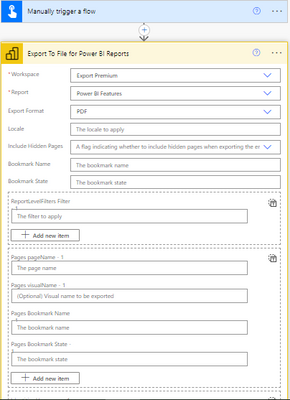
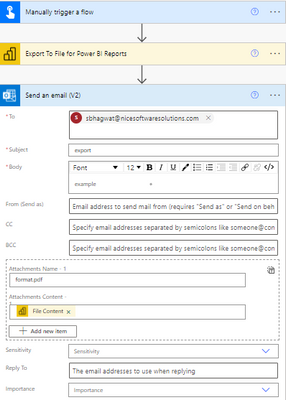
I am creating a simple flow to export my report to pdf,
but I am getting an error as;
"{"error":{"code":"FeatureNotAvailableError","pbi.error":{"code":"FeatureNotAvailableError","parameters":{},"details":[]}}}".
I have attached screensots of my flow below;
I have a Pro account and my workspace is Premium per user.
Regards,
Sanket Bhagwat
Solved! Go to Solution.
Hi @Anonymous
See this post: How to add a button to the Power BI report for sending a PDF of the report to the User Email
It does not work on Premium per user.
The report MUST be in the workspace that is backed by a reserved capacity; This capacity can be any of the A1/EM1 - A6/P3 SKUs. (not Premium per User capacity)
If this post helps, please consider accepting it as the solution to help the other members find it more quickly.
Appreciate your Kudos!!
LinkedIn: www.linkedin.com/in/vahid-dm/
Good afternoon:
I'm also needing to export a PBI report to PDF and then automatically email it from Power Automate. The Premiun license with reserved capacity is for Power BI, right? In Power Automate, do you have to have any particular licenses as well?
Thanks a lot!
Hi @Anonymous ,
You’ll need to ensure you have at least one workspace in your Power BI tenant backed by a dedicated capacity. This capacity can be any of the A, EM or P SKU’s for Power BI reports, or the A4/P1 – A6/P3 SKU’s for paginated reports. You’ll also need to have a Power Automate subscription that provides access to the standard connectors.
Best Regards,
Jay
Hi @Anonymous @Anonymous .
Thanks to both of you for replying, but can any one of you tell me will I need a Power Automate license for it or not?
If so, which license should I buy?
Regards,
Sanket
Hi @Anonymous
See this post: How to add a button to the Power BI report for sending a PDF of the report to the User Email
It does not work on Premium per user.
The report MUST be in the workspace that is backed by a reserved capacity; This capacity can be any of the A1/EM1 - A6/P3 SKUs. (not Premium per User capacity)
If this post helps, please consider accepting it as the solution to help the other members find it more quickly.
Appreciate your Kudos!!
LinkedIn: www.linkedin.com/in/vahid-dm/
If you have recently started exploring Fabric, we'd love to hear how it's going. Your feedback can help with product improvements.
A new Power BI DataViz World Championship is coming this June! Don't miss out on submitting your entry.
Share feedback directly with Fabric product managers, participate in targeted research studies and influence the Fabric roadmap.
| User | Count |
|---|---|
| 56 | |
| 39 | |
| 35 | |
| 19 | |
| 17 |
| User | Count |
|---|---|
| 73 | |
| 70 | |
| 37 | |
| 35 | |
| 26 |