

Don't miss your chance to take the Fabric Data Engineer (DP-700) exam on us!
Learn moreNext up in the FabCon + SQLCon recap series: The roadmap for Microsoft SQL and Maximizing Developer experiences in Fabric. All sessions are available on-demand after the live show. Register now
Hi, since there is no other way to connect to the PostgreSQL on Heroku is only via ODBC, I am trying to connect with ODBC DRIVER
But every time I get the ERROR [08001] timeout expired.
I tried to change all the parameters as written here
https://docs.microsoft.com/en-us/powerquery-m/odbc-datasource
But it does not help and after 15-20 seconds I get an error.
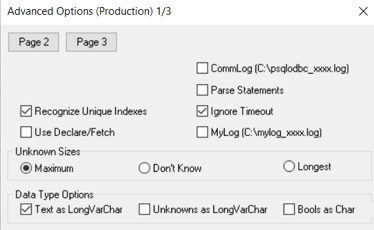
I also tried to mark "Ignore Timeout" in settings but it also does not help:
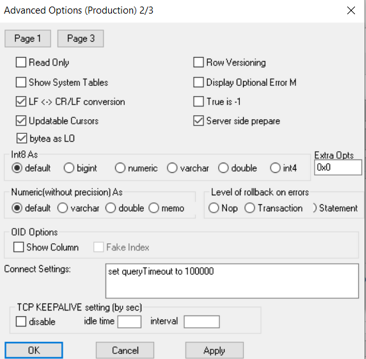
I also tried to change Connect Settings:
Does not help anything, 15-20 seconds, and gets an error.
Does anyone know how to set timeout configurations?
Hi @Anonymous ,
I find some documents, please see if they are helpful:
Timeout settings for PostgreSQL via ODBC-Connector Package
Postgresql Connection Timed out
Cannot connect to PostgreSQL from client - Error timed out
If the problem is still not resolved, please provide detailed error information or the expected result you expect. Let me know immediately, looking forward to your reply.
Best Regards,
Winniz
If this post helps, then please consider Accept it as the solution to help the other members find it more quickly.
@v-kkf-msft
The problem keeps coming back:
PB Service
Underlying error code: -2147467259
Underlying error message: ODBC: ERROR [08001] timeout expired
DM_ErrorDetailNameCode_UnderlyingHResult: -2147467259
Microsoft.Data.Mashup.ValueError.DataSourceKind: Odbc
Microsoft.Data.Mashup.ValueError.DataSourcePath: dsn=Production
Microsoft.Data.Mashup.ValueError.OdbcErrors: #table({"SQLState", "NativeError", "Message"}, {})
Microsoft.Data.Mashup.ValueError.Reason: DataSource.Error
Cluster URI: WABI-WEST-EUROPE-D-PRIMARY-redirect.analysis.windows.net
Activity ID: ae26f4bd-6b57-45d0-8c63-b1dd64606d1a
Request ID: 32d0cbd4-71e6-3384-046b-4891e8e93072
Time: 2021-08-19 15:03:40Z
PB Desktop
Hello, hope you are well.
We are having the same issue.! Could you resolved it?
Hi! Colud you resolved it?
I have de exact same problem,
im checking if it is a problem caused by security managment in the server like a firewall, let me know please if you could find the answer 😁👍
If you have recently started exploring Fabric, we'd love to hear how it's going. Your feedback can help with product improvements.
A new Power BI DataViz World Championship is coming this June! Don't miss out on submitting your entry.
Share feedback directly with Fabric product managers, participate in targeted research studies and influence the Fabric roadmap.
| User | Count |
|---|---|
| 53 | |
| 45 | |
| 44 | |
| 20 | |
| 19 |
| User | Count |
|---|---|
| 73 | |
| 71 | |
| 34 | |
| 33 | |
| 31 |