Join us at FabCon Atlanta from March 16 - 20, 2026, for the ultimate Fabric, Power BI, AI and SQL community-led event. Save $200 with code FABCOMM.
Register now!The Power BI Data Visualization World Championships is back! Get ahead of the game and start preparing now! Learn more
Hi,
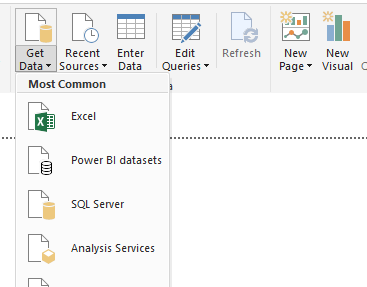
I'd like to try having a "Golden Dataset" - i.e. a single dataset, which I pull into Power BI Desktop, and from there make the individual reports. Get Data > Power BI Datasets
From there, you pull in your 'Golden Dataset', and make the report. Thus a lot less duplicated data. Possibly a bit of control over consistency as well.
But, to have a single dataset that could fulfill all our needs - it'd end up > 1GB.
Is there a way to do the 'Golden Dataset' concept, but with that dataset hosted on Sharepoint, or somewhere else that doesn't have the 1GB size limit?
Solved! Go to Solution.
Hi @mmace1,
If you want to load more than 1GB data to Power BI Desktop that is allowed but it may cause memory error.
If you publish the report to Power BI Service, I'm afraid that it will show the error for 1 GB limit.
For reference, you could have a look at this thread.
Best Regars,
Cherry
Hi @mmace1,
If you want to load more than 1GB data to Power BI Desktop that is allowed but it may cause memory error.
If you publish the report to Power BI Service, I'm afraid that it will show the error for 1 GB limit.
For reference, you could have a look at this thread.
Best Regars,
Cherry
The Power BI Data Visualization World Championships is back! Get ahead of the game and start preparing now!
| User | Count |
|---|---|
| 41 | |
| 38 | |
| 36 | |
| 31 | |
| 28 |
| User | Count |
|---|---|
| 129 | |
| 88 | |
| 79 | |
| 68 | |
| 63 |