Forum Discussion

Possible Tip/Trick: Dynamic Date Dimension Table
I'm going to share the dynamic date dimension table I built, hopefully it is useful to someone! I named it DateTable for this tutorial, and my fact table FactTable.
The table is built using the following formula:
DateTable = CALENDAR (MINX('FactTable', [Created Date]), NOW())
Basically, it looks for the oldest date you have for the column [created date], and builds a sequential date range until the time of refresh - so it always has calendar information for all data points in the set.
I added the following columns:
Date = This is built when you create the table
Year = YEAR([Date])
MonthofYear = MONTH([Date])
QuarterofYear = ROUNDUP (MONTH([Date])/3,0)
OrdinalDate = DATEDIFF([Year]&",1,1",[Date],DAY)+1
DayofWeek = WEEKDAY([Date],2)
ISOWeekofYear = IF ((([OrdinalDate] - [DayofWeek] + 10)/7) >= 53, 1, TRUNC(([OrdinalDate] - [DayofWeek] + 10)/7))
DayofMonth = DAY([Date])
Month = FORMAT([Date], "MMM") & " " & [Year])
Quarter = "Q" & [Quarter] & " " & [Year]
Week Ending = [Date] + (7- [DayofWeek])
Day = Format([Date],"DDDD")
With both the numeric and text values, you can use "Sort by" to properly order them in visuals. If you want your week numbers to start on a Sunday instead of Monday, change the "1" to a "2" in ISOWeekofYear column - however ISO Standard is a Monday Start.
I'm still pretty new to PowerBI, but I'll help if I can! If you have suggestions or modifications, I'd love to hear them.
EDIT: I changed how the week number is calculated, so I can use ISO Week Numbers. This also helped fix the "week Ending column, which broke when spanning multiple years that included a leap year. Let me know if you find any problems!
EDIT2: MS just released the timeline slicer for PowerBI. That probably, mostly makes this table useless. Read more here: http://blogs.msdn.com/b/powerbi/archive/2015/11/03/visual-awesomeness-unlocked-the-timeline-slicer.aspx
39 Replies
- ImkeFCommunity Champion
Nice trick!
Just came across this blogpost using ADDCOLUMN allowing you to "script" the table-creation, so no need to create every single column manually: http://kohera.be/blog/business-intelligence/how-to-create-a-date-table-in-power-bi-in-2-simple-steps/
 AnonymousNot applicable
ImkeF thanks so much! awesome :D
 RJResolver II
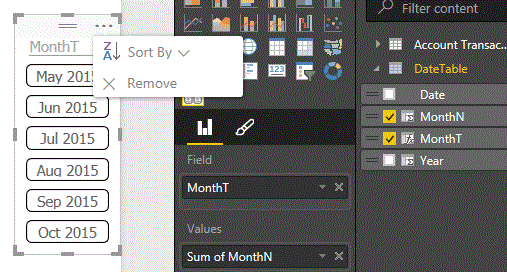
To get dates to sort in the correct order I used this one
MonthT = FORMAT([Date], "MMM") & " " & [Year])
MonthN = MONTH([Date])
And then sorted by SUM OF MonthN as a value
Edit Actually there is a much better way to do this as shown below
- RJResolver II
Actually the correct way to do this si shown in this thread
 weilip1803Frequent Visitor
I am having a problem, The formula above that I had used is sumerizing the data. How can I avoid the summary. The ordering of the column in charts are sorting the month names by alphabetical order how can i make it go by chronological order?
- AnonymousNot applicable
It may not be elegant but I have added a 'MonthSort' column to my table
MonthSort = DateTable[Year]&IF(DateTable[MonthofYear]<10,0,"")&DateTable[MonthofYear]
Then simply select the column you're using on the chart in the data tab, click 'modeling' and select the 'Sort by Column' button
Let me know how that goes :)
- weilip1803Frequent Visitor
Yea got it.Thanks ^^
- robcrockfordAdvocate I
Hi, new to PBI, when you say:
"The table is built using the following formula:
DateTable = CALENDAR (MINX('FactTable', [Created Date]), NOW())"
Where should this formula be added? Assume you create the column headers for the rest and add formulas into row 1?
Thanks in advance
- AnonymousNot applicable
- RJResolver II
Hi
Thanks for this
What would you do if you wanted more than one calendar. Say an Invoice Date plus an Order Date Calendar
Would you need two new tables or could one be set up (called DateTable) and filter by date type in the measure somehow?
Is this possible
Thanks
EDIT. To do the above
- konstantinosMemorable Member
 ALeefResolver II
konstantinos : Why would you use a switch and type in all the names, rather than use the format function? Is it a perfromance difference?
RJ : Check out http://community.powerbi.com/t5/Desktop/Transitive-Relationships/m-p/8563#U8563 . It's an interesting concept, and apparently having inactive relationships is fine - the software is still smart enough to filter right through. It wasn't exactly what I ended up using, but that's because I wasn't using a slicer, I wanted a clustered column chart.
- RJResolver II
BTW I always use today() not now()
Does it make any difference?
- ALeefResolver II
TODAY() only returns a day, and sets the time to 12:00am. For this instance, I don't think it matters, but I use timestamps regularly, so that is what I'm in the habit of.
Good question!
- AnonymousNot applicable
Hi,
I notice you refer to TODAY() and NOW() functions.
I am looking to include rolling periods in my date dimension, but I can't seem to get the TODAY() function to work in Power BI Desktop.
Using 'Add column' to test a generic 'Current Date' column - to use i.e. to calculate deal age or similar, I get this result.
Formula;
= Table.AddColumn(#"Changed Type6", "TESTTODAY", each TODAY())
Error Message;
"Expression error: The name 'TODAY' wasn't recognized. Make sure it's spelled correctly."
Would you happen to have any useful insights, how to apply this formula in Power BI?
Thanks.
- greggybResident Rockstar
TODAY() and NOW() are DAX functions and are available in the data model. You'd define a new column with a ribbon button called 'New Column'.
You are referring to the 'Add Custom Column' button in Power Query. Power Query uses the M data mashup language, which is based on the F# language. In M the way to get the current date-time is as follows:
// Power Query
// Current date-time

 = DateTime.LocalNow()

// Current date (without any time portion)

 = DateTime.Date( DateTime.LocalNow() )
 bernitorresRegular Visitor
I am new to PowerBI and I don't understand how to actually create this table.
I tried creating a New Source -> Blank Query and inserting your query, but that doesn't seem to work.
Could you please add some more detailed steps on how to add it to the queries, for newbies like me? :)
- konstantinosMemorable Member
bernitorres You can create/import tables with 2 ways. One is importing with "Get Data" and the other is through DAX data modelling.
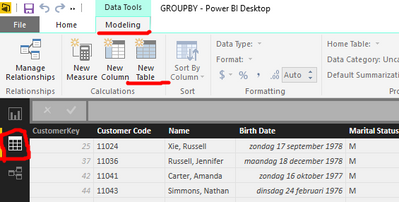
You need to go to the data model view and in the ribbon go to modeling tab & select "New Table". thus using DAX language.
The "Get data" uses M language which is used only for importing data to data model.
Keep in mind that you need to already have import some data in order to see the :Modelling" tab..
- ALeefResolver II
konstantinos has it right. I made it using the New Table option on the ribbon.
- ALeefResolver II
I edited the table above to inclue ISO Week number, which also helped fix the Week Ending values. Should be more accurate now. Please let me know if you figure out how to break it!
- amysmithHelper I
Hi, if you wish, you will be able to learn more here:
- GilesWalkerSkilled Sharer
I am probably missing something but when I enter the DateTable = CALENDAR (MINX('FactTable', [Created Date]), NOW()) in a new table it says it cant find FactTable. I changed this to a table I had imported and then it says Created Date cannot be found.
I am very new to DAX so would appreciate if you could explain a bit further please as this looks very useful.
Thanks,
- RJResolver II
Did you put for minx
1 The table name 'Account Transactions',
2 The field name 'Account Transactions'[Date]) ,
DateTable = CALENDAR( minx ( 'Account Transactions', 'Account Transactions'[Date] ) , today ())
- ALeefResolver II
GilesWalker : [Created Date] refers to a field in my Fact Table, so you will have to change your field name to something that has a date in it.
- GTRHelper III
Great techniques, looking to tinker with this a bit more to incorporate it for personal use.
Thanks!
 lanceenglandRegular Visitor
Nice tip. As usual, there are several ways to do the same thing with DAX. A function similar to CALENDAR is CALENDARAUTO which scans all the date columns and returns a range of dates from the earliest date to the latest date. It is very handy.
- AnonymousNot applicable
lanceengland However, the CALENDARAUTO isn't dynamic right? I mean it scans for all the dates from earliest to the latest. But if the data source is updated, the CALENDARAUTO doesn't update automatically. Someone can correct me if i'm wrong.
Edit: I just realized that CALENDARAUTO is in fact dynamic. Tried it with an Excel data source. Removed some dates and the table named DateTable (created with calendarauto) updated its date range after a refresh.
- lanceenglandRegular Visitor
Yes. Dynamic is this sense is at process time i.e. refreshing the data model from the data source. On that note, while I haven't verified it, I'm guessing CALENDARAUTO would not work in Direct Query mode. That said, if you were in Direct Query mode, you would handle the dynamic date range at the data source.