Forum Discussion

 Resolver II
Linking 2 or more dates to one Master Calendar (USERELATIONSHIP)
The master calendar is created as per this thread
But sometimes there are two dates like order date and invoice date
I wanted to do a report like this Where one column was based on the date of order and one on the date of invoice

This is covered under this blog post
http://sqldusty.com/2015/10/21/10-dax-calculations-for-your-tabular-or-power-pivot-model-part-2/
use relationship
So in effect one calendar is set up as so
The date in the calendar is linked to the Invoice Date in this example
A unlinked join is created for the Order Date
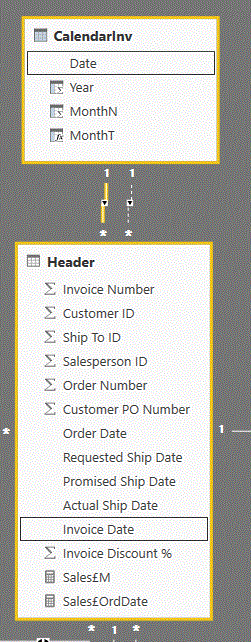
So the calendar date is linked to the Invoice Date
and then the Order Date is linked to the calandar date as follows
Sales£OrdDate = CALCULATE([Sales£M] , USERELATIONSHIP(Header[Order Date] , CalendarInv[Date]))
9 Replies
 alexchsengRegular Visitor
Hi RJ, I have tried the instructions provided, however for some weird reason, I get a group of total at the top without dates. This is despite each of my rows in the Application table has dates.
Here is how I have linked my DateTable, where the active link is between Date and Application Received Date. The inactive date is between Date and Application Offer Sent Date. With the cross filter direction, I have tried both "Single" and "Both", but to no avail.
Here is the output that I am getting. Noticed that next to 6, there isn't any Year or Month information.
Any ideas? Any assistance would be much appreciated. Thanks.
 AnonymousNot applicable
Have you made absolutely sure that all of the dates that show up in the Application table are covered by the range in the Date table?
- alexchsengRegular Visitor
Hi Anonymous, thanks for the hint. I found out that those 6 anamolies were due to the time stamps. Because I have used DateTable = CALENDAR(MINX('Application','Application'[Application Received Date]), TODAY()) to generate the Date table, the default timestamp is 12:00:00 AM. Hence, any row in the Offer Sent Date without 12am could not be matched.
Is there a way to force USERELATIONSHIP() to only match on the date portion and not the time?