cancel
Showing results for 
Search instead for 
Did you mean: 

Next up in the FabCon + SQLCon recap series: The roadmap for Microsoft SQL and Maximizing Developer experiences in Fabric. All sessions are available on-demand after the live show. Register now

Reply
akhil5656
Frequent Visitor

Populate the table in the power bi desktop with out summation

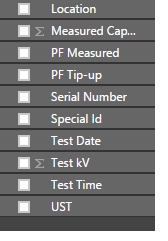
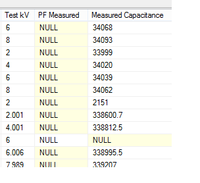
Hi Developers, I am new to Power BI help need from u guys, In my SQL server DB  am having a column with "Capacitance" and "Test Kv" Values (Show in the below image 1)when I was importing the data from SQL Server to Power BI Desktop the "Capacitance" and "Test Kv" values are generating as a summation(Shown in the image 2 below).

As they are reading's of a meter I not want to do summation because I have to create a scattered chart showing capacitance and KV values varying with time the capacitance value. 

How can I get the values without summation in power BI Desktop?

1)
22.png

2)

23.png

And the summation is showing the total value in Millions( as shown in the image below) that means in currency but the reading is meter values how can I change to capacitance and volts? 
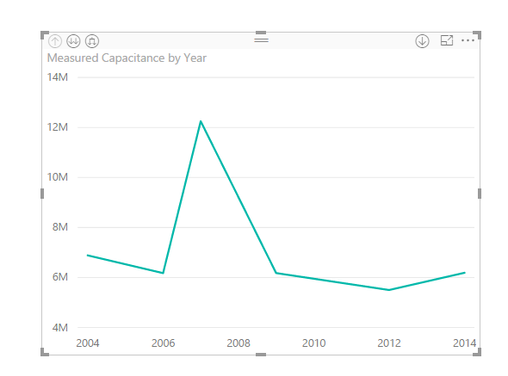
24.png


What I was tried: Actually I tried to change the data type to TEXT but in the Scattered chart it is not showing the values.

 Any help greatly appreciated?

Thanks.


1 ACCEPTED SOLUTION
v-ljerr-msft
Microsoft Employee
Microsoft Employee

Hi @akhil5656,


In Power BI Desktop, we can change the Default Summarization for a column under Modeling tab. Could you try changing the Default Summarization to Do Not Summarize for "Capacitance" and "Test Kv" to see if it works in your scenario? Smiley Happy


Regards

View solution in original post

2 REPLIES 2
v-ljerr-msft
Microsoft Employee
Microsoft Employee

Hi @akhil5656,


In Power BI Desktop, we can change the Default Summarization for a column under Modeling tab. Could you try changing the Default Summarization to Do Not Summarize for "Capacitance" and "Test Kv" to see if it works in your scenario? Smiley Happy


Regards

Ashi
Helper I
Helper I

That summation is just an indicator that the column is numeric,thats it.

and "M"  is Million which is count and not neccesary currency only.

it is automatically calculated in power bi based on the data range.

Helpful resources

Announcements
New to Fabric survey Carousel

New to Fabric Survey

If you have recently started exploring Fabric, we'd love to hear how it's going. Your feedback can help with product improvements.

Power BI DataViz World Championships carousel

Power BI DataViz World Championships - June 2026

A new Power BI DataViz World Championship is coming this June! Don't miss out on submitting your entry.

Join our Fabric User Panel

Join our Fabric User Panel

Share feedback directly with Fabric product managers, participate in targeted research studies and influence the Fabric roadmap.

March Power BI Update Carousel

Power BI Community Update - March 2026

Check out the March 2026 Power BI update to learn about new features.