Hello Everyone,
I've been stuck quit a while with this and I'm pretty sure there is a simple way to do these but I've always struggle with filters.
Data sample pbix:
https://1drv.ms/u/s!AqZ-UB8XHC8si3JwwFVo_kInMdD4?e=riqnGQ
Context: Data that contains information about policies from January to August 2021 and for how long they have been in force.
Important fields:
- Tenurefirstmonth: Inception date of the policy.
- TotalMonthDurationDR : Number of complete months that the policy has been in force.
- TenureStartYearMonth : Inception month of the policy.
I am trying to create a Retention visual. First I created the following measure (reverse cumulative) :
Retention =
var retention = CALCULATE([Policy Count],FILTER(ALL(Sheet4[TotalnMonthDurationDR]),Sheet4[TotalnMonthDurationDR]>=min(Sheet4[TotalnMonthDurationDR])))
return
if(ISBLANK([Policy Count]),blank(),retention)
So that when placed in a line graph with the TotalMonthDurationDR as x-axis basically shows how many policies have completed 0,1,2,3... months:
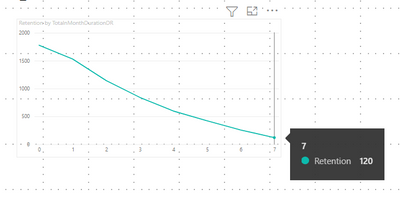
Good, now, the final part that I cant seem to achieve is to divide this measure by the number of policies that have been issued, to show the Retention %. Here is the tricky part, I only want to divide by the total count of issued policies that already could have make it to the 5th,6th,7th.. month. So for example, the 120 policies that already have 7 months of being active, will be divided by the policies issued in January 2021 (because only those policies could have reached the 7th month). The 256 policies that have 6 months of active will be divided by the policies issued in January or Februrary 2021, and so on.
The desired output of the measure of this specific example would be the division of Retention column and Total Column:

So the solution measure would have to compare the TotalMonthDuration with the with the diferences between the months and August2021 (since is the last analyzed month). A measure thay I tested with no success to calculate this issued policies is :
Test =
var maxdate = CALCULATE(MAX(Sheet4[TenureStartyearmonth]),ALL(Sheet4[TenureStartyearmonth])) // August 2021
var issued = CALCULATE(COUNT(Sheet4[TotalnMonthDurationDR]),ALL(Sheet4[TotalnMonthDurationDR]),FILTER(Sheet4,Sheet4[TenureStartyearmonth]<=EDATE(maxdate,-Sheet4[TotalnMonthDurationDR])))
return
issued
Considerations:
- I would like to keep slicing capability of the TenureStartYearMonth (only Year) and PolicyType fields, since the users will be slicing those fields.
Any solution or idea would be amazing! Thank you!!


