Join us at FabCon Atlanta from March 16 - 20, 2026, for the ultimate Fabric, Power BI, AI and SQL community-led event. Save $200 with code FABCOMM.
Register now!The Power BI Data Visualization World Championships is back! It's time to submit your entry. Live now!
I work with datasets that have multiple date/time values per row for task and activity type tracking.
I'm trying to vizualize the data against a reference axis rather than having to chose just one of the columns to be the x-axis.
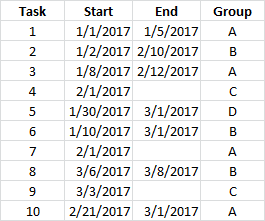
For example, assume I have 10 tasks. Each has a start date and some of them have an end date:
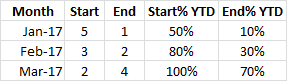
I want to know, for any particular time period, how many tasks have started and how many have finished eg I could summarize by month and calculate a 'to date' value:
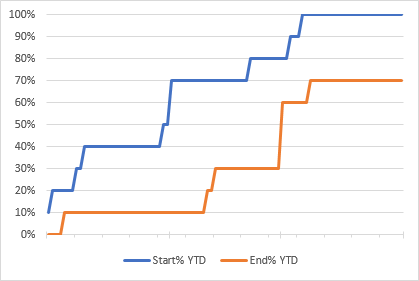
And I can chart this type of data easily enough in Excel by building a reference date range to plot against:
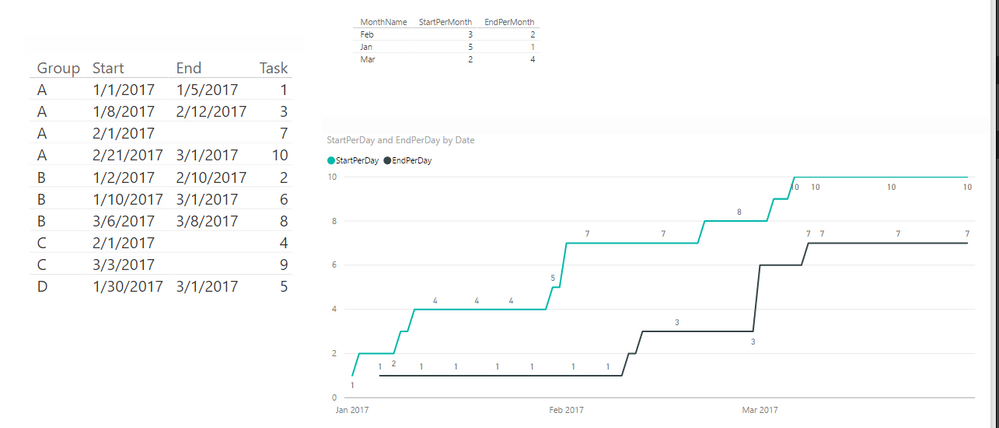
If I create measures in Power BI and try to plot them I have to select either the Start dates or End dates as the x-axis which results in one of my measures being plotted incorrectly:
Here, the first task with an End date (#1 ending on 1/5) isn't plotted at 1/5/2017 on the x-axis but at 1/8/2017 which is when the next 'Start' date falls. Similarly the 2/10/2017 End for #2 doesn't appear at all, and the 2/12/2017 End for #3 appears at 2/21/2017 as total to date = 3.
I don't know if I can fix this by just changing my measures, but I figure I need to create some other refernce timeline to act as the x-axis.
Measures used:
YTDStart = CALCULATE ( COUNTX ( Tasks , [Start] ) , FILTER ( ALLSELECTED ( Tasks ) , [Start] <= MAX( [Start] ) ) )
YTDEnd = CALCULATE ( COUNTX ( Tasks , [End] ) , FILTER ( ALLSELECTED ( Tasks ) , [End] <= MAX ( [Start] ) ) )
Solved! Go to Solution.
Hi @mike_true80,
To calculate the count value of Start and End per month, you can create below measure:
StartPerMonth = CALCULATE(COUNTA('Table1'[Start]),FILTER(ALL(Table1), MONTH(Table1[Start])=MAX('calendar'[Month])))
EndPerMonth = CALCULATE(COUNTA('Table1'[End]),FILTER(ALL(Table1), MONTH(Table1[End])=MAX('calendar'[Month])))
To plot a line chart to display count value of Start and End for each day, the measures should be below:
StartPerDay = CALCULATE(COUNTA(Table1[Start]),FILTER(ALL('Table1'),'Table1'[Start]<=MAX('calendar'[Date])))
EndPerDay = CALCULATE(COUNTA(Table1[Start]),ISBLANK('Table1'[End])=FALSE(),FILTER(ALL('Table1'),'Table1'[End]<=MAX('calendar'[Date])))
Please check attached .pbix file.
Best Regards,
Qiuyun Yu
Hi @mike_true80,
To calculate the count value of Start and End per month, you can create below measure:
StartPerMonth = CALCULATE(COUNTA('Table1'[Start]),FILTER(ALL(Table1), MONTH(Table1[Start])=MAX('calendar'[Month])))
EndPerMonth = CALCULATE(COUNTA('Table1'[End]),FILTER(ALL(Table1), MONTH(Table1[End])=MAX('calendar'[Month])))
To plot a line chart to display count value of Start and End for each day, the measures should be below:
StartPerDay = CALCULATE(COUNTA(Table1[Start]),FILTER(ALL('Table1'),'Table1'[Start]<=MAX('calendar'[Date])))
EndPerDay = CALCULATE(COUNTA(Table1[Start]),ISBLANK('Table1'[End])=FALSE(),FILTER(ALL('Table1'),'Table1'[End]<=MAX('calendar'[Date])))
Please check attached .pbix file.
Best Regards,
Qiuyun Yu
The Power BI Data Visualization World Championships is back! It's time to submit your entry.
Check out the January 2026 Power BI update to learn about new features.
| User | Count |
|---|---|
| 56 | |
| 42 | |
| 41 | |
| 21 | |
| 21 |
| User | Count |
|---|---|
| 150 | |
| 107 | |
| 64 | |
| 36 | |
| 36 |