Join us at FabCon Atlanta from March 16 - 20, 2026, for the ultimate Fabric, Power BI, AI and SQL community-led event. Save $200 with code FABCOMM.
Register now!The Power BI Data Visualization World Championships is back! It's time to submit your entry. Live now!
Hi,
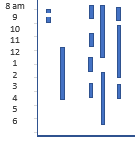
I am Looking for a way to plot the graph as shown below, it has time range on Y axis, Id on X axis and the lines in the graph are the motion status (flag set to 1) for the given Time and ID, I have tried most of the visuals in Power Bi , but it dosent workout.
Any Suggestions in R or in Power Bi ?
Thanks,
Solved! Go to Solution.
Hi @Anonymous,
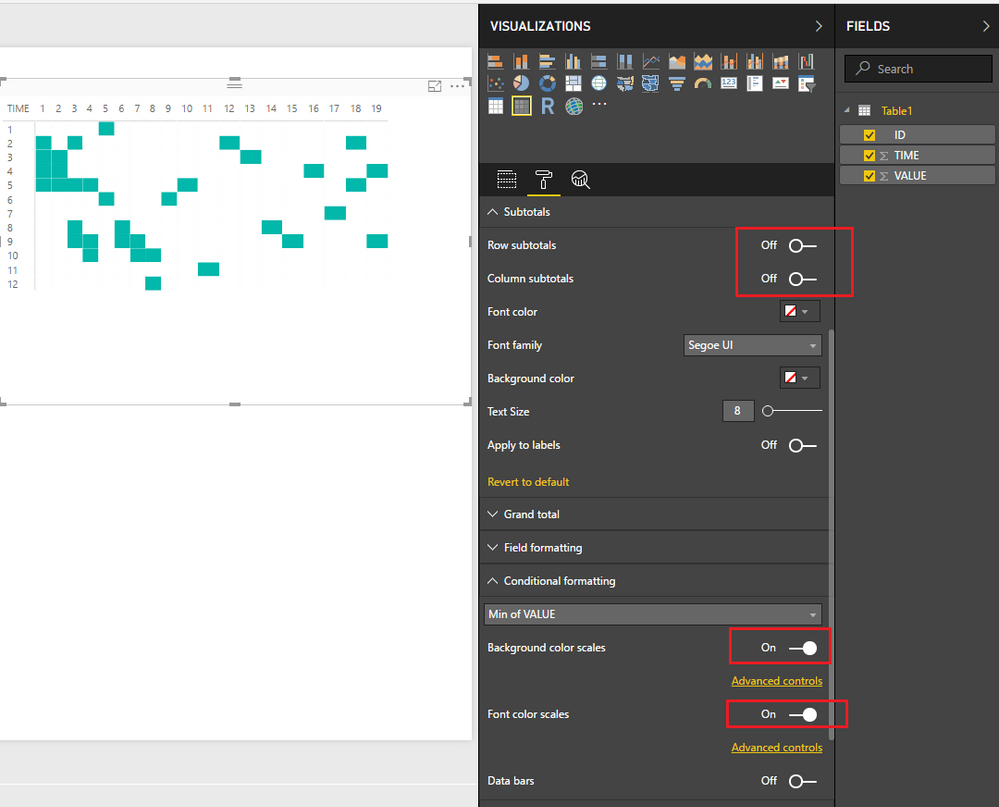
In this scenario, I would suggest you try using the Matrix visual which could partially give your expected result. ![]()
1. Add a Matrix
2. Show Time as Rows, ID as Columns, and Flag as Value.
3. Disable all Subtotals
4. Enable condition formatting for background color scales and font color scales.
Regards
Hi @Anonymous,
In this scenario, I would suggest you try using the Matrix visual which could partially give your expected result. ![]()
1. Add a Matrix
2. Show Time as Rows, ID as Columns, and Flag as Value.
3. Disable all Subtotals
4. Enable condition formatting for background color scales and font color scales.
Regards
Thanks v-ljerr-msft , thats a good workaround:) I have used it for now, but will still work for some R graphs, Thanks again.
The Power BI Data Visualization World Championships is back! It's time to submit your entry.
Check out the January 2026 Power BI update to learn about new features.
| User | Count |
|---|---|
| 69 | |
| 46 | |
| 36 | |
| 28 | |
| 23 |
| User | Count |
|---|---|
| 135 | |
| 121 | |
| 58 | |
| 40 | |
| 32 |