cancel
Showing results for 
Search instead for 
Did you mean: 

The Power BI Data Visualization World Championships is back! Get ahead of the game and start preparing now! Learn more

Reply
XiananZhaoCSM
Frequent Visitor

Please help: Condition Column (has sample)

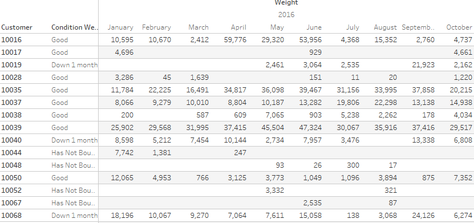
Thank you for your time to read the post. I have some difficulties creating this condition column.  This report sample should list all customerIDs and weights shipped by Year/Month.


A condition column should indicates:

1. If current month's weight is blank or zero, then "Has Not Bought"

2. If current month's weight is less than previous month's AND previous month's weight is less than previous month+1's, then "Down 2 Months"

3. If current month's weight is less than previous month's AND previous month's weight is greater than previous month+1's, then "Down 1 Month"

4. Elses are "Good"


The goal is to use this condition column to filter.


It should be like this:

Capture.PNG


You can download the sample here

4 REPLIES 4
BhaveshPatel
Community Champion
Community Champion

You can download the SAMPLE FILE created for you.

Thanks & Regards,
Bhavesh

Love the Self Service BI.
Please use the 'Mark as answer' link to mark a post that answers your question. If you find a reply helpful, please remember to give Kudos.

Thanks for the help. But the view is not what the result should look like. Based on your file, if I filter "Down 1 Month", customer 10016 shows. However, 10016's October weight is 4737 which is greater than September's weight 2759,54. The condition should be "Good"

@XiananZhaoCSM


In this scenario, since you want this condition column appear in matrix, this column should repeat with each month in your raw data. For your requirement, you need to create calcualted column for "last Month Weight", "last second Month Weight" and "last third Month Weight". Then use those three column as condition to create the "condition" column. Please refer to my sample below:


I use my own sample table.

7.PNG

1. Create a calculated column to return the max month within each Name group.

max Month = CALCULATE(MAX(Table1[Month]),ALLEXCEPT(Table1,Table1[Name]))

2. Create three calculated columns for "last Month Weight", "last second Month Weight" and "last third Month Weight". 


last Month Value = LOOKUPVALUE(Table1[Value],Table1[Month],Table1[max Month],Table1[Name],Table1[Name])
last second Month Value = LOOKUPVALUE(Table1[Value],Table1[Month],Table1[max Month]-1,Table1[Name],Table1[Name])
last third Month Value = LOOKUPVALUE(Table1[Value],Table1[Month],Table1[max Month]-2,Table1[Name],Table1[Name])


3.  Create condition column based above three calculated columns.

Status = IF(Table1[last Month Value]=BLANK(),"Non",IF(Table1[last Month Value]<Table1[last second Month Value] && Table1[last second Month Value]<Table1[last third Month Value],"down 2",IF(Table1[last Month Value]<Table1[last second Month Value],"down 1","good")))

The table looks the like below:
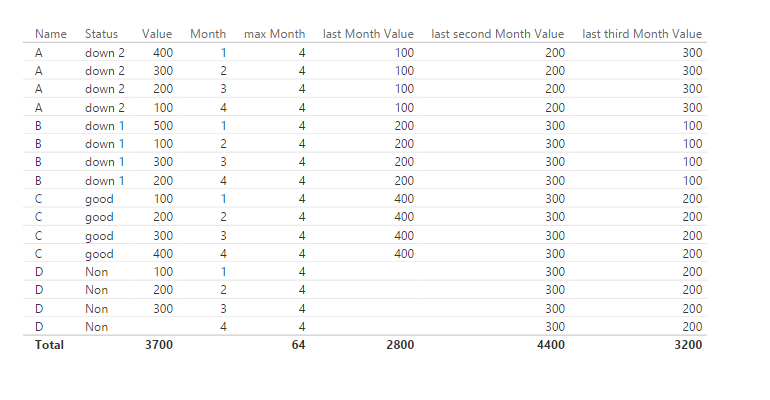
 

88.PNG

When putting fields into matrix, it will appear as you expected.
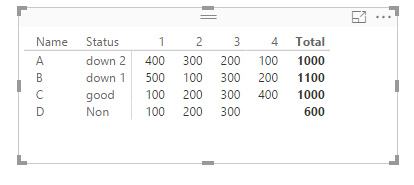
99.PNG

BhaveshPatel
Community Champion
Community Champion

Instead of Conditional column, You can use SWITCH() function to return required results.


Here you will find more information on using SWITCH() in your scenario.

Thanks & Regards,
Bhavesh

Love the Self Service BI.
Please use the 'Mark as answer' link to mark a post that answers your question. If you find a reply helpful, please remember to give Kudos.

Helpful resources

Announcements
Power BI DataViz World Championships

Power BI Dataviz World Championships

The Power BI Data Visualization World Championships is back! Get ahead of the game and start preparing now!

December 2025 Power BI Update Carousel

Power BI Monthly Update - December 2025

Check out the December 2025 Power BI Holiday Recap!

FabCon Atlanta 2026 carousel

FabCon Atlanta 2026

Join us at FabCon Atlanta, March 16-20, for the ultimate Fabric, Power BI, AI and SQL community-led event. Save $200 with code FABCOMM.