cancel
Showing results for 
Search instead for 
Did you mean: 

Learn from the best! Meet the four finalists headed to the FINALS of the Power BI Dataviz World Championships! Register now

Reply
markefrody
Post Patron
Post Patron

Please Help in Creating DAX Formula

Hi everyone,


I am trying to create a DAX formula wherein I need to apply a filter and get total for specified columns in the raw data.


Here is what I am trying to accomplish:

Filter for Data A in Date 1 + Filter for Data B in Date 1 + Filter for Data A in Date 2 / (Total Data for Date 1 + Total Data for Date 2)


Wherein Date 1 is the reference date. Date 2 is the previous date.  This needs to be done for all the dates in the “Req Date” column A.


Here is an example:

Reference date is “3/1/2017” in column A (Req Date)


(1)

Filter for column A (Req Date) for reference date of “3/1/2017”.
Then filter column I (Age) to get value = “1”.
Get the total count of loads in column J (Count of Load).
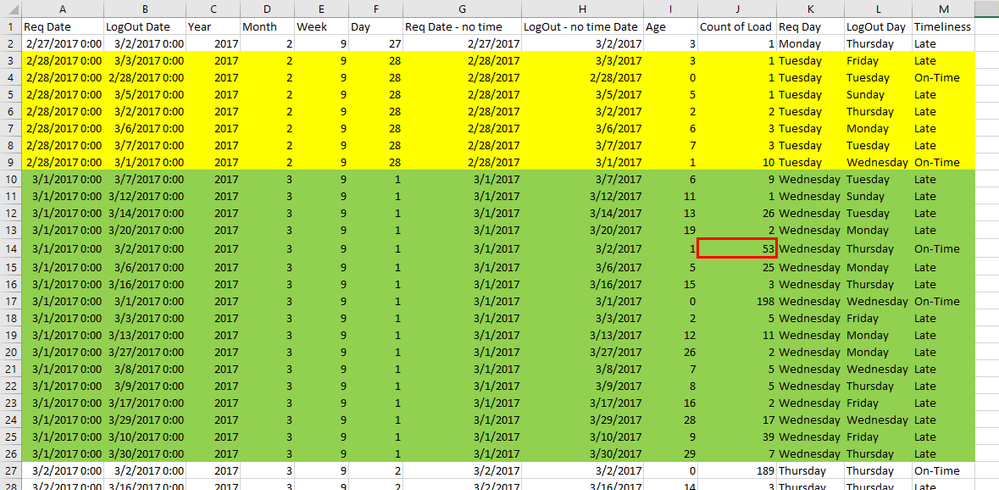
 Photo 1.png


(2)

Filter for column A (Req Date) for reference date of “3/1/2017”.
Then filter column I (Age) to get value = “0”.

Get the total count of loads in column J (Count of Load).

Photo 2.png


(3)

Filter for column A (Req Date) for previous date of “2/28/2017”.
Then filter column I (Age) to get value = “0”.

Get the total count of loads in column J (Count of Load).

 Photo 3.png


(4)

Filter for column A (Req Date) for reference date of “3/1/2017”.
Get the total count of loads in column J (Count of Load).

 Photo 4.png


 (5)

Filter for column A (Req Date) for previous date of “2/28/2017”.
Get the total count of loads in column J (Count of Load).
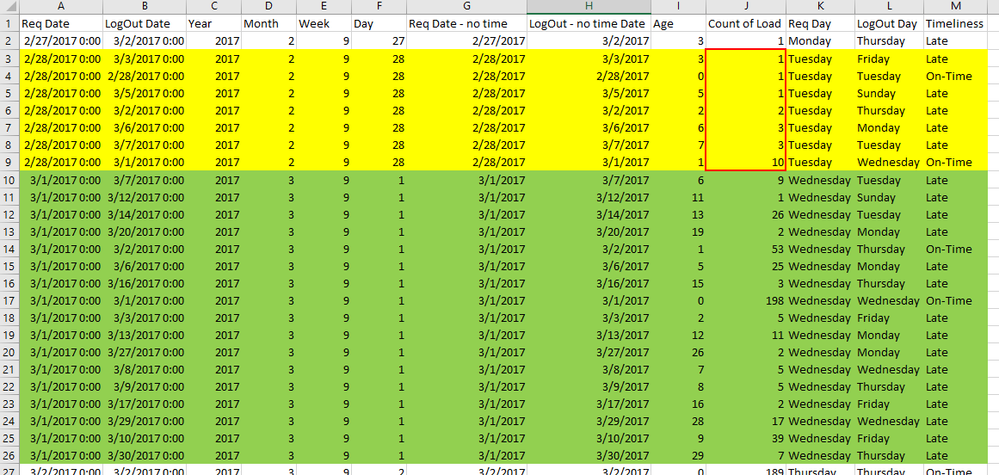
Photo 5.png 


(6)

After getting all the results, the formula will look like this:
= (Result of Step 1 + Result of Step 2 + Result of Step 3) / (Result of Step 4 + Result of Step 5)

Below is the link of the
 raw data file for your reference. Please note that I am using Direct Query mode for the data.

https://www.dropbox.com/s/3snlyjsuxwwyct5/Sample%20file.xlsx?dl=0&m=


Appreciate your kind help.

Best regards,
Mark

1 ACCEPTED SOLUTION

@markefrody,


Refer to the measure below.

Measure =
VAR d =
    SELECTEDVALUE ( 'Calendar'[Date] )
RETURN
    DIVIDE (
        SUMX (
            FILTER (
                Table1,
                ( Table1[Req Date] = d
                    && Table1[Age] IN { 0, 1 } )
                    || ( Table1[Req Date]
                    = d - 1
                    && Table1[Age] = 0 )
            ),
            Table1[Count of Load]
        ),
        SUMX (
            FILTER ( Table1, Table1[Req Date] IN { d, d - 1 } ),
            Table1[Count of Load]
        )
    )
Community Support Team _ Sam Zha
If this post helps, then please consider Accept it as the solution to help the other members find it more quickly.

View solution in original post

3 REPLIES 3
v-chuncz-msft
Community Support
Community Support

@markefrody,


You may start from the SELECTEDVALUE Function.

https://www.sqlbi.com/articles/using-the-selectedvalue-function-in-dax/

Community Support Team _ Sam Zha
If this post helps, then please consider Accept it as the solution to help the other members find it more quickly.

@v-chuncz-msft


Thanks for the link but I am a beginner at writing DAX codes. Will you be able to help me in writing the code as per my specifications above? Appreciate your kind assistance.

@markefrody,


Refer to the measure below.

Measure =
VAR d =
    SELECTEDVALUE ( 'Calendar'[Date] )
RETURN
    DIVIDE (
        SUMX (
            FILTER (
                Table1,
                ( Table1[Req Date] = d
                    && Table1[Age] IN { 0, 1 } )
                    || ( Table1[Req Date]
                    = d - 1
                    && Table1[Age] = 0 )
            ),
            Table1[Count of Load]
        ),
        SUMX (
            FILTER ( Table1, Table1[Req Date] IN { d, d - 1 } ),
            Table1[Count of Load]
        )
    )
Community Support Team _ Sam Zha
If this post helps, then please consider Accept it as the solution to help the other members find it more quickly.

Helpful resources

Announcements
New to Fabric survey Carousel

New to Fabric Survey

If you have recently started exploring Fabric, we'd love to hear how it's going. Your feedback can help with product improvements.

Power BI DataViz World Championships carousel

Power BI DataViz World Championships - June 2026

A new Power BI DataViz World Championship is coming this June! Don't miss out on submitting your entry.

Join our Fabric User Panel

Join our Fabric User Panel

Share feedback directly with Fabric product managers, participate in targeted research studies and influence the Fabric roadmap.

March Power BI Update Carousel

Power BI Community Update - March 2026

Check out the March 2026 Power BI update to learn about new features.