Join us in Barcelona for FabCon and SQLCon, September 28 - October 1, 2026.
This is best Fabric, Power BI, SQL and AI community event. How do we know? The last event sold out! Save €200 with code FABCMTY200.
Register now- Power BI forums
- Get Help with Power BI
- Desktop
- Service
- Report Server
- Power Query
- Mobile Apps
- Developer
- DAX Commands and Tips
- Custom Visuals Development Discussion
- Health and Life Sciences
- Power BI Spanish forums
- Translated Spanish Desktop
- Training and Consulting
- Instructor Led Training
- Dashboard in a Day for Women, by Women
- Galleries
- Data Stories Gallery
- Themes Gallery
- Contests Gallery
- QuickViz Gallery
- Quick Measures Gallery
- Visual Calculations Gallery
- Fabric Apps Gallery
- Notebook Gallery
- Translytical Task Flow Gallery
- TMDL Gallery
- R Script Showcase
- Webinars and Video Gallery
- Ideas
- Custom Visuals Ideas (read-only)
- Issues
- Issues
- Events
- Upcoming Events
The Fabric community is upgrading! Read all of the details including the timeline and what you can expect. Learn more
- Power BI forums
- Forums
- Get Help with Power BI
- Desktop
- Re: Please Help! Bookmarks issue.
- Subscribe to RSS Feed
- Mark Topic as New
- Mark Topic as Read
- Float this Topic for Current User
- Bookmark
- Subscribe
- Printer Friendly Page


- Mark as New
- Bookmark
- Subscribe
- Mute
- Subscribe to RSS Feed
- Permalink
- Report Inappropriate Content
Please Help! Bookmarks issue.
Hello, i've been trying to figure this out for a week now with no luck.
I have 3 bookmarks for time period (6 months, 1 year & 2 year). When I select my bookmark, the current employee id resets. I want to be able to select an employee, then use the bookmark for the time period w/out having to find the employee id again.
In the picute below, i am reviewing employee id 112233 (John Doe), when i select the bookmark time period, it reset to an employee ID no longer in my data source.
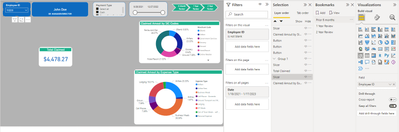
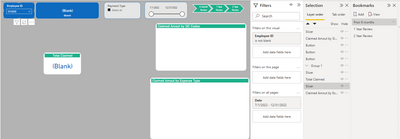
i've tried multiple bookmarks e.g selected visual, all visual. i am giving up 😞
Solved! Go to Solution.


- Mark as New
- Bookmark
- Subscribe
- Mute
- Subscribe to RSS Feed
- Permalink
- Report Inappropriate Content
Hi @Coryanthony
There are different ways to do it. Please find below a starting point. In the end to really help you we need to see your data model with input sample data and expected output incl. your definition of last 6 months. For example to you calculate it on day or month granularity etc.
Time Intelligence | L6M =
    VAR __ReferenceDate = MAX(Dim_Date[Date])
    VAR __StartDate = EDate(__ReferenceDate,-6) + 1
    VAR __Table = FILTER(ALL(Dim_Date), [Date] >=__StartDate && [Date]<=__ReferenceDate)
    VAR __Result = SUMX(__Table,SUM(Fact_Sales[Value]))
    RETURN
    __Result
or
Time Intelligence | L6M =
var var_ReferenceDate = LASTDATE('Dim Date'[Date])
var var_StartDate = STARTOFMONTH(DATEADD(var_ReferenceDate ,-5,MONTH))

RETURN

CALCULATE(
    SUM(FactSales[Value]),
    DATESBETWEEN('Dim Date'[Date],var_StartDate,var_ReferenceDate)
)

Best regards
Michael
-----------------------------------------------------
If this post helps, then please consider Accept it as the solution to help the other members find it more quickly.
Appreciate your thumbs up!
@ me in replies or I'll lose your thread.
Visit my blog datenhungrig which I recently started with content about business intelligence and Power BI in German and English or follow me on LinkedIn!
- Mark as New
- Bookmark
- Subscribe
- Mute
- Subscribe to RSS Feed
- Permalink
- Report Inappropriate Content
Hi @Coryanthony
There are different ways to do it. Please find below a starting point. In the end to really help you we need to see your data model with input sample data and expected output incl. your definition of last 6 months. For example to you calculate it on day or month granularity etc.
Time Intelligence | L6M =
    VAR __ReferenceDate = MAX(Dim_Date[Date])
    VAR __StartDate = EDate(__ReferenceDate,-6) + 1
    VAR __Table = FILTER(ALL(Dim_Date), [Date] >=__StartDate && [Date]<=__ReferenceDate)
    VAR __Result = SUMX(__Table,SUM(Fact_Sales[Value]))
    RETURN
    __Result
or
Time Intelligence | L6M =
var var_ReferenceDate = LASTDATE('Dim Date'[Date])
var var_StartDate = STARTOFMONTH(DATEADD(var_ReferenceDate ,-5,MONTH))

RETURN

CALCULATE(
    SUM(FactSales[Value]),
    DATESBETWEEN('Dim Date'[Date],var_StartDate,var_ReferenceDate)
)
Best regards
Michael
-----------------------------------------------------
If this post helps, then please consider Accept it as the solution to help the other members find it more quickly.
Appreciate your thumbs up!
@ me in replies or I'll lose your thread.
Visit my blog datenhungrig which I recently started with content about business intelligence and Power BI in German and English or follow me on LinkedIn!


- Mark as New
- Bookmark
- Subscribe
- Mute
- Subscribe to RSS Feed
- Permalink
- Report Inappropriate Content
Hi,
I think you have to unselect the bookmark option 'data'.
Regards
- Mark as New
- Bookmark
- Subscribe
- Mute
- Subscribe to RSS Feed
- Permalink
- Report Inappropriate Content
Hi Rudy,
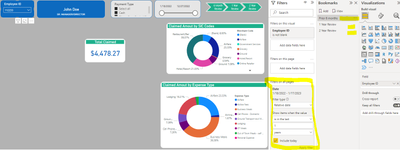
Whenever i unselect the option 'data', it no longer recognize the date filter. It does not apply the date filter when 'data' is unselected.
- Mark as New
- Bookmark
- Subscribe
- Mute
- Subscribe to RSS Feed
- Permalink
- Report Inappropriate Content
Hi @Coryanthony
It is only possible to store the whole filter context in the bookmark (Data activated) or no of the filter context (Data inactivated).
If you want to show last year etc. the typical way would be to implement this in your measure logic using time intelligence functions with or without slicers depending on your needs
Best regards
Michael
-----------------------------------------------------
If this post helps, then please consider Accept it as the solution to help the other members find it more quickly.
Appreciate your thumbs up!
@ me in replies or I'll lose your thread.
Visit my blog datenhungrig which I recently started with content about business intelligence and Power BI in German and English or follow me on LinkedIn!
- Mark as New
- Bookmark
- Subscribe
- Mute
- Subscribe to RSS Feed
- Permalink
- Report Inappropriate Content
Thank you Michael. Do you have any suggestion on how i can make this work? I am wanting to see employee expenses in a 6month, 1year and 2 year period.

Helpful resources

FabCon & SQLCon – Barcelona 2026
Join us in Barcelona for FabCon and SQLCon, the Fabric, Power BI, SQL, and AI community event. Save €200 with code FABCMTY200.

Power BI DataViz World Championships - June 2026
A new Power BI DataViz World Championship is coming this June! Don't miss out on submitting your entry.

| User | Count |
|---|---|
| 24 | |
| 22 | |
| 20 | |
| 18 | |
| 14 |


| User | Count |
|---|---|
| 25 | |
| 20 | |
| 20 | |
| 20 | |
| 20 |


