Get Fabric or SQL Certified for Free.
Get certified for free when you join Fabric Data Days 2026 and dive into Fabric, Power BI, SQL, AI, and other essential data skills.
Join now- Power BI forums
- Get Help with Power BI
- Desktop
- Service
- Report Server
- Power Query
- Mobile Apps
- Developer
- DAX Commands and Tips
- Custom Visuals Development Discussion
- Health and Life Sciences
- Power BI Spanish forums
- Translated Spanish Desktop
- Training and Consulting
- Instructor Led Training
- Dashboard in a Day for Women, by Women
- Galleries
- Data Stories Gallery
- Themes Gallery
- Contests Gallery
- QuickViz Gallery
- Quick Measures Gallery
- Visual Calculations Gallery
- Notebook Gallery
- Translytical Task Flow Gallery
- TMDL Gallery
- R Script Showcase
- Webinars and Video Gallery
- Ideas
- Custom Visuals Ideas (read-only)
- Issues
- Issues
- Events
- Upcoming Events
Try your skills in the Power BI Dataviz World Championship! Round one ends June 26. Join now
- Power BI forums
- Forums
- Get Help with Power BI
- Desktop
- Re: Pivot Table - Don't Aggregate populating error...
- Subscribe to RSS Feed
- Mark Topic as New
- Mark Topic as Read
- Float this Topic for Current User
- Bookmark
- Subscribe
- Printer Friendly Page

- Mark as New
- Bookmark
- Subscribe
- Mute
- Subscribe to RSS Feed
- Permalink
- Report Inappropriate Content
Pivot Table - Don't Aggregate populating errors
Hello, I am trying Pivot and I get errors instead of names in two rows. please let me know what am i doing wrong? thank you.
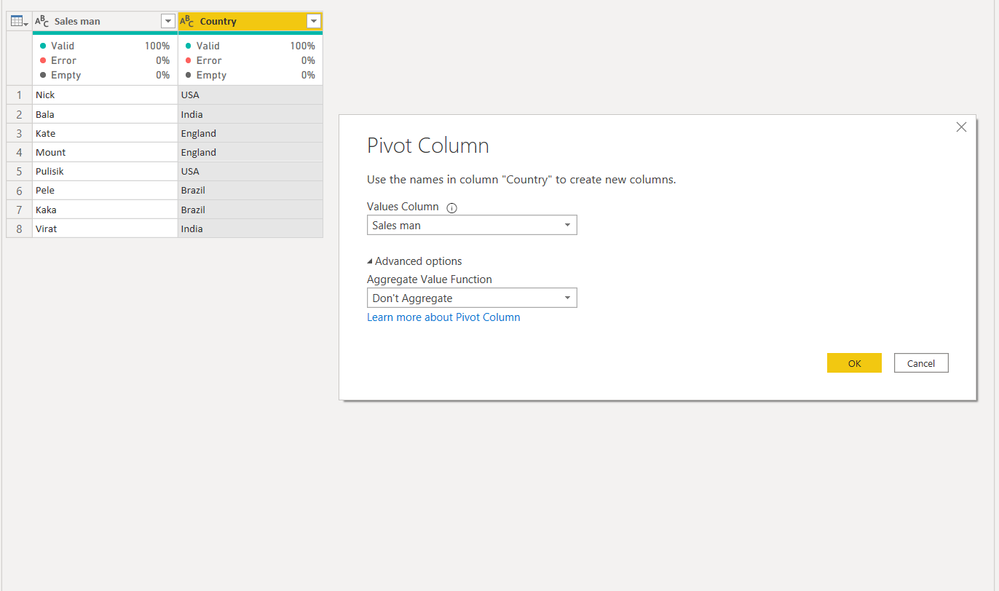

I want to acheive something like this -
| USA | India | England | Brazil |
| Nick | Bala | Kate | Pele |
| Pulisik | Virat | Mount | Kaka |
Solved! Go to Solution.


- Mark as New
- Bookmark
- Subscribe
- Mute
- Subscribe to RSS Feed
- Permalink
- Report Inappropriate Content
Hi,
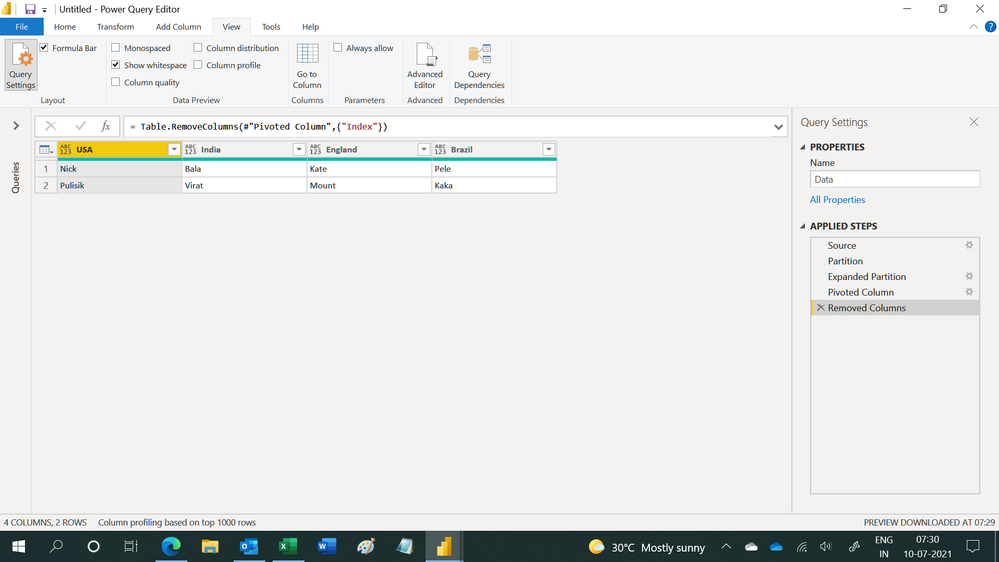
This M code works
let
    Source = Table.FromRows(Json.Document(Binary.Decompress(Binary.FromText("i45W8stMzlbSUQoNdlSK1YlWckrMSQRyPfNSMhPBAt6JJalAAde89JzEvBSwkG9+aV4JmlhAaU5mcSaySQGpOSCNTkWJVZk5UKOyE1FFwjKLEksQ1sUCAA==", BinaryEncoding.Base64), Compression.Deflate)), let _t = ((type nullable text) meta [Serialized.Text = true]) in type table [#"Sales man" = _t, Country = _t]),
    Partition = Table.Group(Source, {"Country"}, {{"Partition", each Table.AddIndexColumn(_, "Index",1,1), type table}}),
    #"Expanded Partition" = Table.ExpandTableColumn(Partition, "Partition", {"Sales man", "Index"}, {"Sales man", "Index"}),
    #"Pivoted Column" = Table.Pivot(#"Expanded Partition", List.Distinct(#"Expanded Partition"[Country]), "Country", "Sales man"),
    #"Removed Columns" = Table.RemoveColumns(#"Pivoted Column",{"Index"})
in
    #"Removed Columns"
Hope this helps.
Regards,
Ashish Mathur
http://www.ashishmathur.com
https://www.linkedin.com/in/excelenthusiasts/
- Mark as New
- Bookmark
- Subscribe
- Mute
- Subscribe to RSS Feed
- Permalink
- Report Inappropriate Content
Hi,
Before creating a Pivot, you should assign occurence numbers to Countries in another column, say Index. The first occurence of each country should show 1 and successive enries of that country should show 2,3 etc. This can be done in the Query Editor. Share data in a format that can be pasted in an MS Excel worksheet.
Regards,
Ashish Mathur
http://www.ashishmathur.com
https://www.linkedin.com/in/excelenthusiasts/
- Mark as New
- Bookmark
- Subscribe
- Mute
- Subscribe to RSS Feed
- Permalink
- Report Inappropriate Content
I have added the index and done pivoting and I get something like this with nulls -

How can I acheive something like this -
| USA | India | England | Brazil |
| Nick | Bala | Kate | Pele |
| Pulisik | Virat | Mount | Kaka |
- Mark as New
- Bookmark
- Subscribe
- Mute
- Subscribe to RSS Feed
- Permalink
- Report Inappropriate Content
As requested in my previous measage, "Share data in a format that can be pasted in an MS Excel worksheet."
Regards,
Ashish Mathur
http://www.ashishmathur.com
https://www.linkedin.com/in/excelenthusiasts/
- Mark as New
- Bookmark
- Subscribe
- Mute
- Subscribe to RSS Feed
- Permalink
- Report Inappropriate Content
@Ashish_Mathur here is the data, please help.
| Sales man | Country |
| Nick | USA |
| Bala | India |
| Kate | England |
| Mount | England |
| Pulisik | USA |
| Pele | Brazil |
| Kaka | Brazil |
| Virat | India |
- Mark as New
- Bookmark
- Subscribe
- Mute
- Subscribe to RSS Feed
- Permalink
- Report Inappropriate Content
Hi,
This M code works
let
    Source = Table.FromRows(Json.Document(Binary.Decompress(Binary.FromText("i45W8stMzlbSUQoNdlSK1YlWckrMSQRyPfNSMhPBAt6JJalAAde89JzEvBSwkG9+aV4JmlhAaU5mcSaySQGpOSCNTkWJVZk5UKOyE1FFwjKLEksQ1sUCAA==", BinaryEncoding.Base64), Compression.Deflate)), let _t = ((type nullable text) meta [Serialized.Text = true]) in type table [#"Sales man" = _t, Country = _t]),
    Partition = Table.Group(Source, {"Country"}, {{"Partition", each Table.AddIndexColumn(_, "Index",1,1), type table}}),
    #"Expanded Partition" = Table.ExpandTableColumn(Partition, "Partition", {"Sales man", "Index"}, {"Sales man", "Index"}),
    #"Pivoted Column" = Table.Pivot(#"Expanded Partition", List.Distinct(#"Expanded Partition"[Country]), "Country", "Sales man"),
    #"Removed Columns" = Table.RemoveColumns(#"Pivoted Column",{"Index"})
in
    #"Removed Columns"
Hope this helps.
Regards,
Ashish Mathur
http://www.ashishmathur.com
https://www.linkedin.com/in/excelenthusiasts/
- Mark as New
- Bookmark
- Subscribe
- Mute
- Subscribe to RSS Feed
- Permalink
- Report Inappropriate Content
@Ashish_Mathur It worked perfectly fine, but can you please explain me the m code? thanks.
- Mark as New
- Bookmark
- Subscribe
- Mute
- Subscribe to RSS Feed
- Permalink
- Report Inappropriate Content
You are welcome. Step through each step in the Applied steps section of the QUery Editor to understand what is happening.
Regards,
Ashish Mathur
http://www.ashishmathur.com
https://www.linkedin.com/in/excelenthusiasts/
- Mark as New
- Bookmark
- Subscribe
- Mute
- Subscribe to RSS Feed
- Permalink
- Report Inappropriate Content

Helpful resources

Fabric Data Days 2026
Don't miss out on Data Days, June 15 through August 7. Learn Fabric, Power BI, SQL, AI and more.

Power BI Monthly Update - May 2026
Check out the May 2026 Power BI update to learn about new features.

Power BI DataViz World Championships - June 2026
A new Power BI DataViz World Championship is coming this June! Don't miss out on submitting your entry.

| User | Count |
|---|---|
| 22 | |
| 22 | |
| 21 | |
| 20 | |
| 12 |


| User | Count |
|---|---|
| 58 | |
| 55 | |
| 41 | |
| 36 | |
| 35 |


