cancel
Showing results for 
Search instead for 
Did you mean: 

The Power BI Data Visualization World Championships is back! Get ahead of the game and start preparing now! Learn more

Reply
andyor
Resolver I
Resolver I

Pivot Rows on Matrix Visualization Month + 1

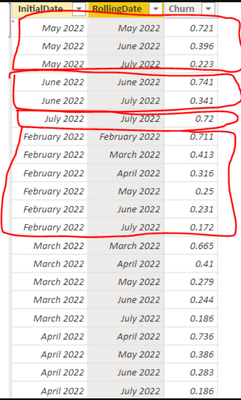
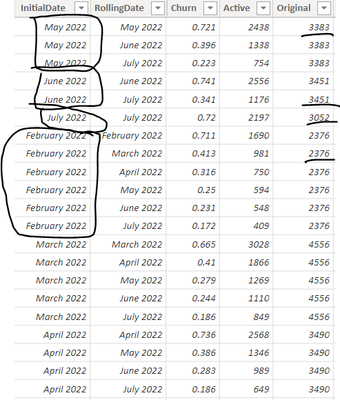
I have a dataset in the following format. Notice InitialDate of July 2022 has 1 corresponding row of RollingDate and Churn, June 2022 has 2 corresponding rows, May has 3 etc etc


andyor_0-1661069340385.png


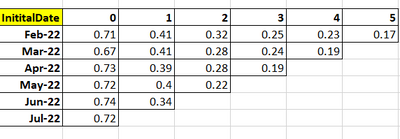
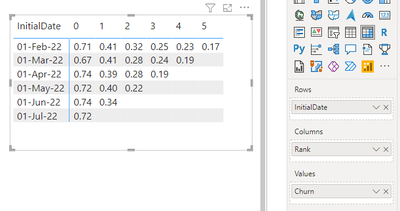
And I want to display the results in a matrix like this. 


andyor_1-1661069637940.png


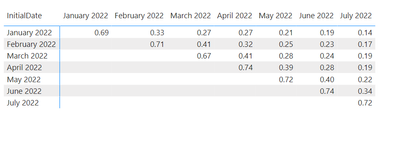
The problem I'm finding it that if I just use the RollingDate as Columns and Churn as the Values, it looks like this


andyor_3-1661069768290.png


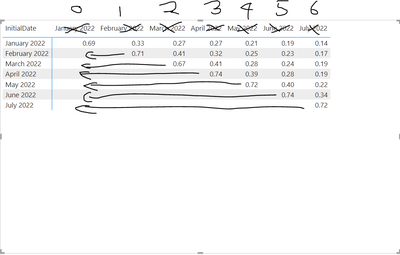
But what I want is this


andyor_2-1661069740863.png


Any help greatly appreciated


1 ACCEPTED SOLUTION
Fowmy
Super User
Super User

@andyor 

First, add a Rank column to your table as follows:

Rank = 
VAR __InitialDate = 'Table4'[InitialDate]
RETURN
RANKX(
    FILTER( Table4 , Table4[InitialDate]  = __InitialDate ),
    Table4[RollingDate],
    ,ASC
)-1

Visualize on a Matrix visual as follows

Fowmy_0-1661076706487.png


Did I answer your question? Mark my post as a solution! and hit thumbs up


Subscribe and learn Power BI from these videos

Website LinkedIn PBI User Group

View solution in original post

4 REPLIES 4
Fowmy
Super User
Super User

@andyor 

First, add a Rank column to your table as follows:

Rank = 
VAR __InitialDate = 'Table4'[InitialDate]
RETURN
RANKX(
    FILTER( Table4 , Table4[InitialDate]  = __InitialDate ),
    Table4[RollingDate],
    ,ASC
)-1

Visualize on a Matrix visual as follows

Fowmy_0-1661076706487.png


Did I answer your question? Mark my post as a solution! and hit thumbs up


Subscribe and learn Power BI from these videos

Website LinkedIn PBI User Group

Thanks @Fowmy 


I got on the right track with a much more crude solution than yours but got stuck again. 


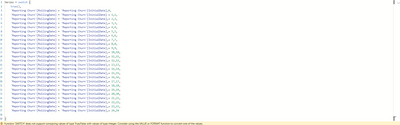
How does one switch true() for comparing month + 1, month + 2 etc?


andyor_0-1661077297345.png


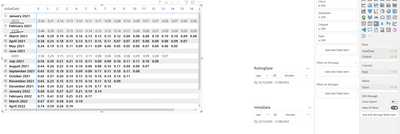
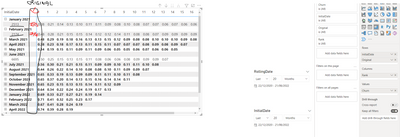
Finally, how can I display 'Original' in Rows to the right of Initial Date?


andyor_0-1661078324809.png


If I just add to Rows they automatically go into a dropdown... Thanks in advance. Subbed your youtube and look forward to going through your videos!!


andyor_1-1661078392650.png


Expected: 


andyor_2-1661078553413.png


@andyor 

Thanks:)
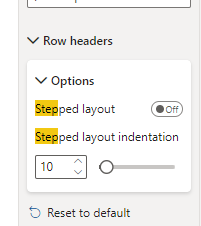
You can turn off the Step Layout under the Matrix Properties

Fowmy_0-1661078641445.png


Did I answer your question? Mark my post as a solution! and hit thumbs up


Subscribe and learn Power BI from these videos

Website LinkedIn PBI User Group

Helpful resources

Announcements
Power BI DataViz World Championships

Power BI Dataviz World Championships

The Power BI Data Visualization World Championships is back! Get ahead of the game and start preparing now!

December 2025 Power BI Update Carousel

Power BI Monthly Update - December 2025

Check out the December 2025 Power BI Holiday Recap!

FabCon Atlanta 2026 carousel

FabCon Atlanta 2026

Join us at FabCon Atlanta, March 16-20, for the ultimate Fabric, Power BI, AI and SQL community-led event. Save $200 with code FABCOMM.