Don't miss your chance to take exam DP-600 or DP-700 on us!
Request nowLearn from the best! Meet the four finalists headed to the FINALS of the Power BI Dataviz World Championships! Register now
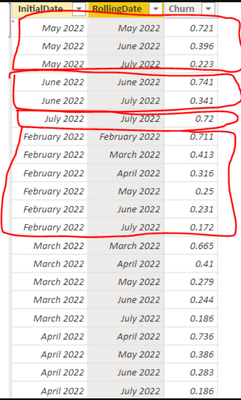
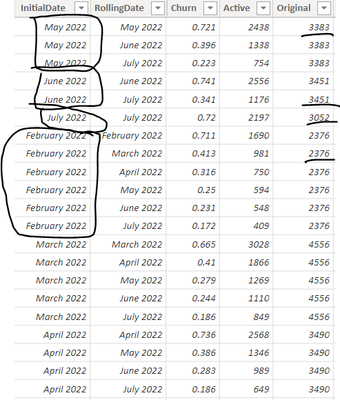
I have a dataset in the following format. Notice InitialDate of July 2022 has 1 corresponding row of RollingDate and Churn, June 2022 has 2 corresponding rows, May has 3 etc etc
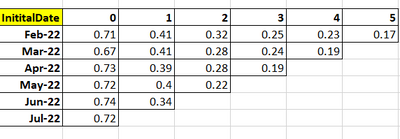
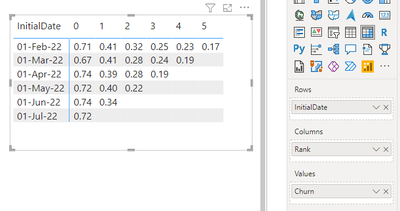
And I want to display the results in a matrix like this.
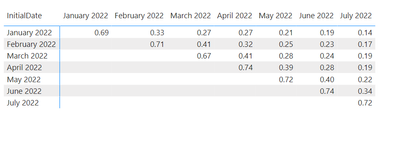
The problem I'm finding it that if I just use the RollingDate as Columns and Churn as the Values, it looks like this
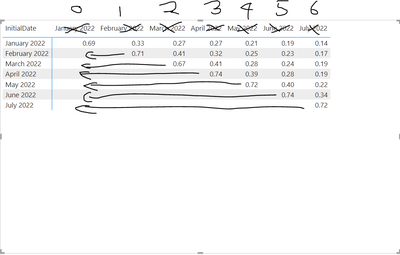
But what I want is this
Any help greatly appreciated
Solved! Go to Solution.
@andyor
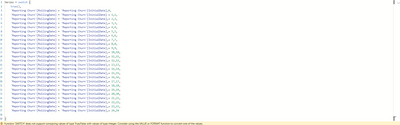
First, add a Rank column to your table as follows:
Rank =
VAR __InitialDate = 'Table4'[InitialDate]
RETURN
RANKX(
FILTER( Table4 , Table4[InitialDate] = __InitialDate ),
Table4[RollingDate],
,ASC
)-1
Visualize on a Matrix visual as follows
⭕ Subscribe and learn Power BI from these videos
⚪ Website ⚪ LinkedIn ⚪ PBI User Group
@andyor
First, add a Rank column to your table as follows:
Rank =
VAR __InitialDate = 'Table4'[InitialDate]
RETURN
RANKX(
FILTER( Table4 , Table4[InitialDate] = __InitialDate ),
Table4[RollingDate],
,ASC
)-1
Visualize on a Matrix visual as follows
⭕ Subscribe and learn Power BI from these videos
⚪ Website ⚪ LinkedIn ⚪ PBI User Group
Thanks @Fowmy
I got on the right track with a much more crude solution than yours but got stuck again.
How does one switch true() for comparing month + 1, month + 2 etc?
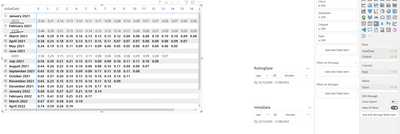
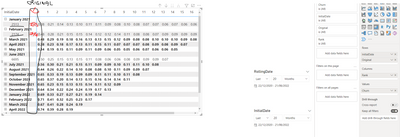
Finally, how can I display 'Original' in Rows to the right of Initial Date?
If I just add to Rows they automatically go into a dropdown... Thanks in advance. Subbed your youtube and look forward to going through your videos!!
Expected:
@andyor
Thanks:)
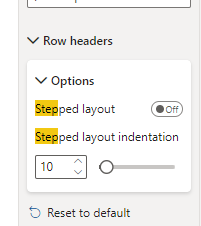
You can turn off the Step Layout under the Matrix Properties
⭕ Subscribe and learn Power BI from these videos
⚪ Website ⚪ LinkedIn ⚪ PBI User Group
| User | Count |
|---|---|
| 50 | |
| 41 | |
| 32 | |
| 14 | |
| 13 |
| User | Count |
|---|---|
| 84 | |
| 72 | |
| 37 | |
| 27 | |
| 24 |