cancel
Showing results for 
Search instead for 
Did you mean: 

We've captured the moments from FabCon & SQLCon that everyone is talking about, and we are bringing them to the community, live and on-demand. Starts on April 14th. Register now

Reply
JillHenninger
Helper I
Helper I

Pivot Multiple Measures

Hi all

Try as I might - I'm not figuring out a work-around for my scenario. I've pivoted and unpivoted data, but with less complexity. This current data set has 25+ measures like this:


image.png


For whatever reason, the data comes in with Current and year Ago in that TimeSet column.


Based on how I've used data in the past, this is how I'd assume I'd want it:

image.png


A) I can't figure out how I'd pivot those 25 columns. B) Is that even the right way to think about it? Or is it easier to create measures using TimeSet as a Filter.


I'd appreciate some thoughts on it!

Thanks!

1 ACCEPTED SOLUTION
v-alq-msft
Community Support
Community Support

Hi, @JillHenninger 


Based on your description, I created data to reproduce your scenario. The pbix file is attached in the end.

Table:

a1.png


You may apply the following transformations in the Power Query.

1. Unpivot 'M1', 'M2', 'M3', 'M4', 'M5', 'M6', 'M7'.
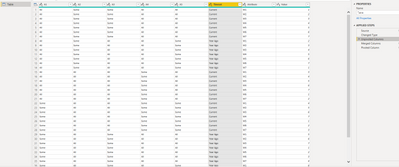
 a2.png


2. Merge 'Timeset' and 'Attribute' columns.
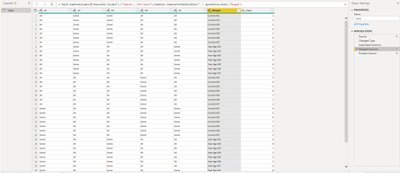
a3.png


3. Pivot 'Merged' column and set the value column as 'Value' column.

a4.png


Here are the m codes in 'Advanced Editor'.


let
    Source = Table.FromRows(Json.Document(Binary.Decompress(Binary.FromText("i45WcszJUdJRCs7PTUVQEDEI6VxaVJSaVwJkGQKxERAbA7EJEJsCsRkQmyvF6qCZg2wAVCgyNbFIwTE9H6chIAsQBmExAd092I0AGQ8yBrdLoBTCIOyGgCzAMAiLqUgew24IyAL8BmEGEXZTQDbExgIA", BinaryEncoding.Base64), Compression.Deflate)), let _t = ((type nullable text) meta [Serialized.Text = true]) in type table [A1 = _t, A2 = _t, A3 = _t, A4 = _t, A5 = _t, Timeset = _t, M1 = _t, M2 = _t, M3 = _t, M4 = _t, M5 = _t, M6 = _t, M7 = _t]),
    #"Changed Type" = Table.TransformColumnTypes(Source,{{"A1", type text}, {"A2", type text}, {"A3", type text}, {"A4", type text}, {"A5", type text}, {"Timeset", type text}, {"M1", Int64.Type}, {"M2", Int64.Type}, {"M3", Int64.Type}, {"M4", Int64.Type}, {"M5", Int64.Type}, {"M6", Int64.Type}, {"M7", Int64.Type}}),
    #"Unpivoted Columns" = Table.UnpivotOtherColumns(#"Changed Type", {"A1", "A2", "A3", "A4", "A5", "Timeset"}, "Attribute", "Value"),
    #"Merged Columns" = Table.CombineColumns(#"Unpivoted Columns",{"Timeset", "Attribute"},Combiner.CombineTextByDelimiter(" ", QuoteStyle.None),"Merged"),
    #"Pivoted Column" = Table.Pivot(#"Merged Columns", List.Distinct(#"Merged Columns"[Merged]), "Merged", "Value", List.Sum)
in
    #"Pivoted Column"


Best Regards

Allan


If this post helps, then please consider Accept it as the solution to help the other members find it more quickly.


View solution in original post

3 REPLIES 3
v-alq-msft
Community Support
Community Support

Hi, @JillHenninger 


Based on your description, I created data to reproduce your scenario. The pbix file is attached in the end.

Table:

a1.png


You may apply the following transformations in the Power Query.

1. Unpivot 'M1', 'M2', 'M3', 'M4', 'M5', 'M6', 'M7'.

 a2.png


2. Merge 'Timeset' and 'Attribute' columns.

a3.png


3. Pivot 'Merged' column and set the value column as 'Value' column.

a4.png


Here are the m codes in 'Advanced Editor'.


let
    Source = Table.FromRows(Json.Document(Binary.Decompress(Binary.FromText("i45WcszJUdJRCs7PTUVQEDEI6VxaVJSaVwJkGQKxERAbA7EJEJsCsRkQmyvF6qCZg2wAVCgyNbFIwTE9H6chIAsQBmExAd092I0AGQ8yBrdLoBTCIOyGgCzAMAiLqUgew24IyAL8BmEGEXZTQDbExgIA", BinaryEncoding.Base64), Compression.Deflate)), let _t = ((type nullable text) meta [Serialized.Text = true]) in type table [A1 = _t, A2 = _t, A3 = _t, A4 = _t, A5 = _t, Timeset = _t, M1 = _t, M2 = _t, M3 = _t, M4 = _t, M5 = _t, M6 = _t, M7 = _t]),
    #"Changed Type" = Table.TransformColumnTypes(Source,{{"A1", type text}, {"A2", type text}, {"A3", type text}, {"A4", type text}, {"A5", type text}, {"Timeset", type text}, {"M1", Int64.Type}, {"M2", Int64.Type}, {"M3", Int64.Type}, {"M4", Int64.Type}, {"M5", Int64.Type}, {"M6", Int64.Type}, {"M7", Int64.Type}}),
    #"Unpivoted Columns" = Table.UnpivotOtherColumns(#"Changed Type", {"A1", "A2", "A3", "A4", "A5", "Timeset"}, "Attribute", "Value"),
    #"Merged Columns" = Table.CombineColumns(#"Unpivoted Columns",{"Timeset", "Attribute"},Combiner.CombineTextByDelimiter(" ", QuoteStyle.None),"Merged"),
    #"Pivoted Column" = Table.Pivot(#"Merged Columns", List.Distinct(#"Merged Columns"[Merged]), "Merged", "Value", List.Sum)
in
    #"Pivoted Column"


Best Regards

Allan


If this post helps, then please consider Accept it as the solution to help the other members find it more quickly.

 

amitchandak
Super User
Super User

@JillHenninger , Can select timeset and all the measures after that and unpivot. I am assuming these are columns in the  table


If not

Can you share sample data and sample output in table format? Or a sample pbix after removing sensitive data.

Share with Power BI Enthusiasts: Full Power BI Video (20 Hours) YouTube
Microsoft Fabric Series 60+ Videos YouTube
Microsoft Fabric Hindi End to End YouTube
mahoneypat
Microsoft Employee
Microsoft Employee

Can you just use a matrix visual with that Timeset column in the Columns field well?

Regards,

Pat


Did I answer your question? Mark my post as a solution! Kudos are also appreciated!

To learn more about Power BI, follow me on Twitter or subscribe on YouTube.


@mahoneypa HoosierBI on YouTube


Helpful resources

Announcements
New to Fabric survey Carousel

New to Fabric Survey

If you have recently started exploring Fabric, we'd love to hear how it's going. Your feedback can help with product improvements.

Power BI DataViz World Championships carousel

Power BI DataViz World Championships - June 2026

A new Power BI DataViz World Championship is coming this June! Don't miss out on submitting your entry.

Join our Fabric User Panel

Join our Fabric User Panel

Share feedback directly with Fabric product managers, participate in targeted research studies and influence the Fabric roadmap.

March Power BI Update Carousel

Power BI Community Update - March 2026

Check out the March 2026 Power BI update to learn about new features.
