
Don't miss your chance to take the Fabric Data Engineer (DP-600) exam for FREE! Find out how by watching the DP-600 session on-demand now through April 28th.
Learn moreJoin the FabCon + SQLCon recap series. Up next: Power BI, Real-Time Intelligence, IQ and AI, and Data Factory take center stage. All sessions are available on-demand after the live show. Register now
Hi there ;
i nned your kind help about below issue
thanks in advance for your kind supports
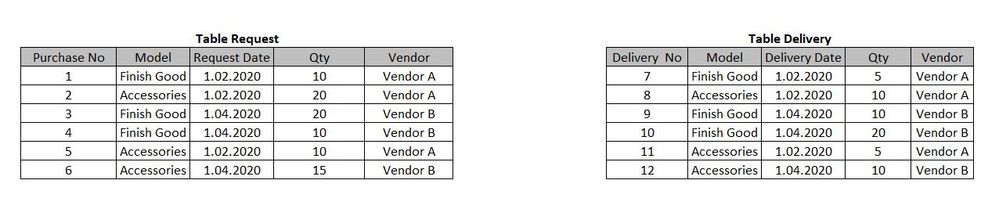
so , i have two table as below , left one is request table , and right one is the delivery table of these requests.İ want to show quantity difference base on month , each vendor , even with number of difference and with percentange .I tried to paste what i need dears .
These are my tables that i have now
i want to create a new table kia a pivot , as with below infos
i will wait for your good news thank you very much
Solved! Go to Solution.
Find the file attached after the signature.
You need to common Vendor, Date calendar, Model and you can have a month , qtr, etc in date table.
As the date, the dimension will join Requested date in one table and delivery date in another table, you will able to see data together
Refer to this file
https://www.dropbox.com/s/y47ah38sr157l7t/Order_delivery_date_diff.pbix?dl=0
dear @amitchandak ;
thanks fro the pbix but i am really sorry i could not understand as well ,i am new about power bi , i need a formula to create that new table , is it possible that you can create for me a new formula to create a new table ?
Dear @amitchandak
thank you very much , i will wait here for your reply
i am sending as below i hope it works for you
table request
| Purchase No | Model | Request Date | Qty | Vendor |
| 1 | Finish Good | 1.02.2020 | 10 | Vendor A |
| 2 | Accessories | 1.02.2020 | 20 | Vendor A |
| 3 | Finish Good | 1.04.2020 | 20 | Vendor B |
| 4 | Finish Good | 1.04.2020 | 10 | Vendor B |
| 5 | Accessories | 1.02.2020 | 10 | Vendor A |
| 6 | Accessories | 1.04.2020 | 15 | Vendor B |
Table Delivery
| Inbound No | Model | Delivery Date | Qty | Vendor |
| 7 | Finish Good | 1.02.2020 | 5 | Vendor A |
| 8 | Accessories | 1.02.2020 | 10 | Vendor A |
| 9 | Finish Good | 1.04.2020 | 10 | Vendor B |
| 10 | Finish Good | 1.04.2020 | 20 | Vendor B |
| 11 | Accessories | 1.02.2020 | 5 | Vendor A |
| 12 | Accessories | 1.04.2020 | 10 | Vendor B |
Find the file attached after the signature.
Check out the April 2026 Power BI update to learn about new features.
If you have recently started exploring Fabric, we'd love to hear how it's going. Your feedback can help with product improvements.
A new Power BI DataViz World Championship is coming this June! Don't miss out on submitting your entry.
| User | Count |
|---|---|
| 41 | |
| 37 | |
| 34 | |
| 21 | |
| 16 |
| User | Count |
|---|---|
| 65 | |
| 59 | |
| 31 | |
| 25 | |
| 25 |