cancel
Showing results for 
Search instead for 
Did you mean: 

The Power BI Data Visualization World Championships is back! Get ahead of the game and start preparing now! Learn more

Reply
Anonymous
Not applicable

Pipeline rule

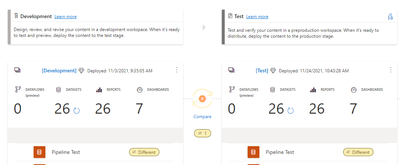
I created a rule on a pipeline, trying to change the DB and Server when it goes from Dev to test with the deply button, but the connection does not shows any data in the "new" report in test, any clue of what shoul I have to do?

eduardosilvin1_0-1637800003240.png


eduardosilvin1_1-1637800088733.png


1 ACCEPTED SOLUTION
Anonymous
Not applicable

Thank you for response, but I found the issue:

When you have different Servers on each workspace and you have different gateways, if you create parameters to change the servers or DB in the pipeline, the gateways will act weird and non-functional. But if you do not create any parameters, you can creat rules in the pipeline (clicking in the thunderbolt and selecting the dataset that you wanna modify), in the first part you should select the one that is in the dataset that you upload and in the next section you have to put the server and/or DB that you wanna change (production). And on the previous workspace you should deploy again the dataset that you modified. On each dataset you have to set the correct connection and gateway.

NOTE: you should remove the port at the end of the server's name in the rules if it applies.

View solution in original post

2 REPLIES 2
amitchandak
Super User
Super User

@Anonymous , Based On what I got. If you have a data file and visual file (use power bi dataset ) .

The data file will ask for the credential and rules. The Visual file will take the same dataset name from QA/Prod env.

Share with Power BI Enthusiasts: Full Power BI Video (20 Hours) YouTube
Microsoft Fabric Series 60+ Videos YouTube
Microsoft Fabric Hindi End to End YouTube
Anonymous
Not applicable

Thank you for response, but I found the issue:

When you have different Servers on each workspace and you have different gateways, if you create parameters to change the servers or DB in the pipeline, the gateways will act weird and non-functional. But if you do not create any parameters, you can creat rules in the pipeline (clicking in the thunderbolt and selecting the dataset that you wanna modify), in the first part you should select the one that is in the dataset that you upload and in the next section you have to put the server and/or DB that you wanna change (production). And on the previous workspace you should deploy again the dataset that you modified. On each dataset you have to set the correct connection and gateway.

NOTE: you should remove the port at the end of the server's name in the rules if it applies.

Helpful resources

Announcements
Power BI DataViz World Championships

Power BI Dataviz World Championships

The Power BI Data Visualization World Championships is back! Get ahead of the game and start preparing now!

December 2025 Power BI Update Carousel

Power BI Monthly Update - December 2025

Check out the December 2025 Power BI Holiday Recap!

FabCon Atlanta 2026 carousel

FabCon Atlanta 2026

Join us at FabCon Atlanta, March 16-20, for the ultimate Fabric, Power BI, AI and SQL community-led event. Save $200 with code FABCOMM.