Join us at FabCon Atlanta from March 16 - 20, 2026, for the ultimate Fabric, Power BI, AI and SQL community-led event. Save $200 with code FABCOMM.
Register now!The Power BI Data Visualization World Championships is back! Get ahead of the game and start preparing now! Learn more
Hi guys,
I'm trying to improve my dax queries, but it still takes about 7000ms to load a table.
I have these 4 measures, will it be possible to improve performance using other functions? If so can you help me?
Slowness is only in the Final measure (Val Li Final LY).
Val Li: 240ms
Val Li LY: 180ms
Val Li Has LY: 500ms
Val Li Final LY: 7000ms
Solved! Go to Solution.
Hi @fcarvalho ,
You need to improve Val Li LY first:
VAR SelectedMin = MINX(VALUES('table2'[StartInicio]),'table2'[StartInicio]))
VAR SelectedMax = MAXX(VALUES('table2'[EndFim]),'table2'[EndFim]))
For measure Val Li Has LY,you could first create 2 columns as below:
Column = 'Table'[Level 1]&'Table'[Level 2]&'Table'[Level 3]&'Table'[Level 4]&'Table'[Level 5]&'Table'[Level 6]&'Table'[Level 7]&'Table'[Level 8]&'Table'[Level 9]
search_Rls = IF(SEARCH("RLS",'Table'[Column],1,0)>0,1,BLANK())
And you will see:
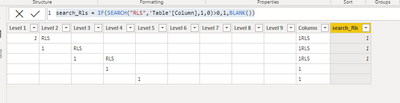
Then modify your measure as below:
Val Li Has LY =
CALCULATE( [Val Li LY],
FILTER(RLSF,
RLSF[search_Rls]=1),
,TREATAS( VALUES( Calendario[Date] ), table[Data] )
,TREATAS( VALUES( table2[key] ), table[key] )
,CROSSFILTER( table[key2], table2[key2], None )
)
Best Regards,
Kelly
Did I answer your question? Mark my post as a solution!
Hi @v-kelly-msft ,
I had come to the conclusion that with Values () or Summarize () it would be better to use Addcolumns (), so I added Addcolumns to my sumx, values and put a Filter in the last measure. Now I have 400ms , it improved the performance!
I will follow your advice too, thank you very much
Hi @fcarvalho ,
You need to improve Val Li LY first:
VAR SelectedMin = MINX(VALUES('table2'[StartInicio]),'table2'[StartInicio]))
VAR SelectedMax = MAXX(VALUES('table2'[EndFim]),'table2'[EndFim]))
For measure Val Li Has LY,you could first create 2 columns as below:
Column = 'Table'[Level 1]&'Table'[Level 2]&'Table'[Level 3]&'Table'[Level 4]&'Table'[Level 5]&'Table'[Level 6]&'Table'[Level 7]&'Table'[Level 8]&'Table'[Level 9]
search_Rls = IF(SEARCH("RLS",'Table'[Column],1,0)>0,1,BLANK())
And you will see:
Then modify your measure as below:
Val Li Has LY =
CALCULATE( [Val Li LY],
FILTER(RLSF,
RLSF[search_Rls]=1),
,TREATAS( VALUES( Calendario[Date] ), table[Data] )
,TREATAS( VALUES( table2[key] ), table[key] )
,CROSSFILTER( table[key2], table2[key2], None )
)
Best Regards,
Kelly
Did I answer your question? Mark my post as a solution!
The Power BI Data Visualization World Championships is back! Get ahead of the game and start preparing now!
| User | Count |
|---|---|
| 161 | |
| 132 | |
| 117 | |
| 79 | |
| 54 |