FabCon is coming to Atlanta
Join us at FabCon Atlanta from March 16 - 20, 2026, for the ultimate Fabric, Power BI, AI and SQL community-led event. Save $200 with code FABCOMM.
Register now!- Power BI forums
- Get Help with Power BI
- Desktop
- Service
- Report Server
- Power Query
- Mobile Apps
- Developer
- DAX Commands and Tips
- Custom Visuals Development Discussion
- Health and Life Sciences
- Power BI Spanish forums
- Translated Spanish Desktop
- Training and Consulting
- Instructor Led Training
- Dashboard in a Day for Women, by Women
- Galleries
- Data Stories Gallery
- Themes Gallery
- Contests Gallery
- QuickViz Gallery
- Quick Measures Gallery
- Visual Calculations Gallery
- Notebook Gallery
- Translytical Task Flow Gallery
- TMDL Gallery
- R Script Showcase
- Webinars and Video Gallery
- Ideas
- Custom Visuals Ideas (read-only)
- Issues
- Issues
- Events
- Upcoming Events
Get Fabric Certified for FREE during Fabric Data Days. Don't miss your chance! Request now
- Power BI forums
- Forums
- Get Help with Power BI
- Desktop
- Re: Percentile 33 based on a summarized table
- Subscribe to RSS Feed
- Mark Topic as New
- Mark Topic as Read
- Float this Topic for Current User
- Bookmark
- Subscribe
- Printer Friendly Page


- Mark as New
- Bookmark
- Subscribe
- Mute
- Subscribe to RSS Feed
- Permalink
- Report Inappropriate Content
Percentile 33 based on a summarized table
Hi everyone,
I have a table with production data by product, region and many other columns
| Table 1 | |||||||
| Product | Customer | Region | other columns in table | Production | |||
| A | 1 | … | … | 100 | |||
| B | 1 | … | … | 150 | |||
| C | 1 | … | … | 0 | |||
| D | 1 | … | … | 0 | |||
| E | 1 | … | … | 0 | |||
| F | 1 | … | … | 23 | |||
| G | 1 | … | … | 15 | |||
| A | 2 | … | … | 21 | |||
| B | 2 | … | … | 8 | |||
| C | 2 | … | … | 9 | |||
| D | 2 | … | … | 15 | |||
| E | 2 | … | … | 23 | |||
| F | 2 | … | … | 33 | |||
| G | 2 | … | … | 45 | |||
| A | 3 | … | … | 60 | Percentile 33 | ||
| B | 3 | … | … | 48 | 20.46 | ||
| C | 3 | … | … | 84 | |||
| D | 3 | … | … | 65 | |||
| E | 3 | … | … | 33 | |||
| F | 3 | … | … | 29 | |||
| G | 3 | … | … | 12 | |||
| A | 4 | … | … | 35 | |||
| B | 4 | … | … | 66 | |||
| C | 4 | … | … | 79 | |||
| D | 4 | … | … | 98 | |||
| E | 4 | … | … | 8 | |||
| F | 4 | … | … | 46 | |||
| G | 4 | … | … | 32 |
(using the percentile.inc measure i get the 20.46 value)
But...
What I want is to select the region in slicer and calculate the Percentile 33 of the sum of the production values by product.
In this case the value should be 130.46
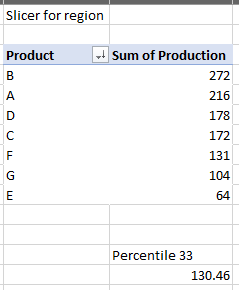
no matter what i try, i always get the 20 so I'm going crazy. Is there a way to do it?
Regards and thanks,
Nico
Solved! Go to Solution.


- Mark as New
- Bookmark
- Subscribe
- Mute
- Subscribe to RSS Feed
- Permalink
- Report Inappropriate Content
Hi @nicoenz
Use PERCENTILEX.INC like this:
Production Percentile 33 by Product =
PERCENTILEX.INC (
    VALUES ( Production[Product] ),
    CALCULATE ( SUM ( Production[Production] ) ),
    0.33
)
Also, if you create a measure for Production Sum (which I would recommend) e.g.
Production Sum =
SUM ( Production[Production] )
then you can write:
Production Percentile 33 by Product =
PERCENTILEX.INC (
    VALUES ( Production[Product] ),
    [Production Sum],
    0.33
)
Does this work for you?
Regards
- Mark as New
- Bookmark
- Subscribe
- Mute
- Subscribe to RSS Feed
- Permalink
- Report Inappropriate Content
Hi again @nicoenz
Apologies, I was caught up yesterday.
You could reformulate slightly and create a measure like this:
Production below 33rd Percentile =
VAR Percentile33 =
    CALCULATE (
        PERCENTILEX.INC ( VALUES ( Production[Product] ), [Production Sum], 0.33 ),
        ALLSELECTED ()
    )
VAR ProductionBelowPercentile33 =
    SUMX (
        VALUES ( Production[Product] ),
        VAR Prod = [Production Sum]
        RETURN
            IF ( Prod < Percentile33, Prod )
        )
RETURN
    ProductionBelowPercentile33
Does this work for you?
Regards
- Mark as New
- Bookmark
- Subscribe
- Mute
- Subscribe to RSS Feed
- Permalink
- Report Inappropriate Content
Hi @OwenAuger ,
How can i now retrieve the summarized table with all values below that percentile value? 🙂
- Mark as New
- Bookmark
- Subscribe
- Mute
- Subscribe to RSS Feed
- Permalink
- Report Inappropriate Content
- Mark as New
- Bookmark
- Subscribe
- Mute
- Subscribe to RSS Feed
- Permalink
- Report Inappropriate Content
- Mark as New
- Bookmark
- Subscribe
- Mute
- Subscribe to RSS Feed
- Permalink
- Report Inappropriate Content
Hi again @nicoenz
Apologies, I was caught up yesterday.
You could reformulate slightly and create a measure like this:
Production below 33rd Percentile =
VAR Percentile33 =
    CALCULATE (
        PERCENTILEX.INC ( VALUES ( Production[Product] ), [Production Sum], 0.33 ),
        ALLSELECTED ()
    )
VAR ProductionBelowPercentile33 =
    SUMX (
        VALUES ( Production[Product] ),
        VAR Prod = [Production Sum]
        RETURN
            IF ( Prod < Percentile33, Prod )
        )
RETURN
    ProductionBelowPercentile33
Does this work for you?
Regards
- Mark as New
- Bookmark
- Subscribe
- Mute
- Subscribe to RSS Feed
- Permalink
- Report Inappropriate Content
Hi @OwenAuger ,
absolutely no need to apologize!!!!! really appreciate your support.
i wil try it today and accept it as solution if it works well
thanks again
- Mark as New
- Bookmark
- Subscribe
- Mute
- Subscribe to RSS Feed
- Permalink
- Report Inappropriate Content
brilliant!!!!! thanks!
- Mark as New
- Bookmark
- Subscribe
- Mute
- Subscribe to RSS Feed
- Permalink
- Report Inappropriate Content
Hi @nicoenz
Use PERCENTILEX.INC like this:
Production Percentile 33 by Product =
PERCENTILEX.INC (
    VALUES ( Production[Product] ),
    CALCULATE ( SUM ( Production[Production] ) ),
    0.33
)
Also, if you create a measure for Production Sum (which I would recommend) e.g.
Production Sum =
SUM ( Production[Production] )
then you can write:
Production Percentile 33 by Product =
PERCENTILEX.INC (
    VALUES ( Production[Product] ),
    [Production Sum],
    0.33
)
Does this work for you?
Regards

Helpful resources

Power BI Monthly Update - November 2025
Check out the November 2025 Power BI update to learn about new features.

Fabric Data Days
Advance your Data & AI career with 50 days of live learning, contests, hands-on challenges, study groups & certifications and more!

FabCon Atlanta 2026
Join us at FabCon Atlanta, March 16-20, for the ultimate Fabric, Power BI, AI and SQL community-led event. Save $200 with code FABCOMM.


