Join us at FabCon Atlanta from March 16 - 20, 2026, for the ultimate Fabric, Power BI, AI and SQL community-led event. Save $200 with code FABCOMM.
Register now!The Power BI Data Visualization World Championships is back! Get ahead of the game and start preparing now! Learn more
Hi All,
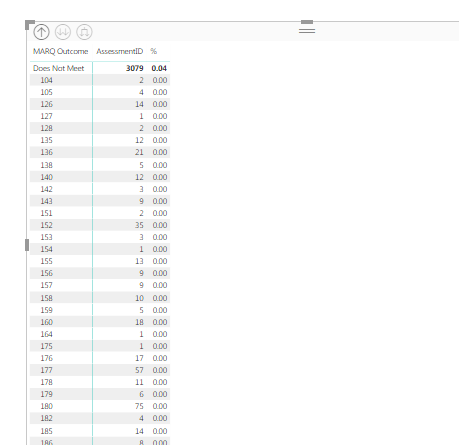
I have two groups Meets and doesnot meet related to that i have site numbers and Ass ID.
MarQ outcome = does not meet & Meet
I want to count Assessment ID's for site number based on MarQ outcome and show percentages for Meets and does not meet.
output % = 2/3079*100 = 0.064%........
Solved! Go to Solution.
Hi @chotu27,
Perhaps you can try to use below formula if it suitable for your scenario.
output %= COUNT(Table[Assessment])/ COUNTX(ALL(Table[Assessment]),[Assessment])*100
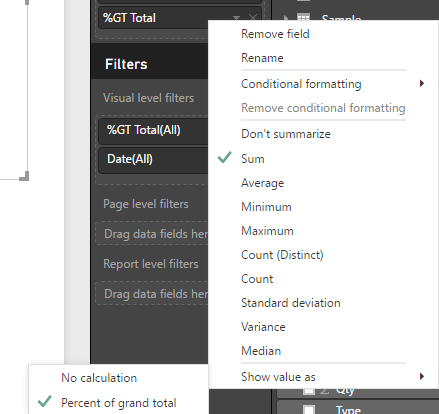
In addition, you can also try to use the 'show value as' feature and choose the 'percent of grand total' option.
If above not help, please provide the sample data to test.
Regard,
Xiaoxin Sheng
Hi @chotu27,
Perhaps you can try to use below formula if it suitable for your scenario.
output %= COUNT(Table[Assessment])/ COUNTX(ALL(Table[Assessment]),[Assessment])*100
In addition, you can also try to use the 'show value as' feature and choose the 'percent of grand total' option.
If above not help, please provide the sample data to test.
Regard,
Xiaoxin Sheng
The Power BI Data Visualization World Championships is back! Get ahead of the game and start preparing now!
| User | Count |
|---|---|
| 39 | |
| 38 | |
| 38 | |
| 28 | |
| 27 |
| User | Count |
|---|---|
| 124 | |
| 88 | |
| 73 | |
| 66 | |
| 65 |