cancel
Showing results for 
Search instead for 
Did you mean: 

The Power BI Data Visualization World Championships is back! Get ahead of the game and start preparing now! Learn more

Reply
Raudolph11
Frequent Visitor

Percentages by Legend in Clustered Bar Chart

Hi All,

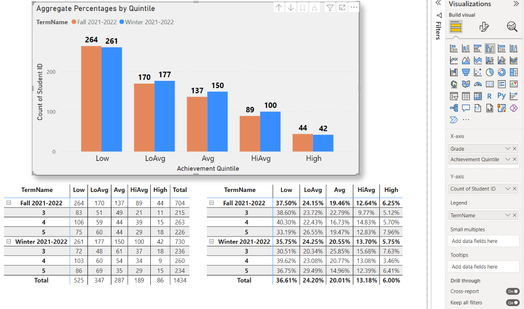
I'm transitioning from Tableau to PowerBI and I'm trying to compare two testing sessions (TermNames) by percentages at each quintile level (Low, LoAvg, Avg, HiAvg, High). It works fine in the bottom right Matrix table. But, I can only get the Count of Student ID to show in the clustered column chart. When I try to change the Y-axis from Count of Student ID to Show value as...it only gives me the option to use percent of grand total...not percent by TermName.


Any help would be greatly appreciated!


Raudolph11_0-1660168115208.png


2 REPLIES 2
amitchandak
Super User
Super User

@Raudolph11 , You can create by creating a measure


divide(count(Table[Student ID]), calculate(count(Table[Student ID]), removefilters(Table[TermNames]) ))


or


divide(count(Table[Student ID]), calculate(count(Table[Student ID]), allselected(Table[TermNames]) ))


refer: https://www.youtube.com/watch?v=6jTildcV2ho

Share with Power BI Enthusiasts: Full Power BI Video (20 Hours) YouTube
Microsoft Fabric Series 60+ Videos YouTube
Microsoft Fabric Hindi End to End YouTube

I'm not sure where to put the new measure in the clustered column chart.  I tried putting it in the Y-axis, but it gives me 100% for each quintile.

Helpful resources

Announcements
November Power BI Update Carousel

Power BI Monthly Update - November 2025

Check out the November 2025 Power BI update to learn about new features.

Fabric Data Days Carousel

Fabric Data Days

Advance your Data & AI career with 50 days of live learning, contests, hands-on challenges, study groups & certifications and more!

FabCon Atlanta 2026 carousel

FabCon Atlanta 2026

Join us at FabCon Atlanta, March 16-20, for the ultimate Fabric, Power BI, AI and SQL community-led event. Save $200 with code FABCOMM.