cancel
Showing results for 
Search instead for 
Did you mean: 

The Power BI Data Visualization World Championships is back! Get ahead of the game and start preparing now! Learn more

Reply
chethan
Resolver III
Resolver III

% Percentage

Hey, I Need Help,


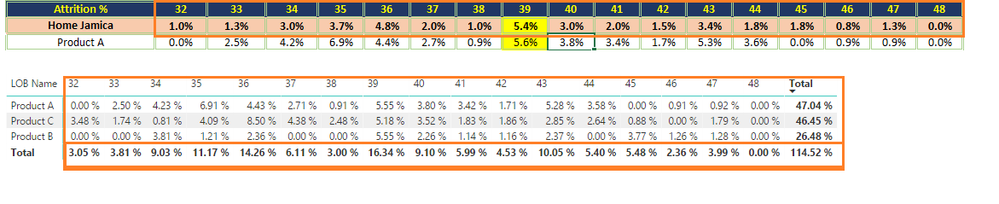
I Have an Excel File (Link) where report created I need to migrate the report to power bi 


My Challenges are total  


Whenever if I filter it's not showing correct numbers 


am attaching the Pbix file Link


Please help 


Regards,

Chethan K

4 REPLIES 4
chethan
Resolver III
Resolver III

error.png

Hi @chethan,

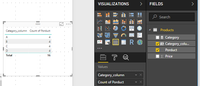
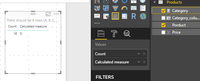
You add two measure in the table visual, so it only display one row shown in picture1. Because there is no row context in the table visual, the measure returns the total value for the resource table. Just like, you add a measure in a card visual, it only display total one value for the table. You should create a calculated column as you did(the column name is Category_column), and it returns correct result as picture2 shown.
 

picture1picture1picture2picture2
For your picture posted, how did you get it. What's the error and what expected result you want to get? Please share more details for further analysis.

Best Regards,

Angelia

@v-huizhn-msftI have created the measure Below is the DAX  

Attrition% = 
VAR Actual_Attr_Count =
    SUM ( 'Raw Data'[Actual ATTR Count] )
VAR OpeningHeadCount_ClosingHeadCount =
    AVERAGEX ( 'Raw Data', 'Raw Data'[Opening HC] + 'Raw Data'[Closing HC] )
        / 2
VAR Attrition__Per__ =
    DIVIDE ( Actual_Attr_Count, OpeningHeadCount_ClosingHeadCount, 0 )
RETURN
    IF ( ISBLANK ( Attrition__Per__ ), 0, Attrition__Per__ )


Hi @chethan,

You have resolved your issue?  If you have, please mark right reply as answer, so more people will get workaround easily and clearly.

Best Regards,
Angelia

Helpful resources

Announcements
Power BI DataViz World Championships

Power BI Dataviz World Championships

The Power BI Data Visualization World Championships is back! Get ahead of the game and start preparing now!

December 2025 Power BI Update Carousel

Power BI Monthly Update - December 2025

Check out the December 2025 Power BI Holiday Recap!

FabCon Atlanta 2026 carousel

FabCon Atlanta 2026

Join us at FabCon Atlanta, March 16-20, for the ultimate Fabric, Power BI, AI and SQL community-led event. Save $200 with code FABCOMM.