FabCon is coming to Atlanta
Join us at FabCon Atlanta from March 16 - 20, 2026, for the ultimate Fabric, Power BI, AI and SQL community-led event. Save $200 with code FABCOMM.
Register now!- Power BI forums
- Get Help with Power BI
- Desktop
- Service
- Report Server
- Power Query
- Mobile Apps
- Developer
- DAX Commands and Tips
- Custom Visuals Development Discussion
- Health and Life Sciences
- Power BI Spanish forums
- Translated Spanish Desktop
- Training and Consulting
- Instructor Led Training
- Dashboard in a Day for Women, by Women
- Galleries
- Data Stories Gallery
- Themes Gallery
- Contests Gallery
- QuickViz Gallery
- Quick Measures Gallery
- Visual Calculations Gallery
- Notebook Gallery
- Translytical Task Flow Gallery
- TMDL Gallery
- R Script Showcase
- Webinars and Video Gallery
- Ideas
- Custom Visuals Ideas (read-only)
- Issues
- Issues
- Events
- Upcoming Events
Get Fabric Certified for FREE during Fabric Data Days. Don't miss your chance! Request now
- Power BI forums
- Forums
- Get Help with Power BI
- Desktop
- Re: Percentage of total calculation
- Subscribe to RSS Feed
- Mark Topic as New
- Mark Topic as Read
- Float this Topic for Current User
- Bookmark
- Subscribe
- Printer Friendly Page

- Mark as New
- Bookmark
- Subscribe
- Mute
- Subscribe to RSS Feed
- Permalink
- Report Inappropriate Content
Percentage of total calculation
Hey Guys,
Need help with trying to show percentage completion.
I've got the following data and I want to create a measure so that I can have a bar chart to show % of total depending on the Descendants.State

Any advice?
Solved! Go to Solution.
- Mark as New
- Bookmark
- Subscribe
- Mute
- Subscribe to RSS Feed
- Permalink
- Report Inappropriate Content
Hi @Anonymous ,
For dynamic change display value type, you can add a selector table with two types, then add if statement to compare with selection and return corresponding expression result:
Measure =
IF (
    SELECTEDVALUE ( Selector[Type] ) = "Percent",
    DIVIDE (
        CALCULATE (
            SUM ( Table[Amount] ),
            ALLSELECTED ( Table ),
            VALUES ( Table[Category] ),
            VALUES ( Table[Legend] )
        ),
        CALCULATE (
            SUM ( Table[Amount] ),
            ALLSELECTED ( Table ),
            VALUES ( Table[Category] )
        )
    ),
    CALCULATE (
        SUM ( Table[Amount] ),
        ALLSELECTED ( Table ),
        VALUES ( Table[Category] ),
        VALUES ( Table[Legend] )
    )
)
Notice: 'category' is axis, 'legend' means legend field, 'amount' is value fields.
Regards,
Xiaoxin Sheng


- Mark as New
- Bookmark
- Subscribe
- Mute
- Subscribe to RSS Feed
- Permalink
- Report Inappropriate Content
hi @Anonymous
did you try a simple measure
Measure = divide(
calculate(sum(FeatureProgress[Descendants.Count]), ALLEXCEPT(FeatureProgress, FeatureProgress[Descendants.State])),
calculate(sum(FeatureProgress[Descendants.Count]), ALL(FeatureProgress))
)
?
do not hesitate to give a kudo to useful posts and mark solutions as solution
- Mark as New
- Bookmark
- Subscribe
- Mute
- Subscribe to RSS Feed
- Permalink
- Report Inappropriate Content
@az38 thanks for that - works for me 🙂
Only thing is - that Measure seems to ignore all my page filters - should that be expected? 😕
- Mark as New
- Bookmark
- Subscribe
- Mute
- Subscribe to RSS Feed
- Permalink
- Report Inappropriate Content
@Anonymous
yes, because of usage ALL and ALLEXCEPT functions
you can try use something like
Measure = divide(
calculate(sum(FeatureProgress[Descendants.Count]), FILTER(FeatureProgress, FeatureProgress[Descendants.State]=SELECTEDVALUE(FeatureProgress[Descendants.State]))),
calculate(sum(FeatureProgress[Descendants.Count]))
)
but this behaviour will depend on exactly data model and slicer usage
do not hesitate to give a kudo to useful posts and mark solutions as solution


- Mark as New
- Bookmark
- Subscribe
- Mute
- Subscribe to RSS Feed
- Permalink
- Report Inappropriate Content
@Anonymous and that was the reason on my original reply mentioned that it is import to know how you data model looks like, sometime just creating a measure is not the solution but need to know more about data model and how you are visualizing the data. FYI
Subscribe to the @PowerBIHowTo YT channel for an upcoming video on List and Record functions in Power Query!!
Learn Power BI and Fabric - subscribe to our YT channel - Click here: @PowerBIHowTo
If my solution proved useful, I'd be delighted to receive Kudos. When you put effort into asking a question, it's equally thoughtful to acknowledge and give Kudos to the individual who helped you solve the problem. It's a small gesture that shows appreciation and encouragement! ❤
Did I answer your question? Mark my post as a solution. Proud to be a Super User! Appreciate your Kudos 🙂
Feel free to email me with any of your BI needs.
- Mark as New
- Bookmark
- Subscribe
- Mute
- Subscribe to RSS Feed
- Permalink
- Report Inappropriate Content
Ah gotcha, so to elaborate:
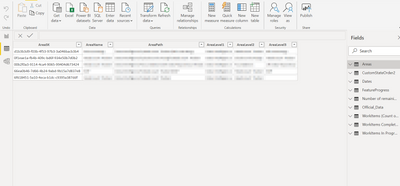
There is an Areas table which I'm using as a filter on all pages, using the AreaPath column:
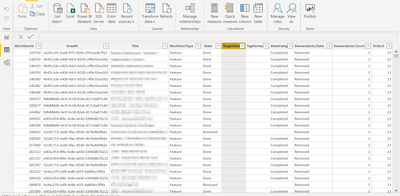
The visual is created using the FeatureProgress table:
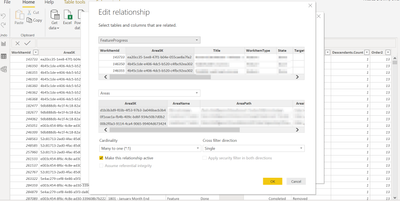
Which has the following relationship:
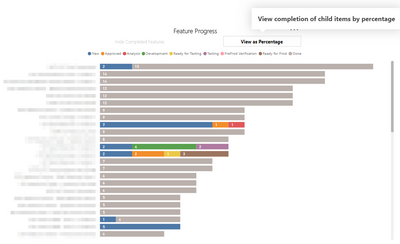
I'm trying to create a visual on top of the current visual I have in Power BI, which just shows count of child items in a particular state. I want to have a button to flip between 'View as Count' / 'View as Percentage'
- Mark as New
- Bookmark
- Subscribe
- Mute
- Subscribe to RSS Feed
- Permalink
- Report Inappropriate Content
HI @Anonymous ,
If you want to keep the original filter effect in measure formula, I'd like to suggest you to use allselected to replace all function:
Managing “all” functions in DAX: ALL, ALLSELECTED, ALLNOBLANKROW, ALLEXCEPT
In addition, you can refer to the below blog to know more about corresponding calculation with hierarchy level fields:
Use IsInScope to get the right hierarchy level in DAX
BTW, current you can't create a dynamic calculate column/table based on filter/slicers.
Regards,
Xiaoxin Sheng
- Mark as New
- Bookmark
- Subscribe
- Mute
- Subscribe to RSS Feed
- Permalink
- Report Inappropriate Content
Thanks - but I'm still unsure on what my measure should be?
- Mark as New
- Bookmark
- Subscribe
- Mute
- Subscribe to RSS Feed
- Permalink
- Report Inappropriate Content
Hi @Anonymous ,
For dynamic change display value type, you can add a selector table with two types, then add if statement to compare with selection and return corresponding expression result:
Measure =
IF (
    SELECTEDVALUE ( Selector[Type] ) = "Percent",
    DIVIDE (
        CALCULATE (
            SUM ( Table[Amount] ),
            ALLSELECTED ( Table ),
            VALUES ( Table[Category] ),
            VALUES ( Table[Legend] )
        ),
        CALCULATE (
            SUM ( Table[Amount] ),
            ALLSELECTED ( Table ),
            VALUES ( Table[Category] )
        )
    ),
    CALCULATE (
        SUM ( Table[Amount] ),
        ALLSELECTED ( Table ),
        VALUES ( Table[Category] ),
        VALUES ( Table[Legend] )
    )
)
Notice: 'category' is axis, 'legend' means legend field, 'amount' is value fields.
Regards,
Xiaoxin Sheng
- Mark as New
- Bookmark
- Subscribe
- Mute
- Subscribe to RSS Feed
- Permalink
- Report Inappropriate Content
@Anonymous instead of image, can you share sample data with expected output. Read this post to get your answer quickly.
https://community.powerbi.com/t5/Community-Blog/How-to-Get-Your-Question-Answered-Quickly/ba-p/38490
Subscribe to the @PowerBIHowTo YT channel for an upcoming video on List and Record functions in Power Query!!
Learn Power BI and Fabric - subscribe to our YT channel - Click here: @PowerBIHowTo
If my solution proved useful, I'd be delighted to receive Kudos. When you put effort into asking a question, it's equally thoughtful to acknowledge and give Kudos to the individual who helped you solve the problem. It's a small gesture that shows appreciation and encouragement! ❤
Did I answer your question? Mark my post as a solution. Proud to be a Super User! Appreciate your Kudos 🙂
Feel free to email me with any of your BI needs.
Helpful resources

Power BI Monthly Update - November 2025
Check out the November 2025 Power BI update to learn about new features.

Fabric Data Days
Advance your Data & AI career with 50 days of live learning, contests, hands-on challenges, study groups & certifications and more!

FabCon Atlanta 2026
Join us at FabCon Atlanta, March 16-20, for the ultimate Fabric, Power BI, AI and SQL community-led event. Save $200 with code FABCOMM.


