Join us at FabCon Atlanta from March 16 - 20, 2026, for the ultimate Fabric, Power BI, AI and SQL community-led event. Save $200 with code FABCOMM.
Register now!Get Fabric Certified for FREE during Fabric Data Days. Don't miss your chance! Request now
Here is a small sample size of a large data set I have. I am trying to calculate the percentage of times each agent was "friendly", said "hello" or how often they "listened". For instance in this sample Mike says hello 100% of the time and Bill says hello 50% of the time. I am also trying to understand the percentages of yes and no in each "Section". For example in the "Find Need" section Bill answered yes 100 percent of the time and Kim answers yes 0%. I am looking for an effective way to calcultate the percentage of total yes and no values and I would Like to show this data in a bar graph. Thank you in advance for your help
| Section | Agent | Was agent friendly | Did agent say hello | did agent listen | did Agent understand |
| Warm Welcome | Mike | yes | yes | null | null |
| Warm Welcome | Bill | no | no | null | null |
| Warm Welcome | Tom | no | yes | null | null |
| Warm Welcome | Kim | no | no | null | null |
| Warm Welcome | Mike | yes | yes | null | null |
| Warm Welcome | Bill | yes | yes | null | null |
| Find Need | Mike | null | null | yes | no |
| Find Need | Bill | null | null | yes | yes |
| Find Need | Tom | null | null | no | yes |
| Find Need | Kim | null | null | no | no |
Solved! Go to Solution.
Hi @dw700d,
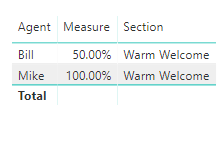
For your first requirement, you could refer to the measure below.
Measure =
VAR a =
CALCULATE (
COUNTROWS ( 'Table1' ),
FILTER (
'Table1',
'Table1'[Was agent friendly] = "yes"
&& 'Table1'[Agent] = MAX ( 'Table1'[Agent] )
)
)
VAR total =
CALCULATE (
COUNTROWS ( 'Table1' ),
ALLEXCEPT ( Table1, Table1[Section], Table1[Agent] )
)
RETURN
DIVIDE ( a, total )
Here is the output.
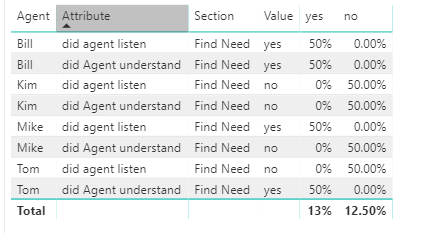
For your second requirement, you need do some change for your data sample in query editor and then create the two measures.
1. Duplicate the original table and unpivot the column did agent listen and did Agent understand.
2. Filter the rows null;
3. Remove the columns don't need;
4. Apply and Close;
5. Create the two measure yes and no.
More details, please refer to my attachment.
Best Regards,
Cherry
Hi @dw700d,
For your first requirement, you could refer to the measure below.
Measure =
VAR a =
CALCULATE (
COUNTROWS ( 'Table1' ),
FILTER (
'Table1',
'Table1'[Was agent friendly] = "yes"
&& 'Table1'[Agent] = MAX ( 'Table1'[Agent] )
)
)
VAR total =
CALCULATE (
COUNTROWS ( 'Table1' ),
ALLEXCEPT ( Table1, Table1[Section], Table1[Agent] )
)
RETURN
DIVIDE ( a, total )
Here is the output.
For your second requirement, you need do some change for your data sample in query editor and then create the two measures.
1. Duplicate the original table and unpivot the column did agent listen and did Agent understand.
2. Filter the rows null;
3. Remove the columns don't need;
4. Apply and Close;
5. Create the two measure yes and no.
More details, please refer to my attachment.
Best Regards,
Cherry
Check out the November 2025 Power BI update to learn about new features.
Advance your Data & AI career with 50 days of live learning, contests, hands-on challenges, study groups & certifications and more!