Join us at FabCon Atlanta from March 16 - 20, 2026, for the ultimate Fabric, Power BI, AI and SQL community-led event. Save $200 with code FABCOMM.
Register now!The Power BI Data Visualization World Championships is back! Get ahead of the game and start preparing now! Learn more
I have a table (example below) which has a set of values, I've set up another column to populate with a 1 whenever that value is higher than a certain number.
I am trying to calculate the percentage of how many times the value is over a certain amount so I can put this into a monthly graph
Going by the below graph the values should be roughly 50% for January, 33% Feb and 75% for March however unsure on how I would get these into a table. Any help appreciated.
| Year-Month | Value | Over 1 | Percentage Of |
| January 2022 | 0.9 | null | |
| January 2022 | 1.2 | 1 | |
| January 2022 | 1.3 | 1 | |
| January 2022 | 0.85 | null | |
| February 2022 | 0.2 | null | |
| February 2022 | 1.2 | 1 | |
| February 2022 | 1.3 | 1 | |
| March 2022 | 1.5 | 1 | |
| March 2022 | 1.6 | 1 | |
| March 2022 | 1.8 | 1 | |
| March 2022 | 0.9 | null |
Solved! Go to Solution.
Hi @DylanBanINT
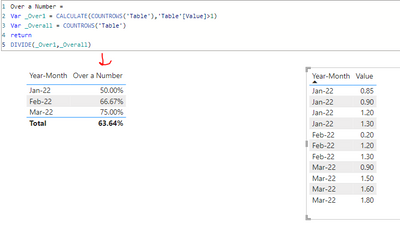
You can use a measure like below:
Over a Number =
VAR _Over1 =
CALCULATE ( COUNTROWS ( 'Table' ), 'Table'[Value] > 1 )
VAR _Overall =
COUNTROWS ( 'Table' )
RETURN
DIVIDE ( _Over1, _Overall )
Output:
If this post helps, please consider accepting it as the solution to help the other members find it more quickly.
Appreciate your Kudos!!
LinkedIn | Twitter | Blog | YouTube
Hi @DylanBanINT
You can use a measure like below:
Over a Number =
VAR _Over1 =
CALCULATE ( COUNTROWS ( 'Table' ), 'Table'[Value] > 1 )
VAR _Overall =
COUNTROWS ( 'Table' )
RETURN
DIVIDE ( _Over1, _Overall )
Output:
If this post helps, please consider accepting it as the solution to help the other members find it more quickly.
Appreciate your Kudos!!
LinkedIn | Twitter | Blog | YouTube
The Power BI Data Visualization World Championships is back! Get ahead of the game and start preparing now!
| User | Count |
|---|---|
| 38 | |
| 38 | |
| 36 | |
| 28 | |
| 28 |
| User | Count |
|---|---|
| 124 | |
| 88 | |
| 74 | |
| 66 | |
| 65 |