Get certified for free when you join Fabric Data Days 2026 and dive into Fabric, Power BI, SQL, AI, and other essential data skills.
Join nowJuly 7 - July 17 | Round 2 of the Power BI Dataviz World Championships. Don't miss your chance! Learn more
Hello Everyone. Can anyone please help me on how to calculate the percentage for the sum/count.
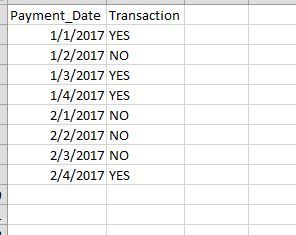
As you can see on the left which is my souce data and on the right you can see the visulaization.
When i selected for a day (Day 1) i got NO as 1 and Yes as 1 and total is 2, which is good and now i aslo want to show the percentage next to them or in another serperate multi row card as NO 50% and YES as 50%.
when i select day 2 it is showing NO as 2 and now i want to show the percentage as NO 100%.
Solved! Go to Solution.
I guess i figured it out
I just need to add the tansaction in to fields>Quick cal > count> GT total
Thank you
I guess i figured it out
I just need to add the tansaction in to fields>Quick cal > count> GT total
Thank you
Join us in Barcelona for FabCon and SQLCon, the Fabric, Power BI, SQL, and AI community event. Save €200 with code FABCMTY200.
Join Fabric Data Days 2026: 60 days of free live/on-demand sessions, challenges, study groups, and certification opportunities.
| User | Count |
|---|---|
| 23 | |
| 22 | |
| 18 | |
| 17 | |
| 13 |
| User | Count |
|---|---|
| 63 | |
| 44 | |
| 42 | |
| 40 | |
| 40 |