cancel
Showing results for 
Search instead for 
Did you mean: 

Learn from the best! Meet the four finalists headed to the FINALS of the Power BI Dataviz World Championships! Register now

Reply
Lexey
Helper I
Helper I

Percentage between two values

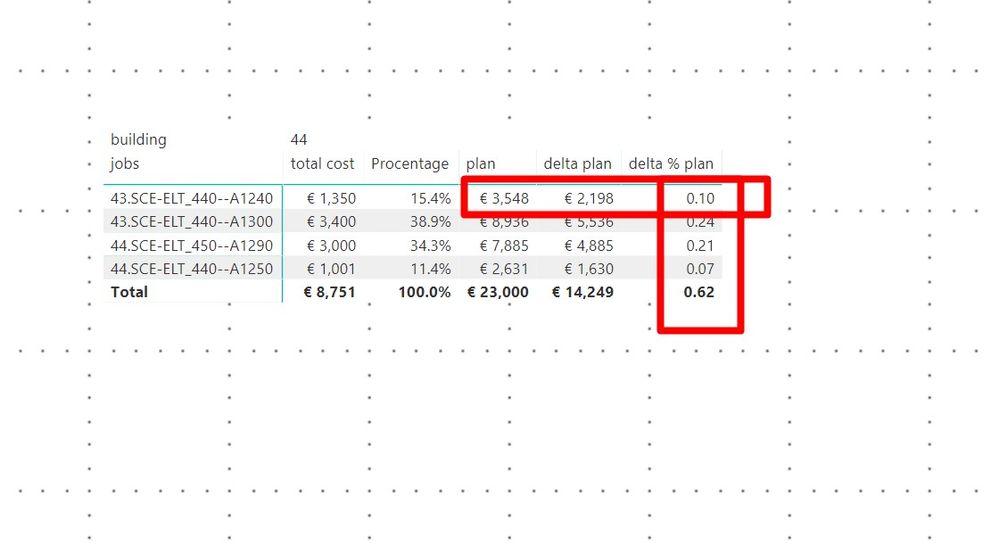
Please help in solving one problem. You need to calculate the percentage as the ratio of [delta plan] and [plan]. Tried different options but have not yet found solutions.Screenshot_4.jpg

6 REPLIES 6
v-yulgu-msft
Microsoft Employee
Microsoft Employee

Hi @Lexey,


What you want to calculate is 2198/3548=0.6195 for the first row under [delta % plan], right?


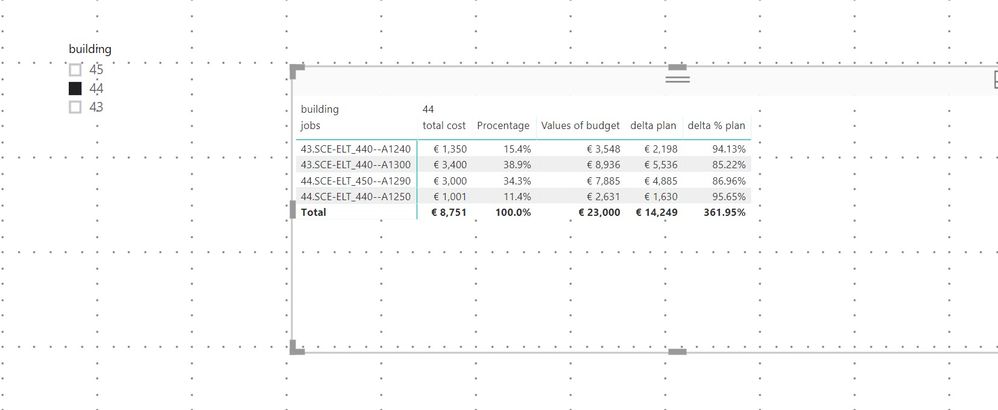
If so, you should modify the measure [delta % plan] as below:

delta % plan = [delta plan]/ [Values of budget]

1.PNG


Best regards,

Yuliana Gu

Community Support Team _ Yuliana Gu
If this post helps, then please consider Accept it as the solution to help the other members find it more quickly.

I need row context.,
 1 row = [delta plan]/[Values of budget]
 2  row = [delta plan]/[Values of budget]
3 row = [delta plan]/[Values of budget]


you get a total percentage that doesn't suit me. Thanks

You could try SUMX(Table;[delta plan]/[Values of budget].


This is for a Measure.

Calculated Column would just be [delta plan]/[Values of budget]


I'm not quite sure wether your columns is name Values of budget or plan.


Please try and let me know.

Thanks
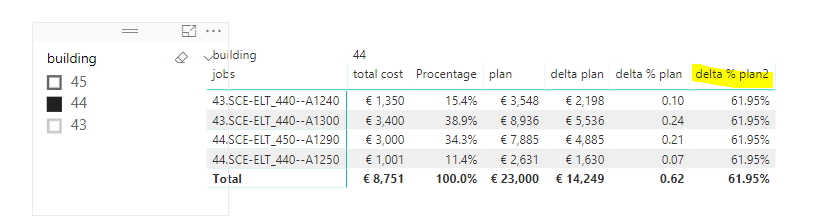
I didn't get quite the right result


delta % plan = sumx('fact'; [delta plan]/ [Values of budget])


Screenshot_5.jpg

What would be your expected results?


For the total row I see it makes no sense.

You may have to change to delta % plan = sum([delta plan]/sum[Values of budget]


Helpful resources

Announcements
Join our Fabric User Panel

Join our Fabric User Panel

Share feedback directly with Fabric product managers, participate in targeted research studies and influence the Fabric roadmap.

March Power BI Update Carousel

Power BI Community Update - March 2026

Check out the March 2026 Power BI update to learn about new features.