Get Fabric or SQL Certified for Free.
Get certified for free when you join Fabric Data Days 2026 and dive into Fabric, Power BI, SQL, AI, and other essential data skills.
Join now- Power BI forums
- Get Help with Power BI
- Desktop
- Service
- Report Server
- Power Query
- Mobile Apps
- Developer
- DAX Commands and Tips
- Custom Visuals Development Discussion
- Health and Life Sciences
- Power BI Spanish forums
- Translated Spanish Desktop
- Training and Consulting
- Instructor Led Training
- Dashboard in a Day for Women, by Women
- Galleries
- Data Stories Gallery
- Themes Gallery
- Contests Gallery
- QuickViz Gallery
- Quick Measures Gallery
- Visual Calculations Gallery
- Notebook Gallery
- Translytical Task Flow Gallery
- TMDL Gallery
- R Script Showcase
- Webinars and Video Gallery
- Ideas
- Custom Visuals Ideas (read-only)
- Issues
- Issues
- Events
- Upcoming Events
Data Days is here! Join us now for 60+ days of learning, challenges, and connection. Learn more
- Power BI forums
- Forums
- Get Help with Power BI
- Desktop
- Re: Percentage between two fields
- Subscribe to RSS Feed
- Mark Topic as New
- Mark Topic as Read
- Float this Topic for Current User
- Bookmark
- Subscribe
- Printer Friendly Page

- Mark as New
- Bookmark
- Subscribe
- Mute
- Subscribe to RSS Feed
- Permalink
- Report Inappropriate Content
Percentage between two fields
Hi,
I am trying to get a percentage between two fields but for some reason is not given the correct result:
Pct Total = IFERROR(1-(Repeat / Contact),0) I am getting the following result
Pct Total = IFERROR(1-(6861 / 22772),0) - NaN
I also get
Pct Total = IFERROR(1-(75 / 278),0) - 1164%
Any help is very much appreciated,
Thanks,
Solved! Go to Solution.
- Mark as New
- Bookmark
- Subscribe
- Mute
- Subscribe to RSS Feed
- Permalink
- Report Inappropriate Content
Hi @vdf,
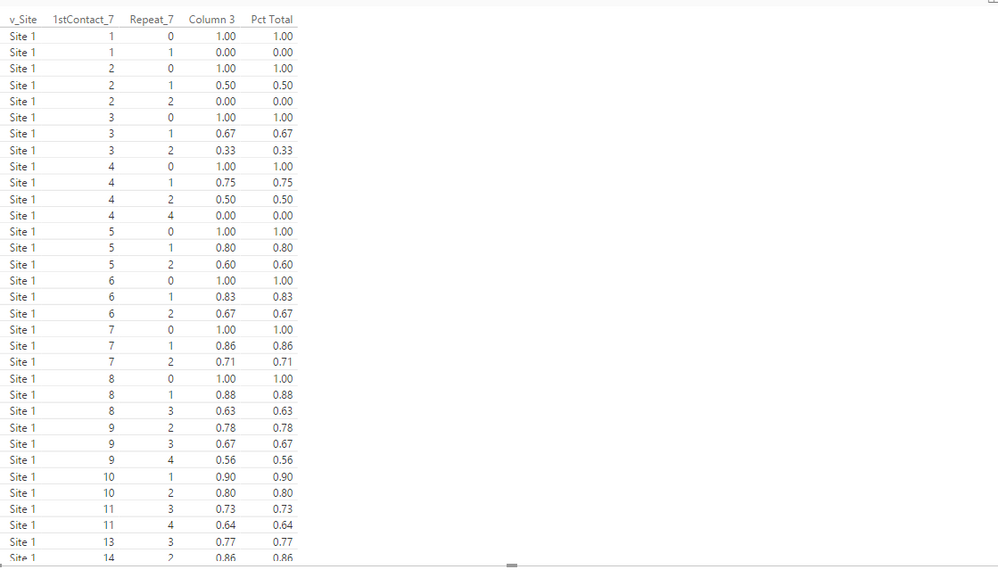
Please right click your fields(1stContact_7,Repeat_7,Column 3,Pct Total) in the Field Panel as shown in the following screenshot, then choose"Don't summarize", then your Column 3 and Pct Total should show correctly.
Thanks,
Lydia Zhang

- Mark as New
- Bookmark
- Subscribe
- Mute
- Subscribe to RSS Feed
- Permalink
- Report Inappropriate Content
Hi @vdf,
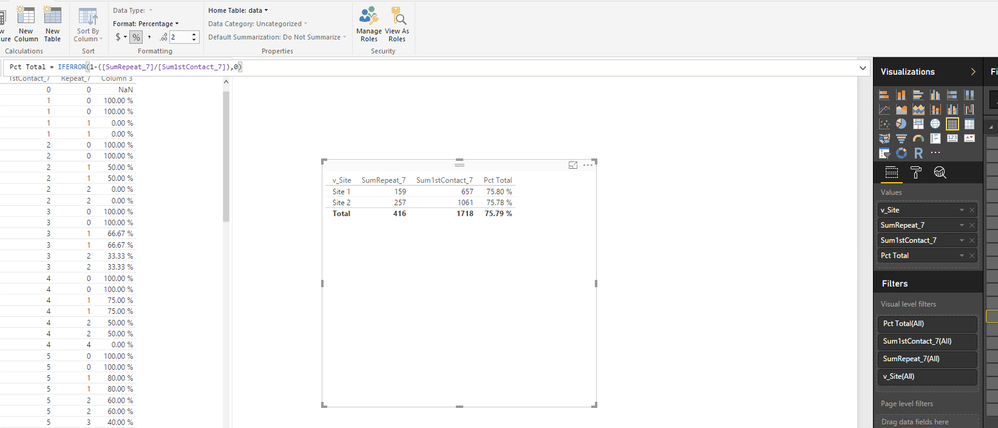
Please create new measures using the following formulas.
SumRepeat_7 = SUM(data[Repeat_7])
Sum1stContact_7 = SUM(data[1stContact_7])
Sum1stContact_7 = SUM(data[1stContact_7])
Then create a visual as follows and check if it resturns your desired result. For more details, check this modified PBIX file.
Thanks,
Lydia Zhang

- Mark as New
- Bookmark
- Subscribe
- Mute
- Subscribe to RSS Feed
- Permalink
- Report Inappropriate Content
Hi @vdf,
I test the scenario as yours, but I am not able to reproduce your issue. You can check the example in the following screenshot, for more details, please review the attached PBIX file.
In your scenario, what is the data type of the two fields(Repeat and Contact)? And what is the result if you use the following formula to create new column instead?
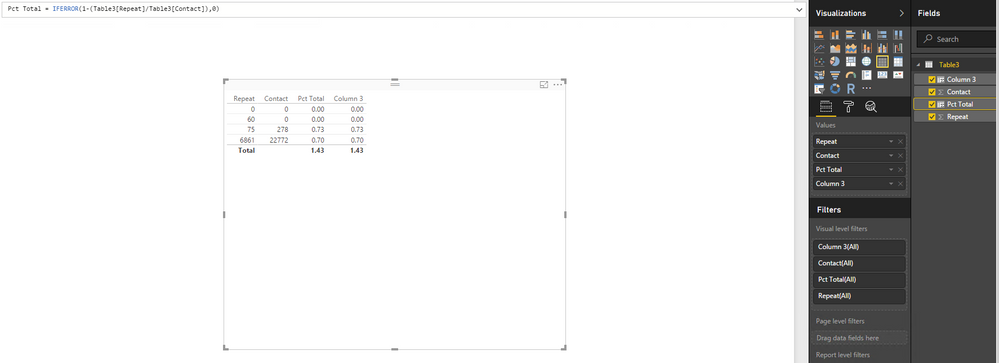
Column 3 = IF(Table3[Contact]=0,
   0,
   1-(Table3[Repeat]/Table3[Contact]))
Thanks,
Lydia Zhang
- Mark as New
- Bookmark
- Subscribe
- Mute
- Subscribe to RSS Feed
- Permalink
- Report Inappropriate Content
Hi Lydia,
Many thanks for your reply, but I am really in a muddle  , I am new to Power BI, so all the help is greatly appreciated. I've tryied to 'copy' your formula but still do not work, I enclosed what I've done ftr-community, could you check where I am wrong, please?
Kind regards,
- Mark as New
- Bookmark
- Subscribe
- Mute
- Subscribe to RSS Feed
- Permalink
- Report Inappropriate Content
Hi @vdf,
Please right click your fields(1stContact_7,Repeat_7,Column 3,Pct Total) in the Field Panel as shown in the following screenshot, then choose"Don't summarize", then your Column 3 and Pct Total should show correctly.
Thanks,
Lydia Zhang
- Mark as New
- Bookmark
- Subscribe
- Mute
- Subscribe to RSS Feed
- Permalink
- Report Inappropriate Content
Many thnks Lydia,
Solution worked, but this gives me the result for each row, is there anyway that I can have it grouped by [v_site]?
Thanks again,
- Mark as New
- Bookmark
- Subscribe
- Mute
- Subscribe to RSS Feed
- Permalink
- Report Inappropriate Content
Hi @vdf,
Please create new measures using the following formulas.
SumRepeat_7 = SUM(data[Repeat_7])
Sum1stContact_7 = SUM(data[1stContact_7])
Sum1stContact_7 = SUM(data[1stContact_7])
Then create a visual as follows and check if it resturns your desired result. For more details, check this modified PBIX file.
Thanks,
Lydia Zhang
Helpful resources

Fabric Data Days 2026
Don't miss out on Data Days, June 15 through August 7. Learn Fabric, Power BI, SQL, AI and more.

Power BI Monthly Update - May 2026
Check out the May 2026 Power BI update to learn about new features.

Power BI DataViz World Championships - June 2026
A new Power BI DataViz World Championship is coming this June! Don't miss out on submitting your entry.

| User | Count |
|---|---|
| 23 | |
| 21 | |
| 20 | |
| 19 | |
| 13 |


| User | Count |
|---|---|
| 58 | |
| 52 | |
| 37 | |
| 31 | |
| 27 |


