
cancel
Showing results for 
Search instead for 
Did you mean: 

The Power BI Data Visualization World Championships is back! Get ahead of the game and start preparing now! Learn more

Reply
Chanleakna123
Post Prodigy
Post Prodigy

Percentage and Number in the same visuzalization


Team , i have KPI which some number need to be percentage and some need to remain the same. 
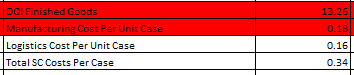
What my visual looks like is : 
For Ex : DOI , 13.26 , this number remain on Visualization the same 

But Logistics Cost Per Unit Case : 0.16 , this number need to be percentage % on visualization. 
I have no idea how to build this while these numbers are different label and Can't make it well on visualization and even on the Table visualization itselves. 

My purpose is to get all of those number in the same vusualization If it's DOI , need to be 13 , or if it's logistic cost per case it's 16%. 

please let me know what is the possible way to acheive it. 


1.PNG

1 ACCEPTED SOLUTION

Hi @Chanleakna123,


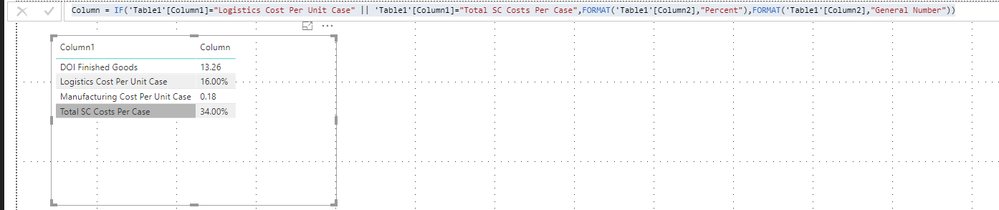
If you also would like to return when the Column1 value is "Total SC Costs Per Case", you can modify the condition below:


Column = IF('Table1'[Column1]="Logistics Cost Per Unit Case" || 'Table1'[Column1]="Total SC Costs Per Case",FORMAT('Table1'[Column2],"Percent"),FORMAT('Table1'[Column2],"General Number"))


q7.PNG


Best Regards,
Qiuyun Yu 

Community Support Team _ Qiuyun Yu
If this post helps, then please consider Accept it as the solution to help the other members find it more quickly.

View solution in original post

3 REPLIES 3
v-qiuyu-msft
Community Support
Community Support

Hi @Chanleakna123,


One measure/column can't return different data type values. In your scenario, you need to use Format() function to change percentage and normal numbers as TEXT type values. 


You can create a calculated column like below: 


Column = IF('Table1'[Column1]="Logistics Cost Per Unit Case",FORMAT('Table1'[Column2],"Percent"),FORMAT('Table1'[Column2],"General Number"))


q1.PNG


Best Regards,
Qiuyun Yu 

Community Support Team _ Qiuyun Yu
If this post helps, then please consider Accept it as the solution to help the other members find it more quickly.

@v-qiuyu-msft , if i have 2 text turn to Percentage , 

what calculation should i add in the calculated column ? 

 IF('Table1'[Column1]="Logistics Cost Per Unit Case",FORMAT('Table1'[Column2],"Percent"),FORMAT('Table1'[Column2],"General Number"))


Hi @Chanleakna123,


If you also would like to return when the Column1 value is "Total SC Costs Per Case", you can modify the condition below:


Column = IF('Table1'[Column1]="Logistics Cost Per Unit Case" || 'Table1'[Column1]="Total SC Costs Per Case",FORMAT('Table1'[Column2],"Percent"),FORMAT('Table1'[Column2],"General Number"))


q7.PNG


Best Regards,
Qiuyun Yu 

Community Support Team _ Qiuyun Yu
If this post helps, then please consider Accept it as the solution to help the other members find it more quickly.

Helpful resources

Announcements
Power BI DataViz World Championships

Power BI Dataviz World Championships

The Power BI Data Visualization World Championships is back! Get ahead of the game and start preparing now!

November Power BI Update Carousel

Power BI Monthly Update - November 2025

Check out the November 2025 Power BI update to learn about new features.

FabCon Atlanta 2026 carousel

FabCon Atlanta 2026

Join us at FabCon Atlanta, March 16-20, for the ultimate Fabric, Power BI, AI and SQL community-led event. Save $200 with code FABCOMM.