cancel
Showing results for 
Search instead for 
Did you mean: 

The Power BI Data Visualization World Championships is back! Get ahead of the game and start preparing now! Learn more

Reply
pstanek
Post Patron
Post Patron

Percent of certain group

I have product categories

A B C


Subcategories

A.1 ..... A.n

B.1.  B.m

C1.... C.j


When I will filter  some category   example A

I need table

A1 8% = percentage A1 of category A

A2 .. 4%

etc.

Total 100%= category A


When use quick calculation  percentage of total , it will create


A1 ... percentage A1 of all categories ABC

Etc.

Total percentage category A of all categories, I means total is not 100%


How can I create what I mean?

1 ACCEPTED SOLUTION

So,

Writing Precentall = Divide(Table1[Value], calculate(Sum(table1[value]), All(table1)))

In

Precentall = Table1[Value]/calculate(Sum(table1[value]), All(table1)) works here?

Direct Query has limitations:

"

By default, limitations are placed on DAX expressions allowed in measures;

"

If any further help needed, please post back.

Regards

View solution in original post

5 REPLIES 5
pstanek
Post Patron
Post Patron


 Výstřižek.PNG

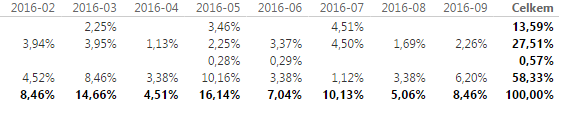
I will specify it correctly, I need to calculate matrix for its progress . Month will be column.

I need each month  has 100% , not only summmary 100%

Hi pstanek,


Could you please share some details about the data model? Also please share about how the value is calculated.

If you mean to change the total under Matrix Visual, currently there is no available methods. Totals in Visuals are auto-generated by the program, which is based on your data models and the data defined, we could write formula to change the month total to 100%, but this would cause the total column in Matrix visual showing a wrong percentage.

we may consider to submit an idea on this topic to add the Total type in the format pane.

23.PNG

The formula for the Precent calculated column I created is the following:

Precent = Divide(Table1[Value], sumX(filter(table1,Table1[month]=earlier(table1[month])), Table1[Value]))
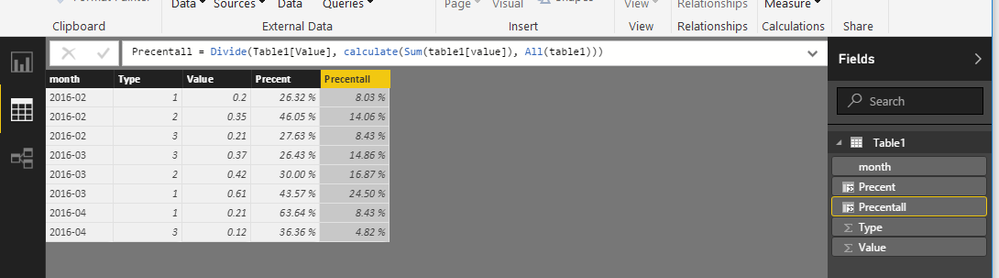
22.PNG

Precentall is item percentage on all months:

Precentall = Divide(Table1[Value], calculate(Sum(table1[value]), All(table1)))

If you need any further assistance, please feel free to post back.

Regards


I don´t if it is result of direct query, but I can´t  find  function divide in power bi desktop anymore.

Plus SUMx cannnot be used within direct query. Earlier desktop doesn´t know too.


I used the second way but without divide  so I used "/"

Výstřižek.PNG

So,

Writing Precentall = Divide(Table1[Value], calculate(Sum(table1[value]), All(table1)))

In

Precentall = Table1[Value]/calculate(Sum(table1[value]), All(table1)) works here?

Direct Query has limitations:

"

By default, limitations are placed on DAX expressions allowed in measures;

"

If any further help needed, please post back.

Regards

Helpful resources

Announcements
November Power BI Update Carousel

Power BI Monthly Update - November 2025

Check out the November 2025 Power BI update to learn about new features.

Fabric Data Days Carousel

Fabric Data Days

Advance your Data & AI career with 50 days of live learning, contests, hands-on challenges, study groups & certifications and more!

FabCon Atlanta 2026 carousel

FabCon Atlanta 2026

Join us at FabCon Atlanta, March 16-20, for the ultimate Fabric, Power BI, AI and SQL community-led event. Save $200 with code FABCOMM.

Top Solution Authors
Top Kudoed Authors