cancel
Showing results for 
Search instead for 
Did you mean: 

Get Fabric Certified for FREE during Fabric Data Days. Don't miss your chance! Request now

Reply
rgu101
Helper I
Helper I

Percent of Column Total incorrect

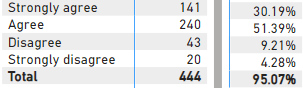
I'm calculating the response rate for this survey question by using Count (Distinct) for each survey ID. The counts (n-sizes) are correct but when I tried to show values as Percent of Column Total, the individual response rates are incorrect and thus don't add to 100%. I do have filters on, but when I double checked with the raw data, I can confirm the n-sizes are accurate.

rgu101_0-1708973413360.png

Should I create a calculated measure to get an accurate number?

Thanks in advance.

1 ACCEPTED SOLUTION
selimovd
Super User
Super User

Hey @rgu101 ,


why don't you just calculate it with DAX?

Percentage =
VAR _DistinctCount = [Your count measure]
VAR _Total = CALCULATE ( [Your count measure], ALL ( myTable[Column with agree disagree] ) )
RETURN
    DIVIDE ( _DistinctCount, _Total )


Then format as percent and you should be good to go.


If you need any help please let me know.
If I answered your question I would be happy if you could mark my post as a solution ✔️ and give it a thumbs up 👍

Best regards
Denis

Blog: WhatTheFact.bi
Follow me: twitter.com/DenSelimovic
 

View solution in original post

2 REPLIES 2
selimovd
Super User
Super User

Hey @rgu101 ,


why don't you just calculate it with DAX?

Percentage =
VAR _DistinctCount = [Your count measure]
VAR _Total = CALCULATE ( [Your count measure], ALL ( myTable[Column with agree disagree] ) )
RETURN
    DIVIDE ( _DistinctCount, _Total )


Then format as percent and you should be good to go.


If you need any help please let me know.
If I answered your question I would be happy if you could mark my post as a solution ✔️ and give it a thumbs up 👍

Best regards
Denis

Blog: WhatTheFact.bi
Follow me: twitter.com/DenSelimovic
 

Response Rate = 
VAR _DCount =
DISTINCTCOUNT('Raw Data'[Visit ID])

VAR _QTotal =
CALCULATE(
    DISTINCTCOUNT('Raw Data'[Visit ID]),
    ALLEXCEPT('Raw Data',
        'Raw Data'[QuestionText],
        'Raw Data'[Date],
        DateTable)
)

RETURN
DIVIDE(_DCount,_QTotal)

Thank you for the help. Settled with a calculated measure because i couldn't find any solutions for why the column total was incorrect.

Helpful resources

Announcements
November Power BI Update Carousel

Power BI Monthly Update - November 2025

Check out the November 2025 Power BI update to learn about new features.

Fabric Data Days Carousel

Fabric Data Days

Advance your Data & AI career with 50 days of live learning, contests, hands-on challenges, study groups & certifications and more!

FabCon Atlanta 2026 carousel

FabCon Atlanta 2026

Join us at FabCon Atlanta, March 16-20, for the ultimate Fabric, Power BI, AI and SQL community-led event. Save $200 with code FABCOMM.

Top Solution Authors
Top Kudoed Authors