
Share feedback directly with Fabric product managers, participate in targeted research studies and influence the Fabric roadmap.
Sign up nowGet Fabric certified for FREE! Don't miss your chance! Learn more
Hi everybody!,
I'm having a problem trying to calculate this % change, what I need is quite simple i want to see the variation from 1/0 (299,87/82,97), 2/1 (336,56/299,87), 3/2 (318,29/336,56),etc.
There is anyway to do it?
Thanks
Solved! Go to Solution.
Hi @Anonymous
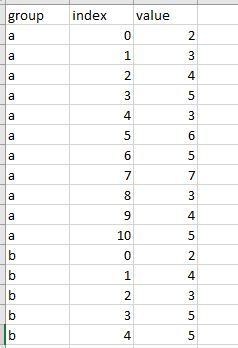
Assume you have data as below
Then create a measure
Measure =
VAR pre =
CALCULATE (
SUM ( 'Table'[value] ),
FILTER (
ALLEXCEPT ( 'Table', 'Table'[group] ),
'Table'[index]
= MAX ( 'Table'[index] ) - 1
)
)
RETURN
IF ( pre = BLANK (), BLANK (), SUM ( 'Table'[value] ) / pre )
Hi @Anonymous
Assume you have data as below
Then create a measure
Measure =
VAR pre =
CALCULATE (
SUM ( 'Table'[value] ),
FILTER (
ALLEXCEPT ( 'Table', 'Table'[group] ),
'Table'[index]
= MAX ( 'Table'[index] ) - 1
)
)
RETURN
IF ( pre = BLANK (), BLANK (), SUM ( 'Table'[value] ) / pre )
Hi @Anonymous ,
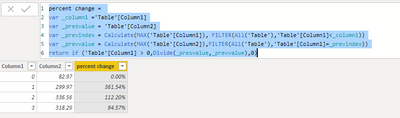
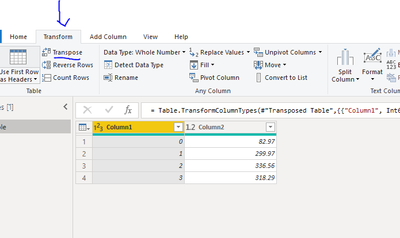
You will need to edit query in Power Query and go to Transform Tab, the Transpose button. That will give you the picture below. Back in Power BI add a column with the dax below to get the values you are after.
Please let me know if you have any questions.
If this solves your issues, please mark it as the solution, so that others can find it easily. Kudos are nice too.
Nathaniel
percent change =
var _column1 ='Table'[Column1]
var _presvalue = 'Table'[Column2]
var _previndex = Calculate(MAX('Table'[Column1]), FILTER(All('Table'),'Table'[Column1]<_column1))
var _prevvalue = Calculate(MAX('Table'[Column2]),FILTER(All('Table'),'Table'[Column1]=_previndex))
return if ('Table'[Column1] > 0,Divide(_presvalue,_prevvalue),0)
Proud to be a Super User!
If you love stickers, then you will definitely want to check out our Community Sticker Challenge!
Check out the January 2026 Power BI update to learn about new features.
| User | Count |
|---|---|
| 62 | |
| 58 | |
| 45 | |
| 21 | |
| 18 |
| User | Count |
|---|---|
| 119 | |
| 116 | |
| 37 | |
| 34 | |
| 30 |