Join us at FabCon Atlanta from March 16 - 20, 2026, for the ultimate Fabric, Power BI, AI and SQL community-led event. Save $200 with code FABCOMM.
Register now!The Power BI Data Visualization World Championships is back! Get ahead of the game and start preparing now! Learn more
My query is almost identical to this one: https://community.powerbi.com/t5/Desktop/Percent-Change-Between-Values-on-Line-Chart/td-p/957563
However I am new to Power BI and my formulae creating is not that great so i am seeking some help to create the formula specific to my measures. I attempted to follow the formula suggested in the previous thread however I am getting some errors, maybe i am not using the right measures and fields.
Below is what the graph looks like:
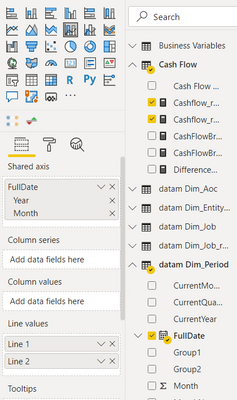
Below are the fields/measures used to create the line graph:
How can I show the percentage difference between the values in the 2 lines, either in tooltip or as a visual on the graph?
Thanks!!
Thanks both!
hi @Anonymous
Yes, you could get it by this simple way as below:
Step1:
Just create a percent change measure as bleow:
Percent Change=DIVIDE([Line 1]-[Line 2],[Line 2])
Step2:
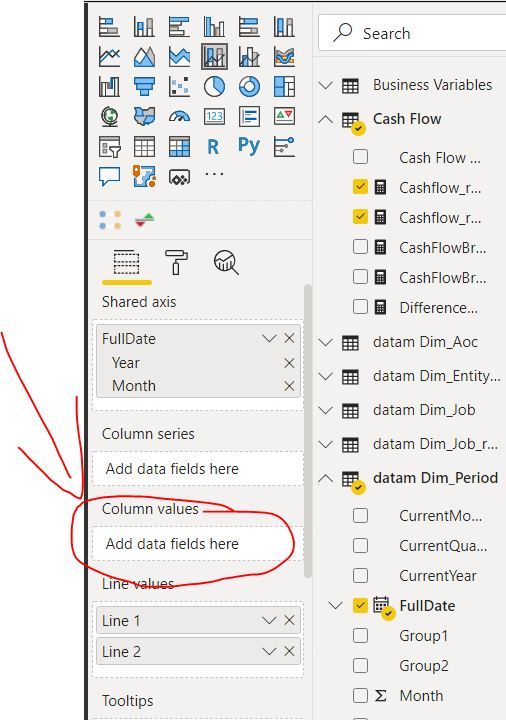
Then drag this measure into Column values as below
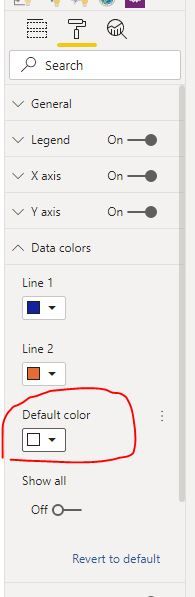
Of course, you could set the column for column to white
Regards,
Lin
@Anonymous ,These are two measures you can create a measure put that on tool tip
Diff % =divide([line1]-[line2],[Line2])
or
Diff =[line1]-[line2]
The Power BI Data Visualization World Championships is back! Get ahead of the game and start preparing now!
| User | Count |
|---|---|
| 38 | |
| 36 | |
| 33 | |
| 31 | |
| 28 |
| User | Count |
|---|---|
| 129 | |
| 88 | |
| 79 | |
| 68 | |
| 63 |